# Technical Document Extraction: Label Studio Interface
## 1. Document Overview
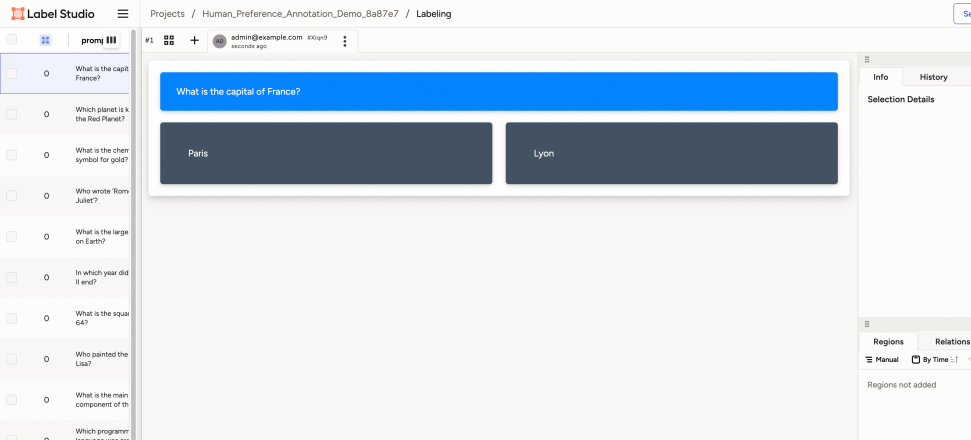
This image is a high-fidelity screenshot of the **Label Studio** web application interface. It depicts a "Human Preference Annotation" task where a user is asked to evaluate or select between two options based on a provided prompt.
---
## 2. Component Isolation
### Region A: Global Header (Top)
* **Logo:** Label Studio (top left).
* **Navigation Path:** `Projects / Human_Preference_Annotation_Demo_8a87e7 / Labeling`
* **Task Metadata:**
* Task ID: `#1`
* User: `admin@example.com`
* Timestamp: `seconds ago`
* Unique Identifier: `#Xiqn9`
### Region B: Sidebar - Task List (Left)
This region contains a vertical list of data rows. Each row includes a checkbox, a numerical status (all showing `0`), and a text prompt.
| Status | Prompt |
| :--- | :--- |
| 0 | What is the capital of France? (Currently selected/active) |
| 0 | Which planet is known as the Red Planet? |
| 0 | What is the chemical symbol for gold? |
| 0 | Who wrote 'Romeo and Juliet'? |
| 0 | What is the largest ocean on Earth? |
| 0 | In which year did World War II end? |
| 0 | What is the square root of 64? |
| 0 | Who painted the Mona Lisa? |
| 0 | What is the main component of the sun? |
| 0 | Which programming language was created... (truncated) |
### Region C: Main Annotation Workspace (Center)
This is the primary interactive area for the labeling task. It consists of a prompt box and two response boxes.
* **Prompt Box (Blue Background):**
* Text: "What is the capital of France?"
* **Response Options (Dark Grey Backgrounds):**
* **Option 1 (Left):** "Paris"
* **Option 2 (Right):** "Lyon"
### Region D: Information & History Panel (Right Top)
* **Tabs:** `Info`, `History`
* **Content:** "Selection Details" (Currently empty/no specific details shown).
### Region E: Regions & Relations Panel (Right Bottom)
* **Tabs:** `Regions`, `Relations`
* **Controls:** `Manual` (dropdown), `By Time` (sort icon).
* **Status Text:** "Regions not added"
---
## 3. Data Structure & Flow
The interface represents a **Comparative Choice** or **A/B Testing** data labeling workflow.
1. **Input:** A natural language question (Prompt).
2. **Candidates:** Two potential answers (Paris vs. Lyon).
3. **Action:** The annotator is expected to select the correct or preferred response from the two dark grey blocks.
4. **Context:** The left sidebar indicates this is the first task in a series of general knowledge questions.
---
## 4. Technical Specifications
* **Primary Language:** English (No other languages detected).
* **UI Elements:** Standard web-based dashboard with a three-pane layout (Navigation/List, Workspace, Metadata).
* **Visual Encoding:**
* **Blue:** Used for the primary prompt/instruction.
* **Dark Grey:** Used for interactive response buttons.
* **Light Grey/White:** Used for background and secondary UI elements.