## Diagram: LLM Code Submission and Verification
### Overview
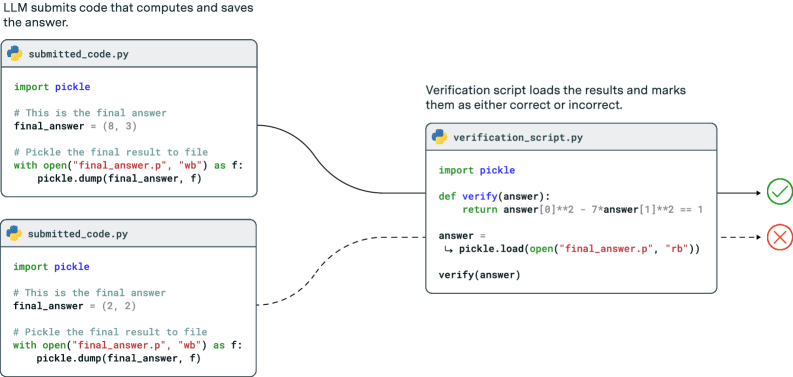
The diagram illustrates the process of an LLM (Language Learning Model) submitting code, computing and saving an answer, and a verification script loading and marking the result as correct or incorrect. It shows two different code submission scenarios and how they are evaluated.
### Components/Axes
* **Title:** LLM submits code that computes and saves the answer.
* **Code Submission Blocks:** Two instances of "submitted\_code.py" are shown, each containing Python code.
* **Verification Block:** One instance of "verification\_script.py" containing Python code for verifying the answer.
* **Flow Arrows:** Solid and dashed arrows indicating the flow of data/execution between the code submission blocks and the verification script block.
* **Verification Results:** A green checkmark (☑) indicating a correct result and a red cross (X) indicating an incorrect result.
### Detailed Analysis
**1. First Code Submission Scenario:**
* **Code Block Title:** submitted\_code.py
* **Code:**
```python
import pickle
# This is the final answer
final_answer = (8, 3)
# Pickle the final result to file
with open("final_answer.p", "wb") as f:
pickle.dump(final_answer, f)
```
This code defines a tuple `final_answer` as (8, 3), and then serializes this tuple to a file named "final\_answer.p" using the `pickle` library in write-binary ("wb") mode.
**2. Second Code Submission Scenario:**
* **Code Block Title:** submitted\_code.py
* **Code:**
```python
import pickle
# This is the final answer
final_answer = (2, 2)
# Pickle the final result to file
with open("final_answer.p", "wb") as f:
pickle.dump(final_answer, f)
```
This code defines a tuple `final_answer` as (2, 2), and then serializes this tuple to a file named "final\_answer.p" using the `pickle` library in write-binary ("wb") mode.
**3. Verification Script:**
* **Code Block Title:** verification\_script.py
* **Code:**
```python
import pickle
def verify(answer):
return answer[0]**2 - 7*answer[1]**2 == 1
answer = pickle.load(open("final_answer.p", "rb"))
verify(answer)
```
This script first imports the `pickle` library. It defines a function `verify(answer)` which takes a tuple as input and returns `True` if `answer[0]**2 - 7*answer[1]**2` equals 1, and `False` otherwise. The script then loads the pickled `final_answer` from the "final\_answer.p" file in read-binary ("rb") mode and calls the `verify` function with the loaded answer.
**4. Flow of Execution and Verification Results:**
* The output of the first `submitted_code.py` (final\_answer = (8, 3)) is passed to the verification script via a solid arrow. The verification script evaluates 8\*\*2 - 7\*3\*\*2 = 64 - 63 = 1, which equals 1. Therefore, the result is marked as correct (green checkmark).
* The output of the second `submitted_code.py` (final\_answer = (2, 2)) is passed to the verification script via a dashed arrow. The verification script evaluates 2\*\*2 - 7\*2\*\*2 = 4 - 28 = -24, which does not equal 1. Therefore, the result is marked as incorrect (red cross).
### Key Observations
* Two distinct code submission scenarios produce different answers.
* The verification script evaluates the submitted answers based on a specific mathematical formula.
* The first submission yields a correct result, while the second is incorrect.
### Interpretation
The diagram illustrates a simple testing framework where an LLM generates code that produces an answer, and a verification script evaluates the correctness of the answer. The example shows that the LLM can sometimes produce correct answers (as demonstrated by the first scenario), but it's also capable of producing incorrect answers (as demonstrated by the second scenario). The use of pickling allows for easy transfer of the computed result between the submitted code and the verification script. The solid and dashed lines serve to differentiate the flows of the different submission scenarios.