## Screenshot: Robotics Simulation Interface
### Overview
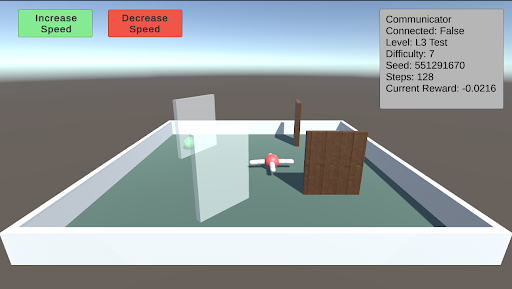
The image depicts a 3D simulation environment for testing robotic or autonomous systems. The scene includes a rectangular arena with interactive elements (obstacles, targets) and a UI overlay displaying system status and controls.
### Components/Axes
#### UI Elements
- **Top-left corner**:
- Green button labeled "Increase Speed"
- Red button labeled "Decrease Speed"
- **Top-right corner**:
- Status panel with the following text:
- `Communicator Connected: False`
- `Level: L3 Test`
- `Difficulty: 7`
- `Seed: 551291670`
- `Steps: 128`
- `Current Reward: -0.0216`
#### Arena Contents
- **Arena**:
- Rectangular boundary with white walls and green floor.
- **Objects**:
1. **Drone**: Red-and-white propeller-based object (central position).
2. **Glass Panel**: Transparent vertical barrier (left side).
3. **Wooden Block**: Brown rectangular obstacle (right side).
4. **Green Sphere**: Small target object (near the glass panel).
### Detailed Analysis
- **UI Text**:
- All text is in English. No non-English content detected.
- Numerical values:
- `Seed: 551291670` (pseudo-random number for reproducibility).
- `Steps: 128` (simulation iterations completed).
- `Current Reward: -0.0216` (negative value suggests suboptimal performance).
- **Arena Layout**:
- Drone is centrally positioned, equidistant from the glass panel and wooden block.
- Green sphere is closer to the glass panel than the wooden block.
### Key Observations
1. **Negative Reward**: The drone’s current reward (-0.0216) indicates poor task performance, possibly due to collisions or failure to reach the target.
2. **Disconnected Communicator**: The system is operating in a local test mode without external communication.
3. **Difficulty Level**: "L3 Test" suggests a mid-level complexity scenario.
### Interpretation
This simulation environment is designed to evaluate a drone’s ability to navigate obstacles (glass panel, wooden block) and reach a target (green sphere). The negative reward implies the drone’s pathfinding or collision-avoidance algorithms require refinement. The disconnected communicator suggests this is a standalone test, not integrated with real-time data streams. The seed value ensures reproducibility of the simulation.
The layout of obstacles and the drone’s central position may indicate a symmetrical test scenario, though the green sphere’s placement introduces asymmetry, potentially challenging the drone’s decision-making.