## Game Environment Screenshot: Reinforcement Learning Task
### Overview
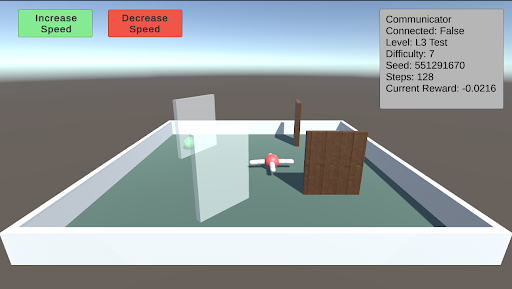
The image is a screenshot of a 3D game environment, likely used for reinforcement learning. It shows a simple scene with an agent (a red and white object resembling a small plane) navigating a small arena with obstacles. The top-right corner displays a "Communicator" box with information about the current state of the environment and agent. There are also "Increase Speed" and "Decrease Speed" buttons at the top-left.
### Components/Axes
* **Environment:** A square arena with light blue floor and white walls.
* **Agent:** A red and white object resembling a small plane.
* **Obstacles:**
* A transparent wall.
* A thin vertical brown wall.
* A larger brown wall with a wooden texture.
* A green sphere.
* **UI Elements:**
* "Increase Speed" button (green).
* "Decrease Speed" button (red).
* "Communicator" box (top-right).
### Detailed Analysis or ### Content Details
**1. "Communicator" Box (Top-Right):**
* **Communicator:** (Title)
* **Connected:** False
* **Level:** L3 Test
* **Difficulty:** 7
* **Seed:** 551291670
* **Steps:** 128
* **Current Reward:** -0.0216
**2. Buttons (Top-Left):**
* **Increase Speed:** Green button with white text.
* **Decrease Speed:** Red button with white text.
**3. Environment Details:**
* The agent is positioned near the center of the arena.
* The green sphere is located near the transparent wall.
* The walls are arranged to create a simple navigation challenge.
### Key Observations
* The agent is not connected to a network ("Connected: False").
* The agent is in the "L3 Test" level.
* The agent has taken 128 steps.
* The agent's current reward is negative (-0.0216), indicating a penalty or unsuccessful action.
### Interpretation
The screenshot depicts a reinforcement learning environment where an agent is being trained to navigate a simple arena. The "Communicator" box provides key information about the agent's progress and the environment's state. The negative reward suggests that the agent may be struggling to complete the task or is being penalized for certain actions. The "Increase Speed" and "Decrease Speed" buttons likely allow manual control of the agent's movement for testing or debugging purposes. The seed value is used for reproducibility of the environment.