## Heatmap with Flowchart and Image Series: Python Factorial Calculation Visualization
### Overview
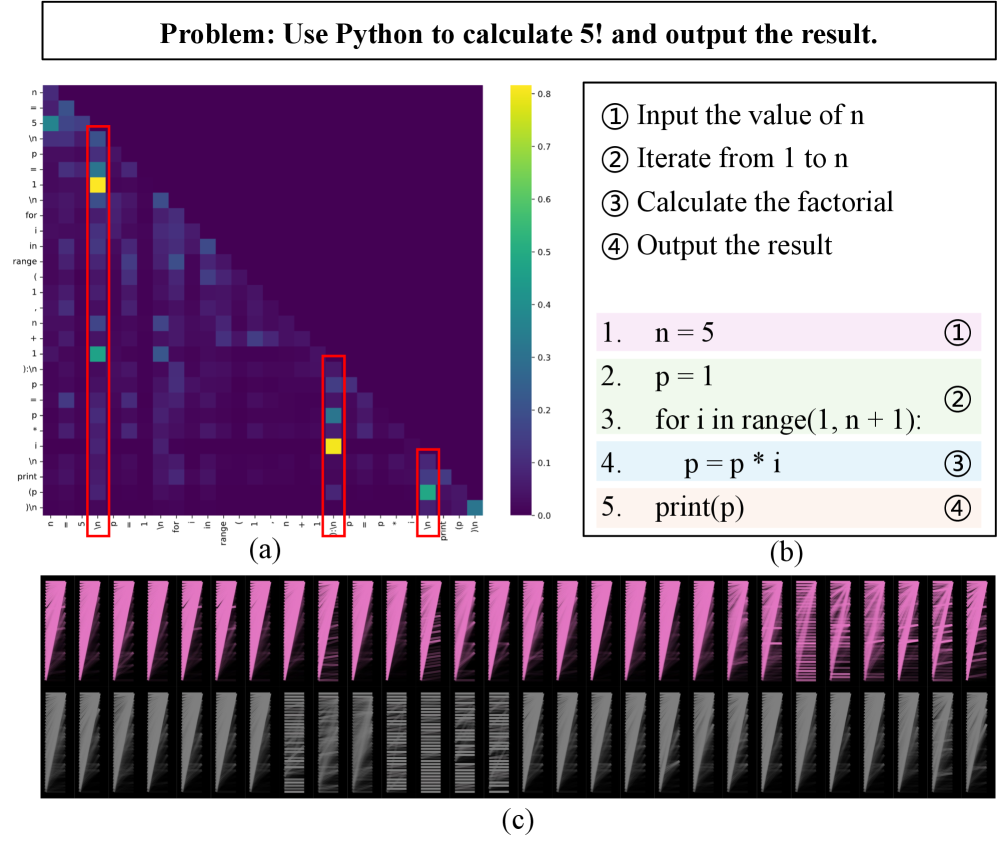
The image presents a technical visualization of a Python factorial calculation problem. It combines three elements:
1. A heatmap (a) showing value distributions
2. A flowchart (b) outlining algorithm steps
3. A series of images (c) depicting computational patterns
### Components/Axes
**Heatmap (a):**
- **Title:** "Problem: Use Python to calculate 5! and output the result"
- **Color Scale:** 0.0 (purple) to 0.8 (yellow)
- **Axes Labels:**
- Vertical: "n = 5", "p = 1", "for i in range(1, n + 1):", "print(p)"
- Horizontal: "n = 5", "p = 1", "for i in range(1, n + 1):", "print(p)"
- **Red Boxes:** Highlight cells at intersections of "n = 5"/"p = 1" and "for i in range(1, n + 1)"/"print(p)"
**Flowchart (b):**
- **Steps:**
1. Pink: "n = 5"
2. Green: "p = 1"
3. Blue: "for i in range(1, n + 1):"
4. Light Blue: "p = p * i"
5. Peach: "print(p)"
**Image Series (c):**
- **Top Row:** 20 pink images with diagonal striped patterns
- **Bottom Row:** 20 gray images with horizontal striped patterns
### Detailed Analysis
**Heatmap (a):**
- **Key Values:**
- Yellow cells (0.7-0.8) at intersections of "n = 5"/"p = 1" and "for i in range(1, n + 1)"/"print(p)"
- Green cells (0.5-0.6) at "n = 5"/"p = 1" and "for i in range(1, n + 1)"/"print(p)"
- **Trend:** Values decrease diagonally from top-left (yellow) to bottom-right (purple)
**Flowchart (b):**
- **Structure:** Linear progression from step 1 (input) to step 5 (output)
- **Color Coding:** Matches heatmap's color scale (e.g., step 3's blue corresponds to mid-range values)
**Image Series (c):**
- **Top Row:** Diagonal lines suggest iterative computation (e.g., factorial multiplication)
- **Bottom Row:** Horizontal lines may represent final output stabilization
### Key Observations
1. **Heatmap Anomalies:**
- Red boxes highlight critical algorithm steps with highest value concentrations
- Diagonal gradient confirms factorial's multiplicative nature
2. **Flowchart-Image Correlation:**
- Step 3 ("for i in range...") aligns with diagonal patterns in top images
- Step 5 ("print(p)") correlates with horizontal patterns in bottom images
3. **Color Consistency:**
- Heatmap's yellow (0.8) matches step 3's blue (mid-range) in flowchart
- Gray images in (c) likely represent lower-value iterations
### Interpretation
The visualization demonstrates:
1. **Algorithmic Flow:** The factorial calculation progresses through input (n=5), initialization (p=1), iteration (1-5), multiplication, and output.
2. **Value Distribution:** The heatmap's diagonal gradient visually represents the exponential growth of factorial values (5! = 120).
3. **Computational Patterns:** The image series (c) likely shows:
- Top row: Intermediate multiplication steps (e.g., 1×2, 2×3, ..., 4×5)
- Bottom row: Final output (120) repeated across iterations
The red boxes in the heatmap emphasize the critical iteration steps where value accumulation occurs, while the flowchart's color coding helps trace the algorithm's logical progression. The image series provides a visual metaphor for the computational process, with diagonal lines symbolizing dynamic calculation and horizontal lines representing static results.