## Screenshot: Unity Game Environment
### Overview
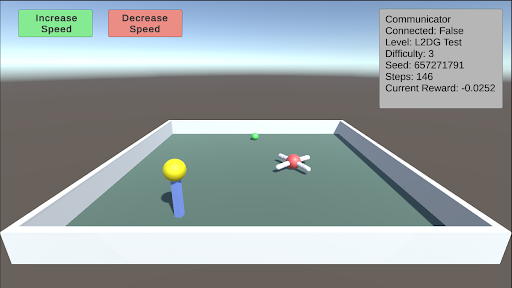
The image is a screenshot of a Unity game environment. It shows a simple game scene with interactive elements and a communicator window displaying game-related information. The scene includes a rectangular arena, a yellow ball on a blue stand, a green ball, and a red-centered object with white extensions. There are also UI elements for controlling speed.
### Components/Axes
* **UI Elements (Top-Left):**
* "Increase Speed" button (green)
* "Decrease Speed" button (red)
* **Communicator Window (Top-Right):**
* Communicator
* Connected: False
* Level: L2DG Test
* Difficulty: 3
* Seed: 657271791
* Steps: 146
* Current Reward: -0.0252
* **Game Environment:**
* Rectangular arena with light gray walls and a light green floor.
* Yellow ball on a blue stand (bottom-left).
* Green ball (center-top).
* Red-centered object with white extensions (center-right).
### Detailed Analysis or ### Content Details
* **Increase Speed Button:** Located at the top-left, colored green, and labeled "Increase Speed".
* **Decrease Speed Button:** Located at the top-center, colored red, and labeled "Decrease Speed".
* **Communicator Window:** Located at the top-right, displays the following information:
* **Connected:** False (Indicates the game is not connected to a network or server)
* **Level:** L2DG Test (Specifies the current level of the game)
* **Difficulty:** 3 (Sets the difficulty level of the game)
* **Seed:** 657271791 (A numerical seed used for random number generation, ensuring consistent game behavior)
* **Steps:** 146 (The number of steps or actions taken in the game)
* **Current Reward:** -0.0252 (The current reward value, indicating a slight penalty or negative score)
* **Game Arena:**
* The arena is a rectangular enclosure with light gray walls and a light green floor.
* The yellow ball on a blue stand is positioned in the bottom-left corner of the arena.
* The green ball is located near the center-top of the arena.
* The red-centered object with white extensions is positioned in the center-right of the arena.
### Key Observations
* The game is currently not connected.
* The level is "L2DG Test" with a difficulty of 3.
* The game has taken 146 steps.
* The current reward is slightly negative (-0.0252).
### Interpretation
The screenshot depicts a simple game environment likely used for testing or development purposes. The "Communicator" window provides real-time feedback on the game's state, including connection status, level, difficulty, and reward. The presence of "Increase Speed" and "Decrease Speed" buttons suggests that the game involves controlling the speed of an object or agent within the arena. The negative reward indicates that the agent may be penalized for certain actions or behaviors. The seed value ensures that the game can be reproduced with the same initial conditions.