## Diagram: LLM Python Code Generation
### Overview
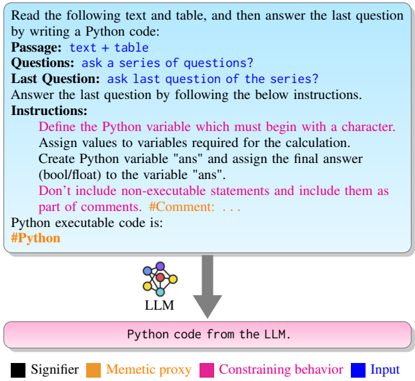
The image illustrates a process where a user reads text and a table, answers a question by writing Python code, and provides instructions for the code. This input is then processed by an LLM (Large Language Model) to generate Python code. The diagram includes a legend explaining the color-coding of different elements.
### Components/Axes
* **Top Section:** A light blue rounded rectangle containing instructions and context for the user.
* Text: "Read the following text and table, and then answer the last question by writing a Python code:"
* "Passage: text + table"
* "Questions: ask a series of questions?"
* "Last Question: ask last question of the series?"
* "Answer the last question by following the below instructions."
* "Instructions:"
* "Define the Python variable which must begin with a character."
* "Assign values to variables required for the calculation."
* "Create Python variable "ans" and assign the final answer (bool/float) to the variable "ans"."
* "Don't include non-executable statements and include them as part of comments. #Comment: ..."
* "Python executable code is:"
* "#Python" (orange text)
* **Middle Section:**
* An arrow pointing downwards from the bottom of the top section to the top of the bottom section.
* An icon representing an LLM (Large Language Model) with interconnected nodes.
* Text: "LLM" below the icon.
* **Bottom Section:** A pink rounded rectangle representing the output of the LLM.
* Text: "Python code from the LLM."
* **Legend (Bottom):**
* Black square: "Signifier"
* Orange square: "Memetic proxy"
* Pink square: "Constraining behavior"
* Blue square: "Input"
### Detailed Analysis or ### Content Details
* **User Input:** The user is instructed to read text and a table, answer a question using Python code, and follow specific instructions for writing the code.
* **LLM Processing:** The LLM takes the user's input and generates Python code.
* **Output:** The output is Python code generated by the LLM.
* **Color Coding:** The legend indicates that different elements in the process are color-coded to represent their function:
* Signifier (Black): Not explicitly shown in the diagram, but likely refers to elements that signify meaning or intent.
* Memetic Proxy (Orange): The "#Python" tag is colored orange, indicating it acts as a memetic proxy.
* Constraining Behavior (Pink): The bottom section "Python code from the LLM" is pink, indicating it represents a constraining behavior.
* Input (Blue): The top section containing the instructions is light blue, indicating it represents the input.
### Key Observations
* The diagram illustrates a workflow where user input is processed by an LLM to generate Python code.
* The color-coding provides additional information about the function of different elements in the process.
* The instructions emphasize the importance of defining variables correctly and including comments in the code.
### Interpretation
The diagram demonstrates the use of an LLM to generate Python code based on user instructions and input. The color-coding helps to clarify the roles of different elements in the process, such as the input, the LLM's processing, and the resulting code. The instructions provided to the user highlight the importance of clear and well-documented code, which is essential for effective collaboration and maintainability. The diagram suggests that the LLM is intended to assist users in writing Python code by automating the generation process based on specific instructions and input data.