## Flowchart: Text-to-Python Code Generation Workflow
### Overview
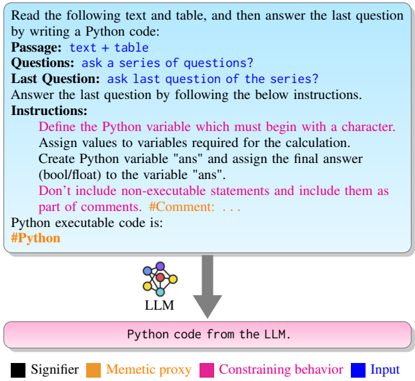
The image depicts a structured workflow for generating Python code from a textual passage and table. It includes a blue box at the top (containing text, questions, and instructions) and a pink box at the bottom (containing Python code). An arrow connects the two boxes, indicating a directional flow. Color-coded elements (black, orange, pink, blue) highlight specific components like signifiers, memetic proxies, constraining behaviors, and inputs.
### Components/Axes
- **Blue Box (Top Section)**:
- **Passage**: Contains "text + table" (table content not visible).
- **Questions**: Lists "ask a series of questions?"
- **Last Question**: "ask last question of the series?"
- **Instructions**:
- Define Python variables starting with a character.
- Assign values to variables for calculations.
- Create Python variables "ans" (bool/float).
- Avoid non-executable statements; include comments as part of comments.
- **Pink Box (Bottom Section)**:
- **Python Code**: Contains executable code with comments (e.g., `#Python`, `#Comment`).
- **Arrow**: Gray, connecting the blue and pink boxes, indicating the flow from text to code.
- **Color Legend**:
- **Black**: Signifiers (e.g., "LLM").
- **Orange**: Memetic proxy (e.g., "LLM").
- **Pink**: Constraining behavior (e.g., "Python code from the LLM").
- **Blue**: Input (e.g., "Passage", "Questions").
### Detailed Analysis
- **Textual Content**:
- The blue box includes a hierarchical structure:
1. **Passage**: A textual input with an embedded table (content unspecified).
2. **Questions**: A prompt to generate a series of questions.
3. **Last Question**: A specific query about the final question in the series.
4. **Instructions**: Step-by-step guidelines for code generation, emphasizing variable naming, value assignment, and comment formatting.
- The pink box contains Python code with comments, though the exact code is not visible in the image.
- **Color Coding**:
- **Black (Signifiers)**: Used for labels like "LLM" (likely representing the language model).
- **Orange (Memetic Proxy)**: Highlights the LLM as a proxy for generating code.
- **Pink (Constraining Behavior)**: Indicates the Python code output, constrained by the instructions.
- **Blue (Input)**: Marks the textual passage and questions as input data.
### Key Observations
1. **Flow Direction**: The arrow explicitly links the textual input (blue box) to the Python code output (pink box), emphasizing a cause-effect relationship.
2. **Instructional Rigor**: The instructions enforce strict coding practices (e.g., variable naming, comment formatting), suggesting a focus on code readability and correctness.
3. **Missing Table Data**: The "text + table" in the passage lacks visible content, limiting analysis of how the table influences the code generation.
4. **Color Consistency**: The legend colors align with the elements they describe (e.g., "LLM" is both black and orange, possibly indicating dual roles).
### Interpretation
The diagram illustrates a **text-to-code pipeline** where a language model (LLM) processes a textual passage and table to generate Python code. The color coding and structured instructions suggest a systematic approach to ensure the generated code adheres to predefined constraints. The absence of the table’s content is a critical gap, as it could reveal how structured data influences the output. The use of "ans" as a variable implies the code’s purpose is to compute a final answer (e.g., a boolean or float value). The workflow emphasizes **input-output clarity** and **code quality**, with the LLM acting as both a signifier (black) and a memetic proxy (orange) for code generation.