## Image Comparison: Effect of Parameter τ on Image Quality
### Overview
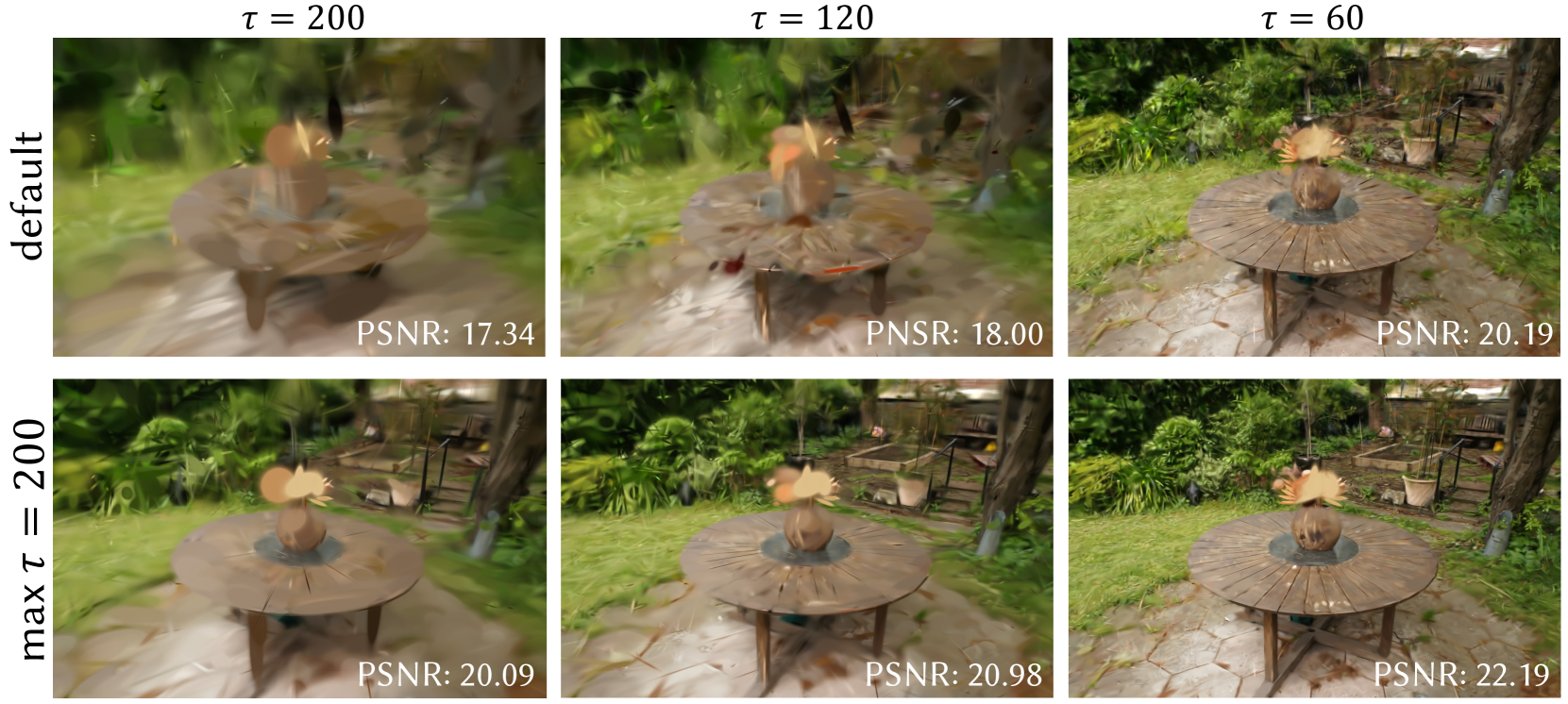
The image presents a comparison of rendered images of a garden scene, focusing on the impact of a parameter denoted as 'τ' on the image quality. The scene features a wooden table with a vase on top, set in a garden environment. The images are arranged in a 2x3 grid, with the top row representing a "default" setting and the bottom row representing "max τ = 200". The columns represent different values of τ (200, 120, and 60). Each image is labeled with its corresponding PSNR (Peak Signal-to-Noise Ratio) value, a metric for image quality.
### Components/Axes
* **Rows:**
* Row 1: "default"
* Row 2: "max τ = 200"
* **Columns:**
* Column 1: τ = 200
* Column 2: τ = 120
* Column 3: τ = 60
* **Image Content:** Garden scene with a wooden table and vase.
* **Metrics:** PSNR (Peak Signal-to-Noise Ratio) values are displayed below each image.
### Detailed Analysis
**Row 1: default**
* **τ = 200:** The image is blurry and less defined. PSNR: 17.34
* **τ = 120:** The image is slightly clearer than with τ = 200, but still blurry. PSNR: 18.00
* **τ = 60:** The image is significantly clearer and more detailed compared to the previous two. PSNR: 20.19
**Row 2: max τ = 200**
* **τ = 200:** The image is clearer than the "default" setting with the same τ value, but still somewhat blurry. PSNR: 20.09
* **τ = 120:** The image is clearer than the "default" setting with the same τ value. PSNR: 20.98
* **τ = 60:** The image is the clearest and most detailed among all the images. PSNR: 22.19
### Key Observations
* **PSNR and Image Quality:** Higher PSNR values generally correspond to clearer and more detailed images.
* **Effect of τ:** Decreasing the value of τ generally improves the image quality, regardless of the row.
* **"max τ = 200" vs. "default":** The "max τ = 200" setting consistently produces images with higher PSNR values compared to the "default" setting for the same τ values.
### Interpretation
The data suggests that the parameter 'τ' has a significant impact on the quality of the rendered images. Lower values of τ result in higher PSNR values and, consequently, clearer and more detailed images. The "max τ = 200" setting appears to optimize the rendering process, leading to better image quality compared to the "default" setting across all τ values. This indicates that adjusting τ and using the "max τ = 200" setting can improve the visual fidelity of the rendered scene. The images with τ = 60 have the highest PSNR values, suggesting that this value provides the best balance between detail and noise for this particular scene and rendering setup.