## UI Screenshot: Group Email Agent Instance Review Interface
### Overview
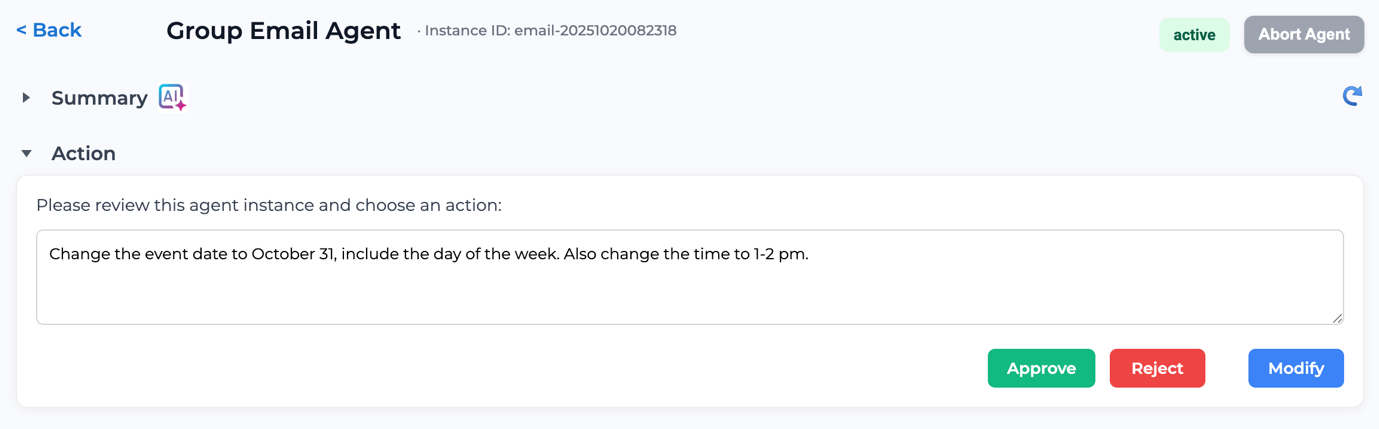
This image is a screenshot of a web-based user interface for reviewing and managing an automated "Group Email Agent" instance. The interface presents a specific agent task for human approval or modification. The overall design is clean and functional, with a light theme and clear visual hierarchy.
### Components & Layout
The interface is structured into distinct horizontal sections from top to bottom:
1. **Header/Navigation Bar (Top):**
- **Left:** A `< Back` navigation link.
- **Center:** The title `Group Email Agent` followed by a unique identifier: `Instance ID: email-20251020082318`.
- **Right:** A status badge labeled `active` (green text on a light green background) and a button labeled `Abort Agent` (gray background).
2. **Collapsible Sections (Middle):**
- **Summary Section:** A collapsed section indicated by a right-pointing arrow (`▶`) and the label `Summary`. It includes a small icon with the text `AI` and a sparkle symbol.
- **Action Section:** An expanded section indicated by a down-pointing arrow (`▼`) and the label `Action`. This is the primary focus of the screen.
3. **Action Panel (Main Content):**
- **Instruction Text:** A line of text reads: `Please review this agent instance and choose an action:`
- **Text Input/Display Area:** A large, bordered text box containing the agent's proposed action or message. The text inside is: `Change the event date to October 31, include the day of the week. Also change the time to 1-2 pm.`
- **Action Buttons (Bottom-right of panel):** Three colored buttons are aligned horizontally:
- `Approve` (Green background)
- `Reject` (Red background)
- `Modify` (Blue background)
### Detailed Content Details
- **Instance Identification:** The agent instance is uniquely identified as `email-20251020082318`.
- **Agent Status:** The agent is currently `active`.
- **Proposed Agent Action:** The core content is the instruction within the text box, which specifies two modifications to an event:
1. **Date Change:** To `October 31` and to `include the day of the week`.
2. **Time Change:** To `1-2 pm`.
- **User Decision Path:** The interface provides three clear, mutually exclusive actions for the reviewer: `Approve` the proposed change, `Reject` it, or `Modify` it (presumably to edit the instruction before approval).
### Key Observations
- **Human-in-the-Loop Design:** This interface is a classic example of a human-in-the-loop (HITL) system, where an AI agent performs a task but requires human validation before execution.
- **Clear Status and Control:** The `active` status and the prominent `Abort Agent` button in the header provide immediate system state awareness and an emergency stop function.
- **Action-Oriented Layout:** The design prioritizes the decision-making task. The proposed action is centrally displayed in a large text area, and the decision buttons are large, color-coded (green for go, red for stop, blue for edit), and placed in a conventional location for form submission.
- **Context Preservation:** The `Summary` section is collapsed, suggesting it contains background information that can be accessed if needed, keeping the primary action view uncluttered.
### Interpretation
This screenshot captures a critical governance point in an automated workflow. The system is designed to manage tasks that require precision and have potential consequences (like changing event details for a group), ensuring a human reviews and authorizes significant modifications.
- **What the data suggests:** The agent has parsed a request or identified a need to update an event's schedule. The specificity of the instruction ("include the day of the week") indicates the agent is attempting to fulfill a detailed requirement, not just make a generic change.
- **How elements relate:** The header provides system context and control. The `Action` panel is the interactive core, presenting the agent's output (the proposed change) and the user's input mechanisms (the buttons). The `Summary` likely provides the history or rationale leading to this proposed action.
- **Notable Anomalies/Considerations:** The instance ID `email-20251020082318` suggests a timestamp (October 20, 2025, 08:23:18), which could be used for logging and auditing. The interface does not show the original event details or the source of the change request, implying that context is either in the collapsed `Summary` or known to the user from prior interaction. The user's decision here will directly determine whether an automated email is sent with the updated event information.