## Survey Form: Response Evaluation
### Overview
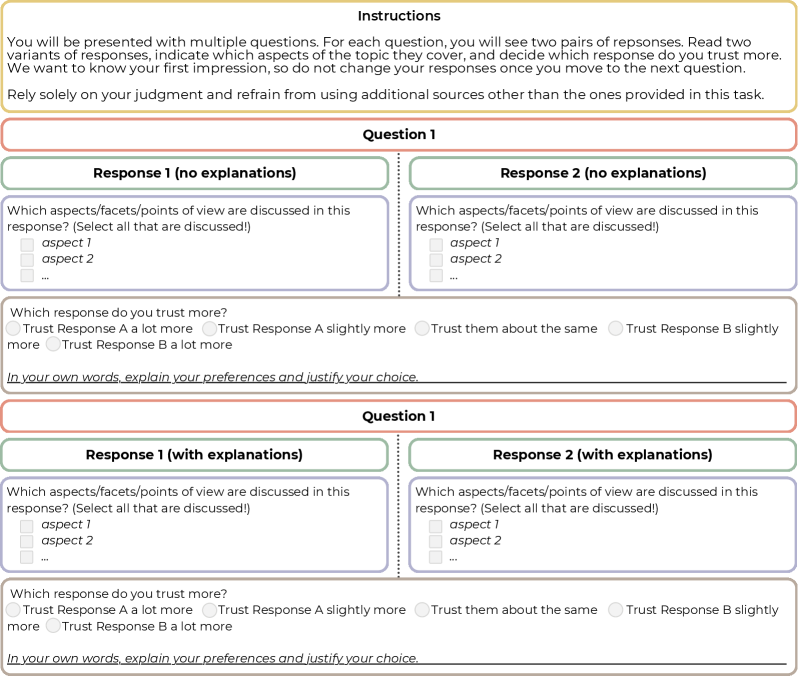
The image presents a survey form designed to evaluate two responses to a question, both with and without explanations. The form prompts users to identify which aspects are discussed in each response and to indicate which response they trust more, providing space for justification. The form is repeated twice, once for responses without explanations and once for responses with explanations.
### Components/Axes
* **Instructions (Top)**: A block of text providing instructions to the user.
* "You will be presented with multiple questions. For each question, you will see two pairs of responses. Read two variants of responses, indicate which aspects of the topic they cover, and decide which response do you trust more. We want to know your first impression, so do not change your responses once you move to the next question. Rely solely on your judgment and refrain from using additional sources other than the ones provided in this task."
* **Question 1 (Top Section)**:
* **Response 1 (no explanations)**: A section for evaluating the first response without explanations.
* "Which aspects/facets/points of view are discussed in this response? (Select all that are discussed!)"
* "aspect 1" (checkbox)
* "aspect 2" (checkbox)
* "..." (checkbox)
* "Which response do you trust more?"
* "Trust Response A a lot more" (radio button)
* "Trust Response A slightly more" (radio button)
* "Trust them about the same" (radio button)
* "Trust Response B slightly more" (radio button)
* "Trust Response B a lot more" (radio button)
* "In your own words, explain your preferences and justify your choice." (text input box)
* **Response 2 (no explanations)**: A section for evaluating the second response without explanations.
* "Which aspects/facets/points of view are discussed in this response? (Select all that are discussed!)"
* "aspect 1" (checkbox)
* "aspect 2" (checkbox)
* "..." (checkbox)
* "Which response do you trust more?"
* "Trust Response A a lot more" (radio button)
* "Trust Response A slightly more" (radio button)
* "Trust them about the same" (radio button)
* "Trust Response B slightly more" (radio button)
* "Trust Response B a lot more" (radio button)
* "In your own words, explain your preferences and justify your choice." (text input box)
* **Question 1 (Bottom Section)**:
* **Response 1 (with explanations)**: A section for evaluating the first response with explanations.
* "Which aspects/facets/points of view are discussed in this response? (Select all that are discussed!)"
* "aspect 1" (checkbox)
* "aspect 2" (checkbox)
* "..." (checkbox)
* "Which response do you trust more?"
* "Trust Response A a lot more" (radio button)
* "Trust Response A slightly more" (radio button)
* "Trust them about the same" (radio button)
* "Trust Response B slightly more" (radio button)
* "Trust Response B a lot more" (radio button)
* "In your own words, explain your preferences and justify your choice." (text input box)
* **Response 2 (with explanations)**: A section for evaluating the second response with explanations.
* "Which aspects/facets/points of view are discussed in this response? (Select all that are discussed!)"
* "aspect 1" (checkbox)
* "aspect 2" (checkbox)
* "..." (checkbox)
* "Which response do you trust more?"
* "Trust Response A a lot more" (radio button)
* "Trust Response A slightly more" (radio button)
* "Trust them about the same" (radio button)
* "Trust Response B slightly more" (radio button)
* "Trust Response B a lot more" (radio button)
* "In your own words, explain your preferences and justify your choice." (text input box)
### Detailed Analysis or Content Details
The form is structured to gather subjective evaluations of two responses to a question. The evaluation is performed twice: once for responses without explanations and once for responses with explanations. For each response, the user is asked to identify the aspects discussed and to indicate their level of trust in the response. A text box is provided for the user to justify their choice.
### Key Observations
* The form is designed to compare the perceived trustworthiness of responses with and without explanations.
* The form allows for the identification of specific aspects discussed in each response.
* The form includes a free-text field for users to provide qualitative feedback.
### Interpretation
The survey aims to understand how explanations affect the perceived trustworthiness of responses. By comparing evaluations of responses with and without explanations, the survey can reveal whether explanations increase, decrease, or have no impact on trust. The identification of discussed aspects allows for a more nuanced understanding of the content of each response, while the free-text field provides valuable qualitative data on the reasons behind user preferences. The form's structure facilitates a comparative analysis of the two responses, allowing for insights into the factors that influence trust in information.