\n
## Screenshot: Instructions for a Response Evaluation Task
### Overview
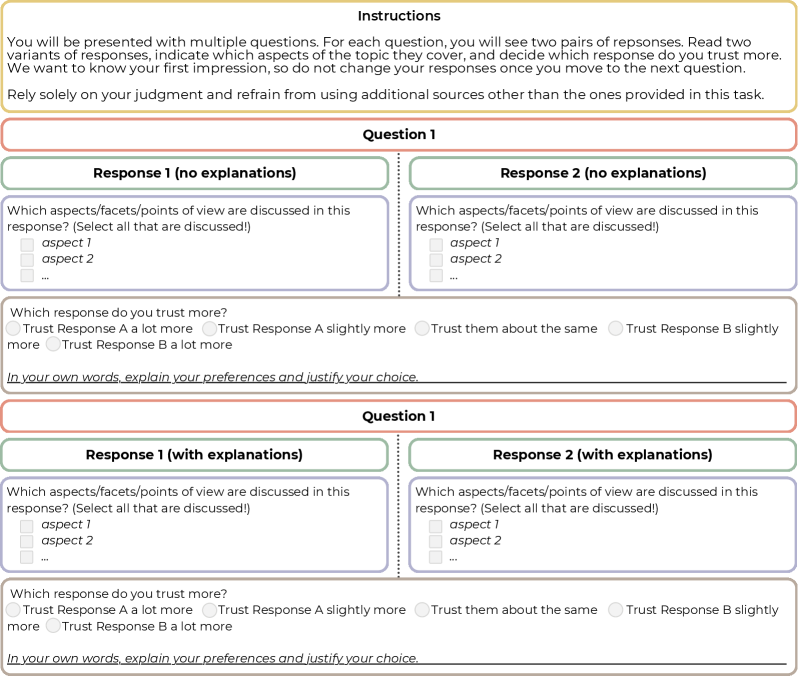
This is a screenshot of an instruction page for a task involving the evaluation of two response variants to a question. The page presents two sets of response pairs, one labeled "Response 1 (no explanations)" and "Response 2 (no explanations)", and another labeled "Response 1 (with explanations)" and "Response 2 (with explanations)". Each pair is followed by a question asking the user to select which response they trust more, and a text box for justification.
### Components/Axes
The screenshot contains the following components:
* **Header:** "Instructions" in large font.
* **Introductory Text:** A paragraph explaining the task's objective – to compare response variants and select the more trustworthy one based on initial judgment.
* **Question 1 (No Explanations):**
* Two response boxes labeled "Response 1 (no explanations)" and "Response 2 (no explanations)".
* A question: "Which aspects/facets/points of view are discussed in this response? (Select all that are discussed)".
* Two checkboxes labeled "aspect 1" and "aspect 2".
* A radio button question: "Which response do you trust more?". Options are: "Trust Response A a lot more", "Trust Response A slightly more", "Trust them about the same", "Trust Response B slightly more", "Trust Response B a lot more".
* A text box: "In your own words, explain your preferences and justify your choice."
* **Question 1 (With Explanations):** Identical structure to the "No Explanations" section, but labeled "Response 1 (with explanations)" and "Response 2 (with explanations)".
### Detailed Analysis or Content Details
The text content is as follows:
"You will be presented with multiple questions. For each question, you will see two pairs of responses. Read two variants of responses, indicate which aspects of the topic they cover, and decide which response do you trust more. We want to know your first impression, so do not change your responses once you move to the next question. Rely solely on your judgment and refrain from using additional sources other than the ones provided in this task."
Within each question section:
* "Which aspects/facets/points of view are discussed in this response? (Select all that are discussed)"
* "aspect 1"
* "aspect 2"
* "Which response do you trust more?"
* "Trust Response A a lot more"
* "Trust Response A slightly more"
* "Trust them about the same"
* "Trust Response B slightly more"
* "Trust Response B a lot more"
* "In your own words, explain your preferences and justify your choice."
### Key Observations
The screenshot is designed as a user interface for a survey or experiment. The repeated structure of the question pairs suggests a comparative evaluation process. The emphasis on "first impression" and avoiding external sources indicates a focus on intuitive judgment. The inclusion of checkboxes for "aspects" and a justification text box encourages detailed consideration of the responses.
### Interpretation
The screenshot represents a methodology for gathering subjective data on the perceived quality or trustworthiness of different responses. The task is designed to minimize bias by restricting information access and emphasizing initial reactions. The structure allows for both quantitative (trust level) and qualitative (justification) data collection. The presence of two question sets (with and without explanations) suggests an investigation into the impact of explanatory content on trust and evaluation. The use of generic labels like "aspect 1" and "aspect 2" indicates that the specific topic of the questions is intentionally left unspecified, allowing for broader applicability of the evaluation process.