## Screenshot: Survey Interface for Response Evaluation
### Overview
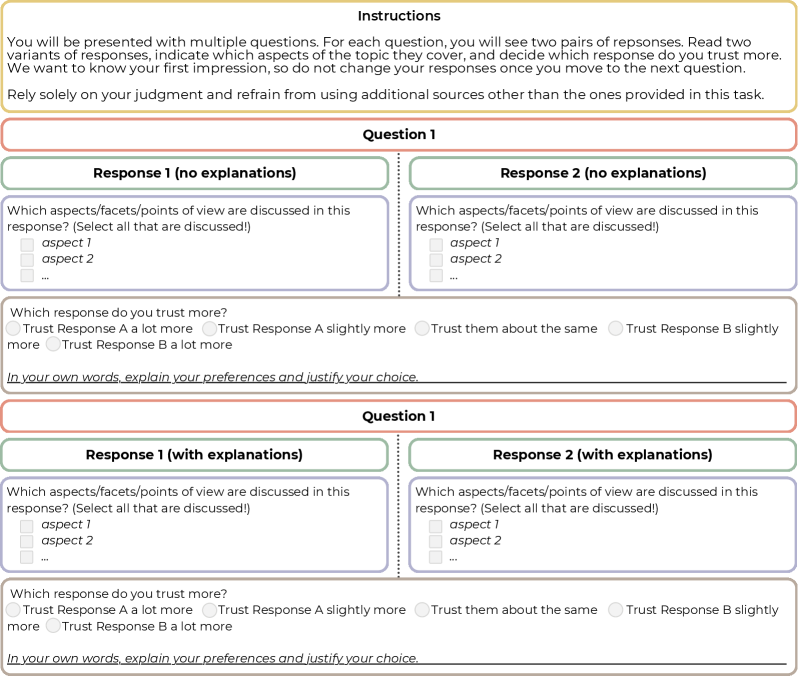
The image depicts a structured survey interface designed to evaluate trust in responses based on explanatory content. It includes instructions, two questions with paired responses, and interactive elements for user input.
### Components/Axes
1. **Instructions Section**:
- Text block explaining the task: Users must compare two response pairs, identify covered aspects, and select the more trustworthy response without external sources.
- Key phrases: "Rely solely on your judgment," "do not change your responses once you move to the next question."
2. **Question Structure**:
- **Question 1** and **Question 2** (repeated structure):
- **Response 1 (no explanations)** and **Response 2 (no explanations)**:
- Sub-question: "Which aspects/facets/points of view are discussed in this response? (Select all that are discussed!)" with checkboxes for "aspect 1," "aspect 2," and an ellipsis for additional aspects.
- **Response 1 (with explanations)** and **Response 2 (with explanations)**:
- Identical sub-question format as above.
- **Trust Evaluation**:
- Radio buttons for trust levels:
- "Trust Response A a lot more"
- "Trust Response A slightly more"
- "Trust them about the same"
- "Trust Response B slightly more"
- "Trust Response B a lot more"
- Text prompt: "In your own words, explain your preferences and justify your choice."
### Detailed Analysis
- **Textual Content**:
- Instructions emphasize impartial judgment and prohibition of external sources.
- Questions alternate between responses with/without explanations to assess their impact on trust.
- Aspects are generically labeled (e.g., "aspect 1") to abstract the evaluation criteria.
- Trust scale uses ordinal categories (e.g., "a lot more," "slightly more") to quantify preference.
- **Spatial Grounding**:
- Instructions occupy the top section, followed by Question 1 and Question 2 in a vertical layout.
- Each question’s responses are side-by-side, with trust evaluation below.
- Checkboxes and radio buttons are aligned horizontally under respective sub-questions.
### Key Observations
1. **Symmetry in Design**: Both questions mirror each other, ensuring consistency in user experience.
2. **Placeholder Aspects**: Generic labels ("aspect 1," "aspect 2") suggest the survey is a template or example.
3. **Trust Scale Granularity**: The five-tier scale allows nuanced differentiation between trust levels.
4. **Explanatory Focus**: The inclusion of "with explanations" and "no explanations" variants isolates the impact of explanatory content on trust.
### Interpretation
This survey interface is structured to investigate how explanatory depth in responses influences perceived trustworthiness. By comparing trust levels for identical content with/without explanations, it aims to quantify the value of transparency in communication. The generic aspect labels imply adaptability to various topics, while the trust scale’s granularity ensures precise measurement of user preference. The prohibition of external sources ensures responses reflect immediate judgment rather than researched opinions.