## Text Diagram: Conditional Explanation Prompt Template
### Overview
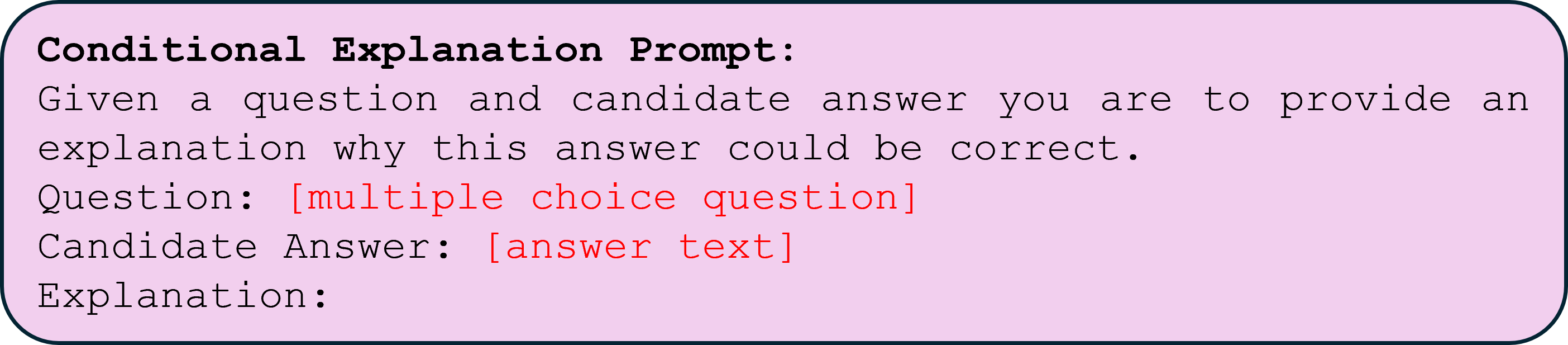
The image displays a rectangular text box with rounded corners, containing a structured prompt template. The template is designed to guide the generation of an explanation for why a candidate answer might be correct in response to a multiple-choice question. The background of the box is a light pink color, and the text is primarily in a monospaced font. Certain placeholder text is highlighted in red.
### Components/Axes
The image is a single, self-contained text block. There are no axes, charts, or data series. The components are purely textual and layout-based:
* **Container:** A rounded rectangle with a light pink fill and a dark border.
* **Text Elements:** Lines of text in a monospaced font, with specific formatting.
* **Color Coding:** The placeholder text within square brackets is rendered in red, while the rest of the text is black.
### Detailed Analysis
The complete textual content of the image, transcribed line by line, is as follows:
**Line 1 (Bold):** `Conditional Explanation Prompt:`
**Line 2:** `Given a question and candidate answer you are to provide an`
**Line 3:** `explanation why this answer could be correct.`
**Line 4:** `Question: [multiple choice question]`
**Line 5:** `Candidate Answer: [answer text]`
**Line 6:** `Explanation:`
**Formatting Notes:**
* The first line is in bold text.
* The text within the square brackets `[...]` on lines 4 and 5 is colored red.
* The text is left-aligned within the container.
* The font appears to be a standard monospaced typeface (e.g., Courier, Consolas).
### Key Observations
1. **Template Structure:** The image is not a data visualization but a **prompt template** or a **form**. It defines a clear structure for a task: input a question and an answer, then generate an explanation.
2. **Placeholder Design:** The use of red text for `[multiple choice question]` and `[answer text]` clearly demarcates these as variable fields to be filled in by a user or another system.
3. **Instructional Clarity:** The prompt provides a direct, imperative instruction ("you are to provide an explanation...") followed by the labeled fields for input and the expected output.
4. **Visual Design:** The simple, bordered box with a colored background serves to visually isolate and highlight this prompt as a distinct unit or module, likely from a larger interface or document.
### Interpretation
This image depicts a **meta-prompt** or a **user interface template** for an AI or a structured reasoning task. Its purpose is to standardize the process of generating justifications for multiple-choice answers.
* **Function:** It acts as a scaffold. A system or user would replace the red placeholder text with actual content. The template then instructs the respondent (likely an AI model or a human evaluator) to produce a rationale ("Explanation:") that supports the given "Candidate Answer."
* **Context:** Such templates are common in:
* **AI Training & Evaluation:** To create datasets where models must explain their reasoning, improving interpretability and allowing for the assessment of *why* a model chooses an answer, not just *what* it chooses.
* **Educational Tools:** To guide students in constructing arguments or understanding the logic behind correct answers.
* **Decision-Support Systems:** To document the rationale behind a selected option from a set of choices.
* **Underlying Logic:** The prompt embodies a "conditional" logic: *Given* these inputs (Q, A), *then* produce this output (Explanation). It formalizes the often-implicit step of justification in multiple-choice reasoning. The design emphasizes clarity and repeatability, ensuring that explanations are generated in a consistent format for easy comparison or analysis.