## Game Simulation: Reinforcement Learning Environment
### Overview
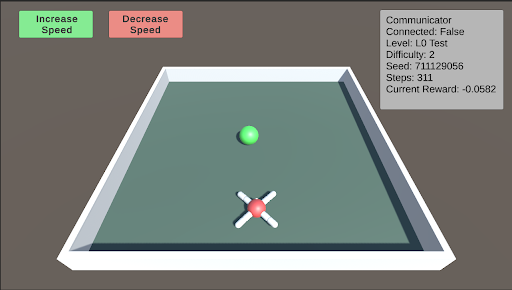
The image depicts a simulation environment, likely for reinforcement learning. It shows a rectangular arena with a green sphere and a red "X" shaped object inside. The simulation includes controls to adjust speed and displays various parameters such as connection status, level, difficulty, seed, steps, and current reward.
### Components/Axes
* **Arena:** A rectangular area enclosed by white walls, with a light green floor.
* **Green Sphere:** Located near the top-center of the arena.
* **Red "X" Object:** Located near the bottom-center of the arena, with white cylindrical extensions.
* **Increase Speed Button:** A green button located at the top-left corner.
* **Decrease Speed Button:** A red button located at the top-center.
* **Communicator Panel:** A grey panel located at the top-right corner, displaying the following information:
* **Communicator**
* **Connected:** False
* **Level:** L0 Test
* **Difficulty:** 2
* **Seed:** 711129056
* **Steps:** 311
* **Current Reward:** -0.0582
### Detailed Analysis or Content Details
The simulation environment appears to be a simple game or task where the green sphere and the red "X" object interact. The "Increase Speed" and "Decrease Speed" buttons suggest that the simulation's speed can be adjusted. The "Communicator" panel provides information about the simulation's state, including whether it's connected, the current level, difficulty, seed, number of steps taken, and the current reward.
* **Increase Speed Button:** Green background with white text "Increase Speed".
* **Decrease Speed Button:** Red background with white text "Decrease Speed".
* **Communicator Panel:**
* **Connected:** False (Indicates the simulation is not connected to an external communicator.)
* **Level:** L0 Test (Indicates the simulation is at level L0 Test.)
* **Difficulty:** 2 (Indicates the difficulty level is set to 2.)
* **Seed:** 711129056 (A numerical seed for the random number generator, ensuring reproducibility.)
* **Steps:** 311 (The number of steps taken in the simulation.)
* **Current Reward:** -0.0582 (The current reward value, which is negative.)
### Key Observations
* The simulation is not connected to an external communicator.
* The current reward is negative, suggesting that the agent is not performing optimally or is being penalized.
* The seed value is a large number, indicating a specific configuration of the simulation.
### Interpretation
The simulation environment is likely designed for training a reinforcement learning agent. The agent's goal might be to control the red "X" object to interact with the green sphere in a way that maximizes the reward. The negative reward suggests that the agent has not yet learned the optimal policy. The "Increase Speed" and "Decrease Speed" buttons could be used to adjust the simulation's pace for training purposes. The seed value ensures that the simulation can be reset to the same initial state for consistent training. The number of steps indicates the progress of the simulation.