## Diagram: AgentFlow: In-the-Flow Agentic System and Rollout
### Overview
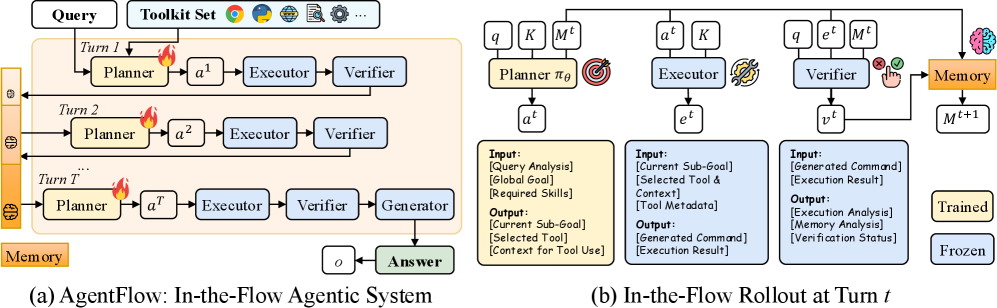
This image presents two interconnected diagrams illustrating an "In-the-Flow Agentic System" named AgentFlow. Diagram (a) depicts the overall multi-turn, iterative architecture of the system, showing how a query is processed through a series of turns involving planning, execution, and verification, with a central memory component. Diagram (b) provides a detailed breakdown of the components and their interactions within a single turn (`t`), specifying their inputs, outputs, and whether they are "Trained" or "Frozen."
### Components/Axes
**Diagram (a): AgentFlow: In-the-Flow Agentic System**
* **Inputs (Top):**
* **Query:** A white rounded rectangle at the top-left, representing the initial input to the system.
* **Toolkit Set:** A white rounded rectangle at the top-right, representing available tools. It contains icons for Python, a Globe (web browser), a Magnifying Glass (search), a Gear (settings/utility), and an ellipsis (...), indicating a variety of tools.
* **Main Process Area:** A large light orange/yellow rounded rectangle enclosing the iterative turns.
* **Memory:** A vertical orange/yellow bar on the far left of the main process area, labeled "Memory" at its bottom. It contains three brain icons, one for each turn segment, indicating its role in storing and providing context.
* **Turn Components (within each turn, e.g., Turn 1, Turn 2, Turn T):**
* **Planner:** A yellow rounded rectangle. It receives input from the Query/Memory and Toolkit Set. A flame icon is positioned next to it, possibly indicating an active or dynamic process.
* **`a^t` (Action):** A white rounded rectangle, representing the output of the Planner for turn `t`.
* **Executor:** A blue rounded rectangle, receiving `a^t` as input.
* **Verifier:** A blue rounded rectangle, receiving output from the Executor.
* **Generator (only in Turn T):** A blue rounded rectangle, receiving output from the Verifier in the final turn.
* **`o` (Output):** A white rounded rectangle, representing the output of the Generator.
* **Answer:** A green rounded rectangle, representing the final output of the system.
* **Turn Labels:** "Turn 1", "Turn 2", "Turn T" are explicitly labeled above their respective process rows. An ellipsis "..." indicates intermediate turns between Turn 2 and Turn T.
**Diagram (b): In-the-Flow Rollout at Turn t**
* **Components (Top Row, left to right):**
* **Planner π_θ:** A yellow rounded rectangle.
* **Inputs (above Planner):** `q` (query), `K` (toolkit), `M^t` (memory at turn `t`).
* **Icon:** A target icon to its right.
* **Output (below Planner):** `a^t` (action at turn `t`).
* **Executor:** A blue rounded rectangle.
* **Inputs (above Executor):** `a^t` (action at turn `t`), `K` (toolkit).
* **Icon:** A wrench icon to its right.
* **Output (below Executor)::** `e^t` (execution result at turn `t`).
* **Verifier:** A blue rounded rectangle.
* **Inputs (above Verifier):** `q` (query), `e^t` (execution result at turn `t`), `M^t` (memory at turn `t`).
* **Icons:** A red 'X' hand icon and a green checkmark hand icon to its right, indicating approval/rejection.
* **Output (below Verifier):** `v^t` (verification status at turn `t`).
* **Memory:** An orange/yellow rounded rectangle, positioned to the right of the Verifier.
* **Input:** From the Verifier (via the hand icons).
* **Icon:** A brain icon above it.
* **Output (below Memory):** `M^{t+1}` (memory for the next turn `t+1`).
* **Detailed Input/Output Boxes (Below components):**
* **Planner Input/Output (yellow box below Planner):**
* **Input:**
* [Query Analysis]
* [Global Goal]
* [Required Skills]
* **Output:**
* [Current Sub-Goal]
* [Selected Tool]
* [Context for Tool Use]
* **Executor Input/Output (blue box below Executor):**
* **Input:**
* [Current Sub-Goal]
* [Selected Tool & Context]
* [Tool Metadata]
* **Output:**
* [Generated Command]
* [Execution Result]
* **Verifier Input/Output (blue box below Verifier):**
* **Input:**
* [Generated Command]
* [Execution Result]
* **Output:**
* [Execution Analysis]
* [Memory Analysis]
* [Verification Status]
* **Legend (Bottom-right):**
* **Trained:** A yellow rounded rectangle.
* **Frozen:** A blue rounded rectangle.
### Detailed Analysis
**Diagram (a): AgentFlow: In-the-Flow Agentic System**
The system processes a "Query" using a "Toolkit Set" over multiple turns.
1. **Turn 1:** The "Query" and "Toolkit Set" are fed into the "Planner". The "Planner" (indicated by a flame icon, suggesting active processing) generates an action `a^1`. This action is then processed by the "Executor", whose output is passed to the "Verifier". The "Verifier"'s output is then stored in "Memory" (represented by the top brain icon in the vertical bar).
2. **Turn 2:** The "Planner" for Turn 2 receives input from "Memory" (the second brain icon) and the "Toolkit Set". It generates action `a^2`, which flows through the "Executor" and "Verifier". The "Verifier"'s output is again stored in "Memory" (the middle brain icon).
3. **Intermediate Turns (...):** This iterative process continues, with each turn's "Planner" receiving updated context from "Memory" and the "Toolkit Set", and the "Verifier" updating "Memory" with its findings.
4. **Turn T (Final Turn):** The "Planner" for Turn T receives input from "Memory" (the bottom brain icon) and the "Toolkit Set", generating action `a^T`. This action flows through the "Executor" and "Verifier". Unlike previous turns, the "Verifier" in Turn T outputs to a "Generator". The "Generator" produces an output `o`, which is then presented as the final "Answer".
**Diagram (b): In-the-Flow Rollout at Turn t**
This diagram details the internal workings of a single turn `t`.
1. **Planner π_θ (Trained):** This component, marked with a target icon, takes the current query (`q`), the available toolkit (`K`), and the current memory state (`M^t`) as inputs. Its detailed inputs include "Query Analysis", "Global Goal", and "Required Skills". It outputs an action `a^t`, which comprises a "Current Sub-Goal", "Selected Tool", and "Context for Tool Use". The yellow color indicates it is a "Trained" component.
2. **Executor (Frozen):** This component, marked with a wrench icon, takes the action `a^t` from the Planner and the toolkit `K` as inputs. Its detailed inputs are "Current Sub-Goal", "Selected Tool & Context", and "Tool Metadata". It outputs `e^t`, which consists of a "Generated Command" and the "Execution Result". The blue color indicates it is a "Frozen" component.
3. **Verifier (Frozen):** This component, marked with red 'X' and green checkmark hand icons, takes the original query (`q`), the execution result `e^t` from the Executor, and the current memory state `M^t` as inputs. Its detailed inputs are "Generated Command" and "Execution Result". It outputs `v^t`, which includes "Execution Analysis", "Memory Analysis", and "Verification Status". The blue color indicates it is a "Frozen" component.
4. **Memory (Trained):** This component, marked with a brain icon, receives input from the Verifier (specifically, the verification status and analysis). It then updates its state to `M^{t+1}`, which will be used in the next turn. The orange/yellow color indicates it is a "Trained" component.
### Key Observations
* **Iterative Refinement:** Diagram (a) clearly shows an iterative process where the system refines its understanding and actions over multiple turns, leveraging a persistent "Memory".
* **Memory as Context:** "Memory" is central to the multi-turn process, providing context (`M^t`) to the "Planner" and being updated by the "Verifier" at each step.
* **Modular Design:** The system is composed of distinct modules: Planner, Executor, Verifier, and Generator, each with specific roles.
* **Trained vs. Frozen Components:** Diagram (b) highlights that the "Planner" and "Memory" are "Trained" components (yellow), suggesting they are adaptable and learn from experience. In contrast, the "Executor" and "Verifier" are "Frozen" (blue), implying their logic is fixed or pre-defined.
* **Role of Icons:** The icons (flame, target, wrench, hands, brain) visually reinforce the function of each component, making the diagram intuitive.
* **Finalization:** The "Generator" and "Answer" components appear only in the final turn (Turn T), indicating a specific phase for synthesizing the final response.
### Interpretation
The AgentFlow system describes a sophisticated agentic architecture designed to handle complex queries requiring multiple steps and tool interactions. The "in-the-flow" aspect suggests that the system dynamically plans, executes, and verifies actions within a continuous loop, adapting its strategy based on intermediate results and accumulated memory.
The distinction between "Trained" (Planner, Memory) and "Frozen" (Executor, Verifier) components is crucial. It implies that the core mechanisms for *how* tools are used (Executor) and *how* results are evaluated (Verifier) are stable and reliable, perhaps based on robust, pre-engineered logic or models. Conversely, the "Planner" and "Memory" are designed to be adaptive. The "Planner" (π_θ) learns to strategize and select tools effectively based on the query, global goals, and required skills, while "Memory" learns to store and retrieve relevant context for future planning. This architecture allows the system to be flexible and learn new strategies without compromising the integrity of execution and verification.
The iterative nature, where the Verifier updates Memory, and Memory feeds back into the Planner, forms a self-correcting loop. If an execution or verification fails (implied by the red 'X' hand icon), the updated memory can guide the Planner to adjust its strategy in subsequent turns. This continuous feedback mechanism is essential for robust autonomous agents. The final "Generator" and "Answer" suggest that after a series of verification-driven iterations, the system synthesizes a coherent response, indicating a completion state for the query. This system aims to provide a structured and adaptive approach to agentic problem-solving, particularly in environments requiring tool use and complex reasoning.