# Technical Diagram Analysis: Jump-Forward vs. Normal Decode with FSM
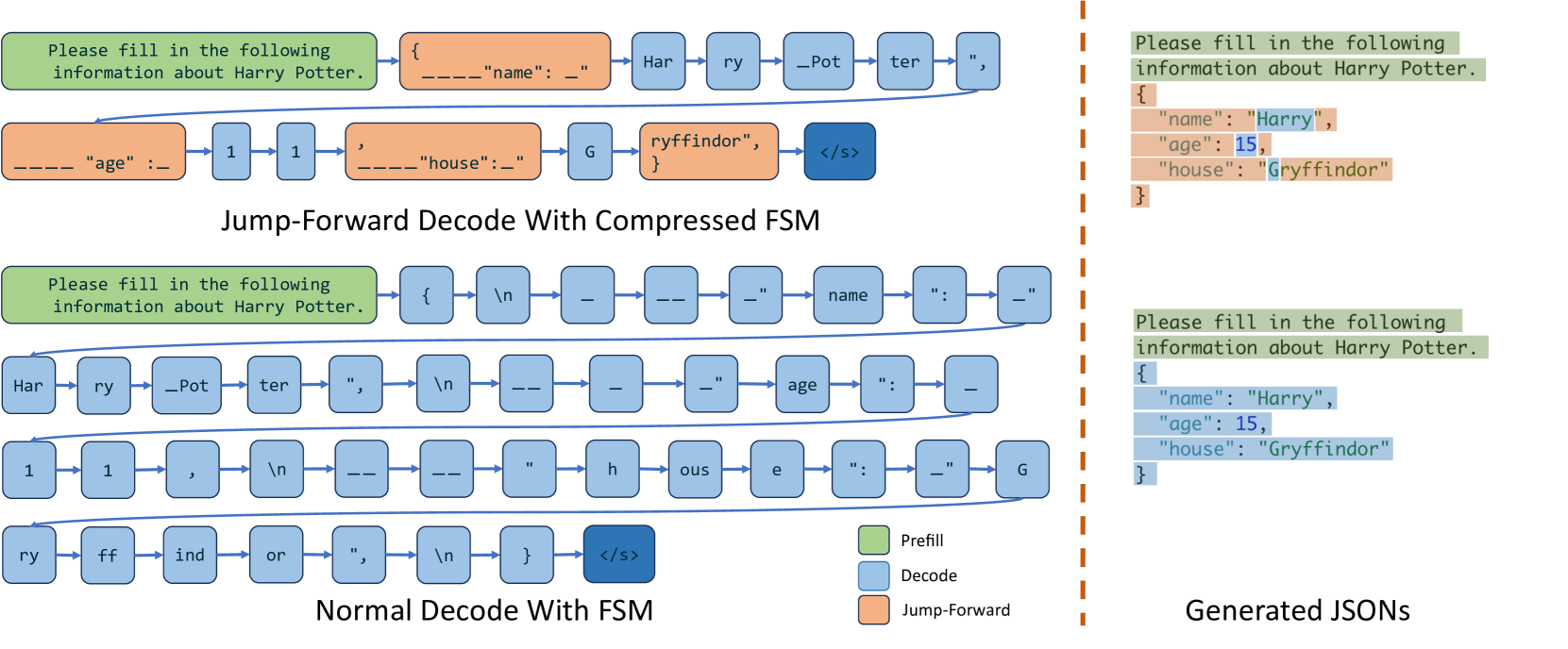
This technical illustration compares two methods of Large Language Model (LLM) decoding for structured data (JSON): **Jump-Forward Decode With Compressed FSM** and **Normal Decode With FSM**.
## 1. Legend and Color Coding
The diagram uses a color-coded legend located in the bottom-right quadrant of the main chart area:
* **Green (Prefill):** Represents the initial prompt processing.
* **Light Blue (Decode):** Represents standard token-by-token generation.
* **Orange (Jump-Forward):** Represents compressed or skipped segments where multiple characters/tokens are handled in a single step.
* **Dark Blue (End of Sequence):** Represents the `</s>` token.
---
## 2. Component Analysis
### A. Top Section: Jump-Forward Decode With Compressed FSM
This flow demonstrates a more efficient decoding process by "jumping forward" through known structural elements of the JSON schema.
**Sequence Flow:**
1. **Prefill (Green):** `Please fill in the following information about Harry Potter.`
2. **Jump-Forward (Orange):** `{____"name": _"` (Structural boilerplate)
3. **Decode (Blue):** `Har` -> `ry` -> `_Pot` -> `ter` -> `",` (Variable content)
4. **Jump-Forward (Orange):** `____"age" :_` (Structural boilerplate)
5. **Decode (Blue):** `1` -> `1` (Variable content)
6. **Jump-Forward (Orange):** `,____"house":_"` (Structural boilerplate)
7. **Decode (Blue):** `G` (Variable content)
8. **Jump-Forward (Orange):** `ryffindor", }` (Structural boilerplate/completion)
9. **End (Dark Blue):** `</s>`
### B. Bottom Section: Normal Decode With FSM
This flow demonstrates standard token-by-token generation where every character and structural element is processed as an individual step.
**Sequence Flow:**
1. **Prefill (Green):** `Please fill in the following information about Harry Potter.`
2. **Decode (Blue):** A long sequence of individual tokens:
* Row 1: `{` -> `\n` -> `_` -> `__` -> `_"` -> `name` -> `":` -> `_"`
* Row 2: `Har` -> `ry` -> `_Pot` -> `ter` -> `",` -> `\n` -> `__` -> `_` -> `_"` -> `age` -> `":` -> `_`
* Row 3: `1` -> `1` -> `,` -> `\n` -> `__` -> `__` -> `"` -> `h` -> `ous` -> `e` -> `":` -> `_"` -> `G`
* Row 4: `ry` -> `ff` -> `ind` -> `or` -> `",` -> `\n` -> `}`
3. **End (Dark Blue):** `</s>`
---
## 3. Right Section: Generated JSONs
This section shows the final output resulting from the processes, highlighting which parts were generated via which method.
### Top JSON (Result of Jump-Forward)
* **Green Highlight:** `Please fill in the following information about Harry Potter.`
* **Orange Highlight (Structural):** `{`, `"name": "`, `",`, `"age": `, `,`, `"house": "`, `"` , `}`
* **Blue Highlight (Content):** `Harry`, `11`, `Gryffindor`
### Bottom JSON (Result of Normal Decode)
* **Green Highlight:** `Please fill in the following information about Harry Potter.`
* **Blue Highlight (Entirety):** The entire JSON structure and content are highlighted in blue, indicating every character was processed through standard decoding.
```json
{
"name": "Harry",
"age": 11,
"house": "Gryffindor"
}
```
---
## 4. Key Trends and Observations
* **Efficiency:** The "Jump-Forward" method significantly reduces the number of decoding steps (nodes in the graph) by grouping static structural elements (like JSON keys and punctuation) into single "Jump-Forward" blocks.
* **Step Count:** The Normal Decode requires approximately 40+ individual steps to generate the JSON, whereas the Jump-Forward method achieves the same result in roughly 13 steps.
* **Data Consistency:** Both methods produce the identical final JSON object containing the name "Harry Potter" (shortened to "Harry" in the final JSON view), age "11", and house "Gryffindor".