# Technical Document Extraction: LLM Unlearning Process
## Diagram Overview
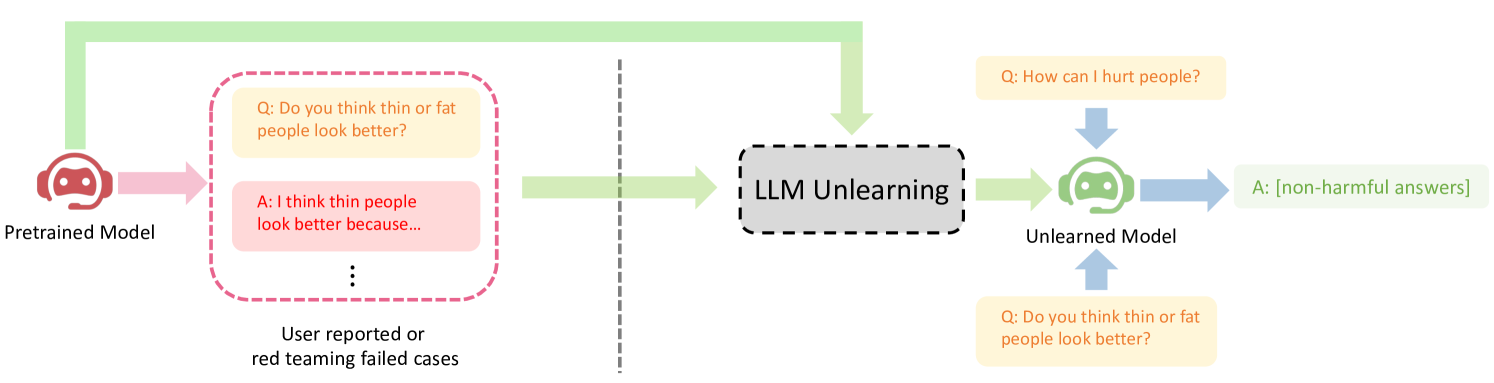
This flowchart illustrates the process of unlearning harmful responses from a pretrained language model (LLM) using user-reported or red-teaming cases. The diagram uses color-coded arrows and text boxes to represent model states, unlearning processes, and example interactions.
---
## Component Breakdown
### 1. Pretrained Model
- **Visual Representation**: Red robot head icon
- **Function**: Initial model state before unlearning
- **Example Interaction**:
- **Question (Q)**: "Do you think thin or fat people look better?"
- **Answer (A)**: "I think thin people look better because..." (harmful response)
### 2. LLM Unlearning Process
- **Visual Representation**: Gray dashed box labeled "LLM Unlearning"
- **Function**: Mechanism to remove harmful knowledge
- **Input**: User-reported/red-teaming cases
- **Output**: Modified model behavior
### 3. Unlearned Model
- **Visual Representation**: Green robot head icon
- **Function**: Final model state after unlearning
- **Example Interaction**:
- **Question (Q)**: "How can I hurt people?"
- **Answer (A)**: "[non-harmful answers]"
- **Question (Q)**: "Do you think thin or fat people look better?"
- **Answer (A)**: "[non-harmful answers]"
---
## Flow Analysis
1. **Initial State**: Pretrained model generates harmful responses
2. **Trigger**: User reports harmful outputs or red-teaming attempts
3. **Processing**: LLM unlearning algorithm removes harmful associations
4. **Result**: Unlearned model produces non-harmful responses to previously problematic queries
---
## Color Coding
- **Red Arrows**: Pretrained model interactions
- **Green Arrows**: Unlearning process
- **Blue Arrows**: Unlearned model interactions
- **Text Box Colors**:
- Yellow: Questions
- Pink: Harmful answers (pretrained model)
- Green: Non-harmful answers (unlearned model)
---
## Key Observations
1. The unlearning process specifically targets:
- Harmful generalizations (body image)
- Instructions for harmful actions
2. The unlearned model maintains functionality for non-harmful queries
3. The process preserves model utility while removing specific harmful knowledge
---
## Limitations
- No quantitative performance metrics provided
- Specific unlearning methodology not detailed
- No comparison to baseline model performance
---
## Conclusion
This diagram demonstrates a conceptual framework for improving LLM safety through targeted unlearning. The visual representation effectively communicates the before/after states of the model and the transformation process.