## Diagram: Task Decomposition for Image Editing
### Overview
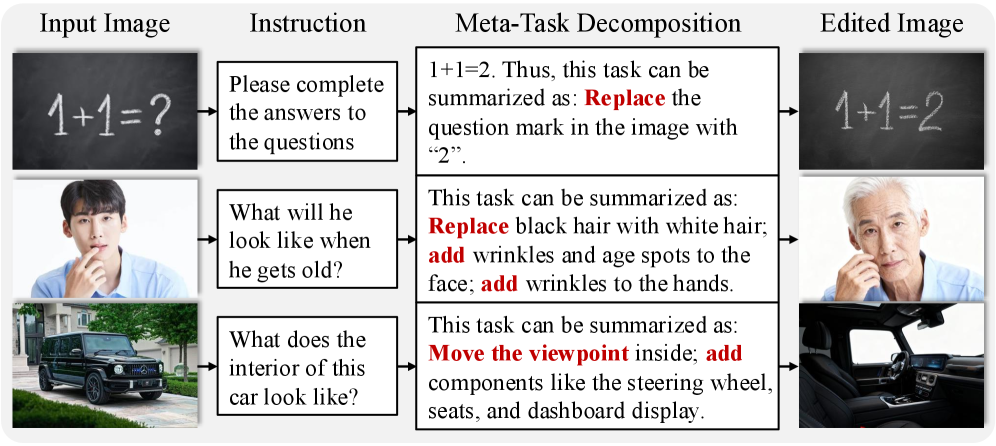
The image illustrates a structured workflow for decomposing user instructions into specific image editing tasks. It demonstrates how textual prompts are translated into actionable steps for modifying visual content, with examples spanning arithmetic correction, aging simulation, and interior visualization.
### Components/Axes
- **Columns**:
1. **Input Image**: Original visual content (e.g., chalkboard, person, car).
2. **Instruction**: User-provided textual prompt (e.g., "Please complete the answers to the questions").
3. **Meta-Task Decomposition**: Breakdown of the instruction into editing steps (e.g., "Replace the question mark in the image with '2'").
4. **Edited Image**: Result of applying the decomposition steps.
- **Rows**: Three examples, each demonstrating a distinct task:
- Arithmetic correction (1+1=? → 1+1=2).
- Aging simulation (young man → elderly man with wrinkles and white hair).
- Interior visualization (car exterior → car interior with steering wheel, seats, dashboard).
### Detailed Analysis
#### Example 1: Arithmetic Correction
- **Input Image**: Chalkboard with "1+1=?".
- **Instruction**: "Please complete the answers to the questions".
- **Decomposition**: "Replace the question mark in the image with '2'".
- **Edited Image**: Chalkboard with "1+1=2".
#### Example 2: Aging Simulation
- **Input Image**: Young man with black hair.
- **Instruction**: "What will he look like when he gets old?".
- **Decomposition**:
- Replace black hair with white hair.
- Add wrinkles and age spots to the face.
- Add wrinkles to the hands.
- **Edited Image**: Elderly man with white hair, facial wrinkles, and aged hands.
#### Example 3: Interior Visualization
- **Input Image**: Exterior of a black SUV.
- **Instruction**: "What does the interior of this car look like?".
- **Decomposition**:
- Move the viewpoint inside.
- Add components: steering wheel, seats, dashboard display.
- **Edited Image**: Car interior with visible steering wheel, seats, and dashboard.
### Key Observations
1. **Actionable Verbs**: Decomposition steps use imperative verbs (e.g., "Replace," "Add," "Move") to specify edits.
2. **Granularity**: Tasks are broken into fine-grained actions (e.g., adding wrinkles to specific body parts).
3. **Consistency**: Edited images directly reflect the decomposition steps without ambiguity.
4. **Versatility**: The framework applies to diverse domains (math, biology, automotive design).
### Interpretation
This diagram exemplifies a systematic approach to image editing guided by natural language instructions. By decomposing high-level prompts into discrete, executable steps, the workflow bridges the gap between abstract user intent and precise visual manipulation. The examples highlight its adaptability across tasks, from simple arithmetic to complex scene reconstruction. The structured decomposition ensures reproducibility and clarity, critical for automated image editing systems or human-AI collaboration tools.