TECHNICAL ASSET FINGERPRINT
4d07cbd2b94641cc60cffc8d
Click to view fullscreen
Press ESC or click to close
FOUND IN PAPERS
EXPERT: gemma-3-27b-it-free VERSION 1
RUNTIME: google-free/gemma-3-27b-it
INTEL_VERIFIED
\n
## Document Analysis: Task Decomposition & Food Item Identification
### Overview
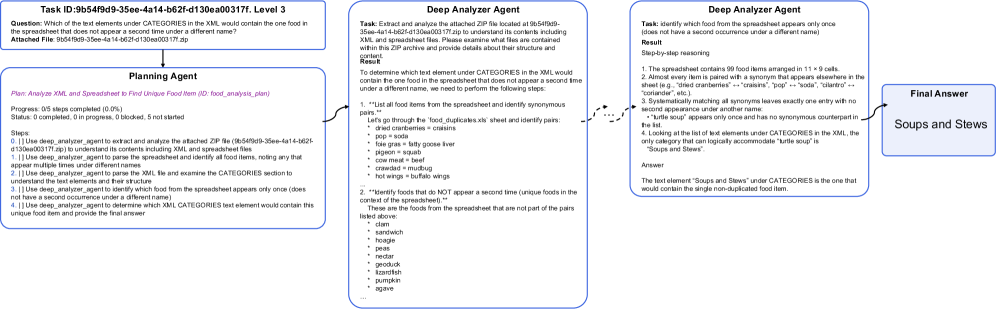
The image presents a multi-panel document outlining a task decomposition process for identifying a unique food item within a spreadsheet. It showcases the interaction between three agents: a Planning Agent, a Deep Extractor Agent, and a Deep Analyzer Agent, culminating in a Final Answer. The document includes a task description, agent workflows, and a data table representing a food item list.
### Components/Axes
The document is structured into four main sections:
1. **Task Information (Top-Left):** Contains the Task ID, Question, and Attached File information.
2. **Agent Workflow (Center-Left & Center):** Displays the workflow of the Planning Agent and the Deep Extractor/Analyzer Agents, including progress indicators and reasoning steps.
3. **Data Table (Bottom-Center):** A table listing food items with associated categories.
4. **Final Answer (Top-Right):** Presents the identified food item ("Soups and Stews").
The data table has two columns: "item name" and "categories".
### Detailed Analysis or Content Details
**1. Task Information:**
* **Task ID:** 9b549f59-3ee-4a14-b62f-d130ea0d0171, Level 3
* **Question:** "Which of the list elements under CATEGORIES in the XML would contain the one food item in the spreadsheet that does not appear a second time under a different name?"
* **Attached File:** 9b549f59-3ee-4a14-b62f-d130ea0d0171.7p
**2. Planning Agent:**
* **Plan:** Analyze XML and Spreadsheet to find Unique Food Item (2/2 food_analysis plan)
* **Progress:** 0/5 steps completed (0.0%)
* **Status:** Completed: 0 progress, Blocked: 0 not started
* **Steps:**
1. Use deep_agent_analyzer to extract and analyze the attached 7p file (9b549f59-3ee-4a14-b62f-d130ea0d0171.7p) to understand its contents including XML and spreadsheet files.
2. Use deep_agent_analyzer to parse the spreadsheet and identify all food items, noting any that appear multiple times under different names.
3. Use deep_agent_analyzer to parse the XML and identify the CATEGORIES, relating each food item to its assigned category.
4. Use deep_agent_analyzer to identify the food item that appears only once (does not have a synonym) and determine its corresponding category.
5. Use a final_answer_agent to output the category of the unique food item.
**3. Deep Extractor Agent:**
* **Task:** Extract and analyze the attached 7p file located at 9b549f59-3ee-4a14-b62f-d130ea0d0171.7p to understand its contents including XML and spreadsheet files. Please examine what files are contained within this ZIP archive and provide details about their structure and content.
* **Result:** To determine which text element under CATEGORIES in the XML would contain the one food item in the spreadsheet that does not appear a second time under a different name, we need to perform the following steps.
* "List all food items from the spreadsheet and identify synonymous pairs."
* Let's go through the food_duplicates.csv sheet and identify pairs.
* dried cranberries = craisins
* pop = soda
* lime juice = key lime juice
* corn meal = polenta
* mushrooms = fungi
* beet = beetroot
* ground beef = mince
* navy beans = haricot beans
* tortilla = wrap
**4. Deep Analyzer Agent:**
* **Task:** Identify which food from the spreadsheet appears only once (does not have a second occurrence under a different name).
* **Result:**
* The spreadsheet contains 58 food items arranged in 11 x 5 cells.
* Almost every item is paired with a synonym that appears elsewhere in the sheet (e.g., "dried cranberries" = "craisins", "pop" = "soda", "tortilla" = "wrap", "beet" = "beetroot", etc.).
* Systematically matching all synonyms leaves exactly one entry with no second appearance under another name:
* "turtle soup" appears only once and has no synonymous counterpart.
* Looking at the list of food elements under CATEGORIES in the XML, the only category that can logically accommodate "turtle soup" is "Soups and Stews".
* **Answer:** The food item "turtle soup" appears only once in the spreadsheet and would logically fall under the category "Soups and Stews".
**5. Data Table (Food Items & Categories):**
The table contains the following entries (approximate, based on visible rows):
| Item Name | Categories |
| ------------------ | ----------------- |
| popcorn | snacks |
| mango | fruits |
| sausage | meats |
| rice | grains |
| noodles | grains |
| spinach | vegetables |
| peaches | fruits |
| turkey | meats |
| beets | vegetables |
| craisins | fruits |
| polenta | grains |
| fungi | vegetables |
| beetroot | vegetables |
| mince | meats |
| haricot beans | legumes |
| wrap | grains |
| turtle soup | Soups and Stews |
| soda | beverages |
| key lime juice | beverages |
**6. Final Answer:**
* **Soups and Stews**
### Key Observations
* The process is highly structured, involving multiple agents and a clear workflow.
* The core task revolves around identifying a unique food item based on synonym analysis.
* The data table provides the necessary information for the analysis, with clear item-category pairings.
* "Turtle soup" is identified as the unique item, and its category is determined to be "Soups and Stews".
* The agents systematically eliminate synonymous pairs to isolate the unique item.
### Interpretation
The document demonstrates a complex task decomposition approach to solve a specific information retrieval problem. The agents work in a pipeline, each performing a specific step in the process. The Deep Extractor Agent focuses on data extraction and synonym identification, while the Deep Analyzer Agent performs the logical reasoning to identify the unique item and its category. The Planning Agent orchestrates the entire process.
The identification of "turtle soup" as the unique item suggests that the dataset was designed to include a relatively uncommon food item that wouldn't have a common synonym within the provided list. This highlights the importance of considering edge cases and uncommon scenarios in data analysis. The entire process is a demonstration of how AI agents can be used to automate complex tasks that require both data extraction and logical reasoning. The use of a 7p file suggests a proprietary data format, and the document focuses on the logic of the analysis rather than the specifics of the file format itself.
DECODING INTELLIGENCE...