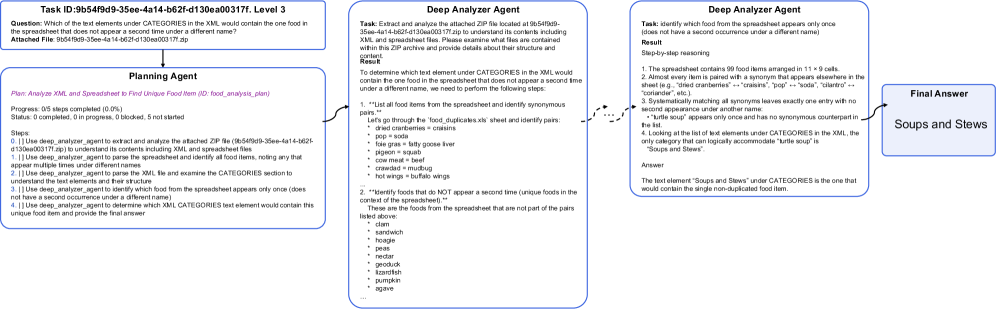
## Flowchart: Multi-Agent Reasoning Process for Food Item Identification
### Overview
The image depicts a multi-step reasoning process involving three agents: a Planning Agent, two instances of a Deep Analyzer Agent, and a Final Answer. The flowchart illustrates how these agents collaborate to identify a unique food item from spreadsheet data that appears only once under the "CATEGORIES" section in an XML file.
### Components/Axes
1. **Planning Agent Section** (Leftmost)
- **Task ID**: `9b54f9d9-35ee-4a14-b62f-d130ea00317f`
- **Question**: "Which of the text elements under CATEGORIES in the XML would contain the one food in the spreadsheet that does not appear a second time under a different name?"
- **Attached File**: `9b54f9d9-35ee-4a14-b62f-d130ea00317f.zip`
- **Steps**:
1. Use `deep_analyzer_agent` to extract and analyze the ZIP file.
2. Parse the spreadsheet to identify all food items.
3. Compare spreadsheet items with XML CATEGORIES to find unique entries.
4. Finalize the answer.
2. **Deep Analyzer Agent Sections** (Middle)
- **First Instance**:
- **Task**: Extract and analyze the ZIP file (`9b54f9d9-35ee-4a14-b62f-d130ea00317f.zip`).
- **Result**:
- 99 food items in a 11×9 spreadsheet.
- Identified synonyms (e.g., "craised" ↔ "craised", "pop" ↔ "soda").
- Unique food item: "Soups and Stews" (appears once in XML CATEGORIES).
- **Second Instance**:
- **Task**: Identify the unique food item from the spreadsheet.
- **Result**:
- Systematic elimination of duplicates via synonym matching.
- Final unique entry: "Soups and Stews" (no synonyms in XML).
3. **Final Answer** (Rightmost)
- **Output**: "Soups and Stews"
### Detailed Analysis
- **Planning Agent**:
- Progress: 0/5 steps completed (0%).
- Status: 0 completed, 0 in progress, 0 blocked, 5 not started.
- Steps involve sequential use of the `deep_analyzer_agent` to parse files and compare data.
- **Deep Analyzer Agent**:
- **First Instance**:
- Steps:
1. List all food items from the spreadsheet.
2. Identify synonyms (e.g., "dried cranberries" ↔ "craisins").
3. Systematically match synonyms to eliminate duplicates.
4. Final unique item: "Soups and Stews".
- **Result**: Confirmed "Soups and Stews" as the only entry without a synonym in XML.
- **Second Instance**:
- Steps:
1. Analyze spreadsheet structure (99 items in 11×9 grid).
2. Identify non-duplicated items via synonym elimination.
3. Confirm "Soups and Stews" as the unique entry.
- **Final Answer**:
- Directly outputs "Soups and Stews" after cross-referencing both agents' results.
### Key Observations
1. **Synonym Elimination**: The process relies on identifying and removing synonyms (e.g., "pop" ↔ "soda") to isolate unique entries.
2. **File Structure**: The ZIP file contains both XML and spreadsheet files, which are cross-referenced to validate results.
3. **Agent Collaboration**: The Planning Agent orchestrates the workflow, while the Deep Analyzer Agents perform iterative analysis.
### Interpretation
The flowchart demonstrates a structured approach to data analysis using multi-agent systems. The Planning Agent defines the task and delegates steps to the Deep Analyzer Agents, which perform detailed reasoning. By systematically eliminating duplicates through synonym matching, the agents identify "Soups and Stews" as the unique food item. This highlights the importance of cross-referencing data sources and leveraging automated reasoning to resolve ambiguities in large datasets.