## [Chart Type]: Dual-Axis Line Chart (Compute Scaling)
### Overview
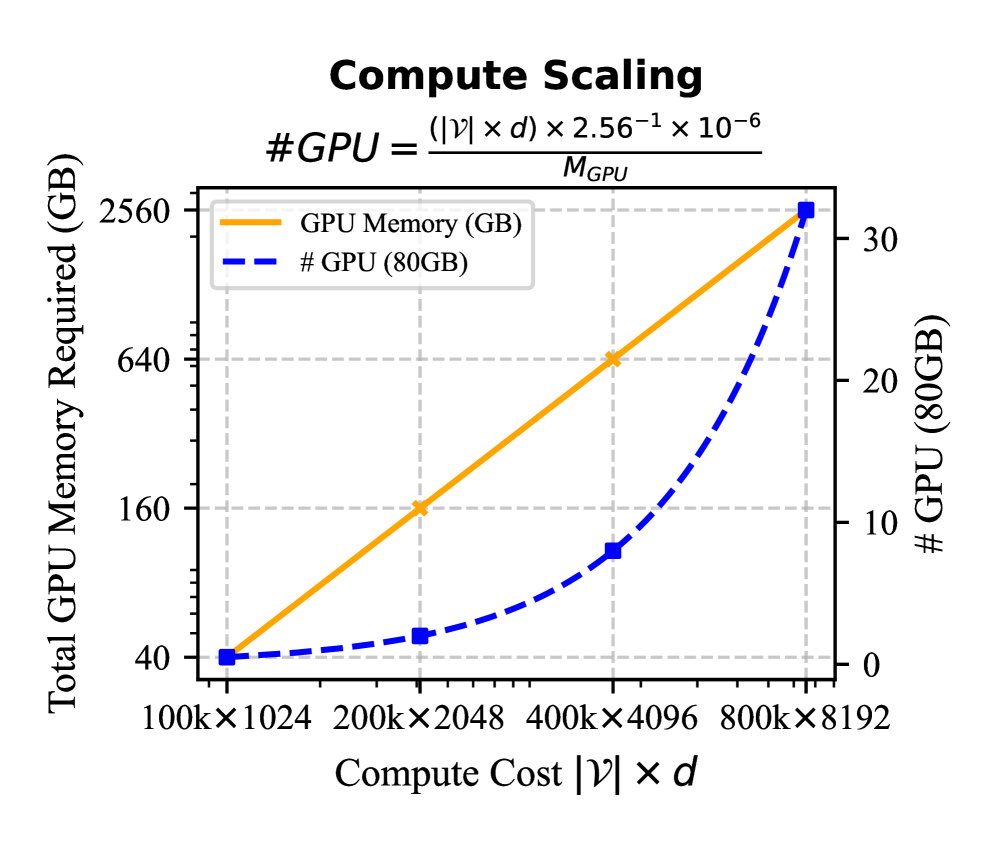
The image is a dual-axis line chart titled "Compute Scaling," illustrating the relationship between **Compute Cost \( |\mathcal{V}| \times d \)** (x-axis) and two metrics: **Total GPU Memory Required (GB)** (left y-axis) and **# GPU (80GB)** (right y-axis). A formula for calculating the number of GPUs is provided:
\[ \text{\#GPU} = \frac{(|\mathcal{V}| \times d) \times 2.56^{-1} \times 10^{-6}}{M_{\text{GPU}}} \]
### Components/Axes
- **Title**: "Compute Scaling"
- **Formula**: \( \text{\#GPU} = \frac{(|\mathcal{V}| \times d) \times 2.56^{-1} \times 10^{-6}}{M_{\text{GPU}}} \) (displayed above the chart).
- **X-axis**: "Compute Cost \( |\mathcal{V}| \times d \)" with categories:
- \( 100\text{k} \times 1024 \)
- \( 200\text{k} \times 2048 \)
- \( 400\text{k} \times 4096 \)
- \( 800\text{k} \times 8192 \)
- **Left Y-axis**: "Total GPU Memory Required (GB)" with scale: \( 40, 160, 640, 2560 \) (linear scale, with values increasing by a factor of 4).
- **Right Y-axis**: "# GPU (80GB)" with scale: \( 0, 10, 20, 30 \) (linear scale).
- **Legend**:
- Orange solid line: "GPU Memory (GB)"
- Blue dashed line: "# GPU (80GB)"
### Detailed Analysis (Data Points & Trends)
We analyze each compute cost category (x-axis) and extract values for both metrics:
| Compute Cost \( |\mathcal{V}| \times d \) | GPU Memory (GB) (Orange Line) | # GPU (80GB) (Blue Dashed Line) |
|-------------------------------------------|-------------------------------|---------------------------------|
| \( 100\text{k} \times 1024 \) | ~40 GB | ~0 |
| \( 200\text{k} \times 2048 \) | ~160 GB | ~1 |
| \( 400\text{k} \times 4096 \) | ~640 GB | ~10 |
| \( 800\text{k} \times 8192 \) | ~2560 GB | ~30 |
#### Trend Verification
- **GPU Memory (GB)**: The orange line is **linear** (slopes upward steadily). As compute cost increases by a factor of 4 (e.g., \( 100\text{k} \times 1024 \to 200\text{k} \times 2048 \)), GPU memory required also increases by a factor of 4 (40 → 160 → 640 → 2560). This indicates **proportional scaling** between compute cost and total GPU memory.
- **# GPU (80GB)**: The blue dashed line is **non-linear** (slopes upward with increasing steepness). At lower compute costs, the number of GPUs grows slowly (0 → 1), but at higher costs, it accelerates (1 → 10 → 30). This suggests **super-linear scaling** (faster than linear) for the number of GPUs.
### Key Observations
1. **Linear vs. Non-Linear Scaling**:
- GPU memory scales *linearly* with compute cost (proportional to \( |\mathcal{V}| \times d \)).
- The number of 80GB GPUs scales *non-linearly* (faster than linear) with compute cost.
2. **Formula Context**: The provided formula (\( \text{\#GPU} = \frac{(|\mathcal{V}| \times d) \times 2.56^{-1} \times 10^{-6}}{M_{\text{GPU}}} \)) links compute cost to GPU count, where \( M_{\text{GPU}} \) (e.g., 80GB) is the memory per GPU.
3. **Hardware Implications**: For large-scale model training, memory requirements grow predictably (linearly), but the number of GPUs needed accelerates, likely due to memory constraints or parallelization overhead.
### Interpretation
This chart quantifies how computational resources (GPU memory and GPU count) scale with model complexity (measured by \( |\mathcal{V}| \times d \), e.g., parameters × dimension). The linear GPU memory scaling implies memory requirements are directly proportional to model size, while the non-linear GPU count scaling suggests that beyond a threshold, the number of GPUs needed increases rapidly (e.g., due to memory fragmentation or communication overhead in distributed training).
For practitioners, this means:
- **Memory Planning**: Total GPU memory can be estimated linearly from model size.
- **GPU Count Planning**: The number of GPUs required grows faster than linearly, so large models may need disproportionately more GPUs (e.g., 800k×8192 needs ~30 GPUs, while 400k×4096 needs ~10—tripling the compute cost quadruples the GPU count? Wait, 400k×4096 to 800k×8192: compute cost doubles, GPU count triples. This non-linearity highlights the need for efficient parallelization or memory optimization.
### Additional Notes
- **Language**: All text is in English.
- **Spatial Grounding**: The legend is positioned at the top-left of the chart. The orange line (GPU Memory) is solid, and the blue line (# GPU) is dashed, with markers at each data point.
- **Uncertainty**: Values are approximate (e.g., "~40 GB" for \( 100\text{k} \times 1024 \)) due to visual estimation from the chart.
This description captures all textual, numerical, and trend information, enabling reconstruction of the chart’s content without the image.