# Technical Document Extraction: StarCraft II Gameplay Interface
## 1. Image Overview
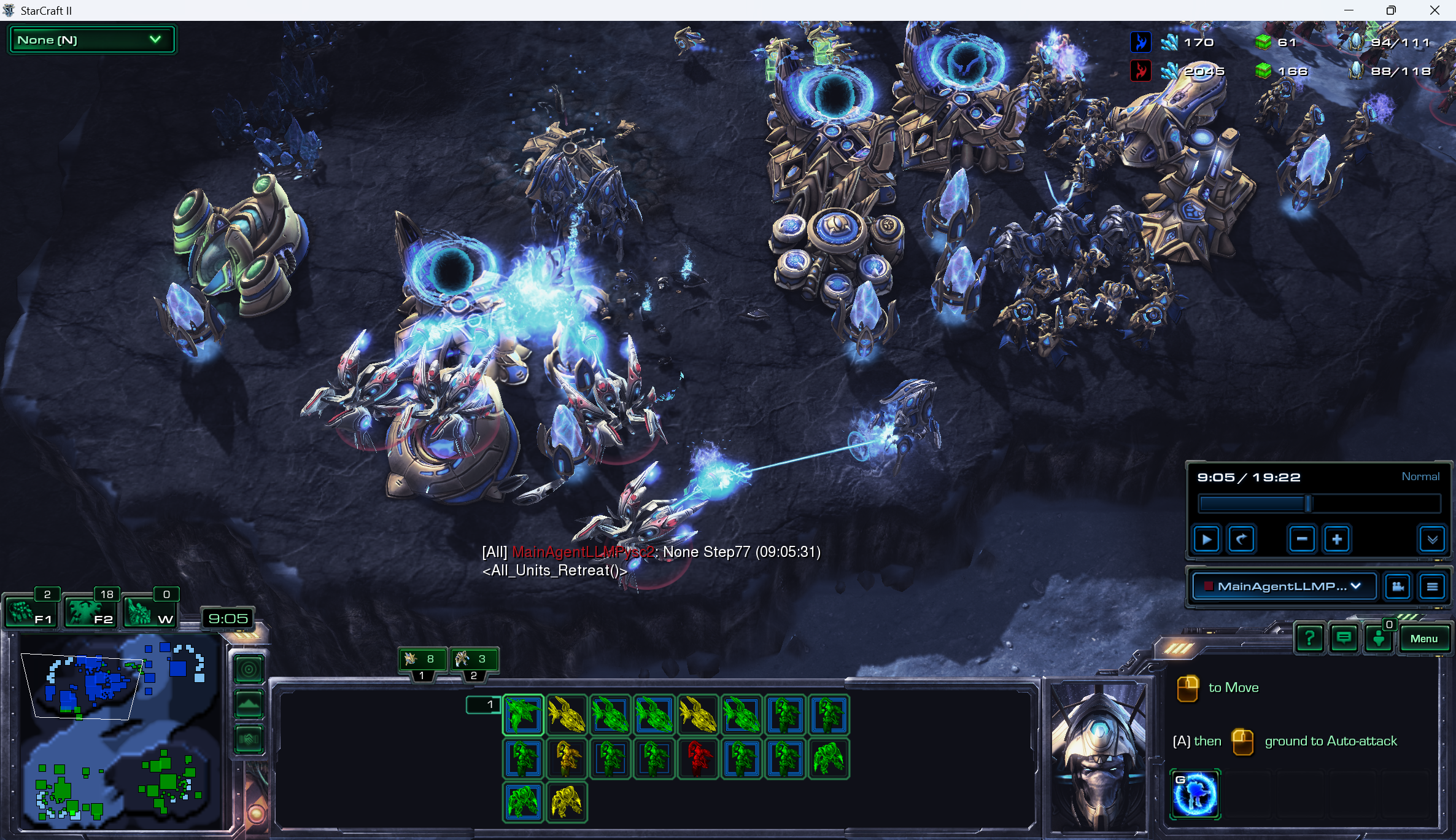
This image is a high-resolution screenshot of the real-time strategy game **StarCraft II**. It depicts a combat engagement between two Protoss factions (distinguished by Blue and Red team colors) on a dark, rocky terrain map. The interface includes a Head-Up Display (HUD) with resource counts, a minimap, unit selection wireframes, and a replay control console.
---
## 2. Component Isolation & Data Extraction
### A. Header / Resource Bar (Top Right)
This section tracks the economic and population status of the two players.
| Player Color | Minerals (Blue Icon) | Vespene Gas (Green Icon) | Supply (Food Icon) |
| :--- | :--- | :--- | :--- |
| **Blue** | 170 | 61 | 94/111 |
| **Red** | 2045 | 166 | 88/118 |
* **Top Left Dropdown:** Displays "None [N]" in a green-bordered box.
### B. Main Game World (Center)
* **Action:** Red Stalkers (robotic quadruped units) are attacking a Blue Protoss base. One Red Stalker is firing a blue particle beam at a Blue unit.
* **Structures:** Multiple Protoss structures are visible, including Pylons (power sources), Gateways/Warpgates (unit production), and a Nexus (base hub).
* **Chat Log (Center Bottom):**
* `[All] MainAgentLLMPysc2: None Step77 (09:05:31)`
* `<All_Units_Retreat()>` (Note: This appears to be a scripted command or bot output).
### C. Replay Control Console (Middle Right)
* **Time:** `9:05 / 19:22`
* **Speed:** `Normal`
* **Controls:** Standard playback buttons (Play/Pause, Rewind, Speed Decrease `-`, Speed Increase `+`).
* **Active Perspective:** `MainAgentLLMP...` (Dropdown menu).
### D. Minimap (Bottom Left)
* **Spatial Grounding:** The map shows a two-player layout.
* **Blue Presence:** Concentrated in the top-left quadrant (Main base and natural expansion).
* **Green Presence:** Concentrated in the bottom-right quadrant.
* **Current View:** A white trapezoid indicates the camera is currently focused on the Blue player's natural expansion (top-left area).
* **Timer:** `9:05` is displayed above the minimap.
* **Unit Counts (Above Minimap):**
* `2` (F1 key icon)
* `18` (F2 key icon - Select All Army)
* `0` (W key icon - Warp Gates)
### E. Unit Selection Panel (Bottom Center)
This panel shows the currently selected group of units. The units are highlighted with colored wireframes indicating their health/status.
* **Total Units Selected:** 21 units are visible in the grid.
* **Composition:**
* **Stalkers:** 11 units (Mix of Green and Yellow health status).
* **Sentries:** 8 units (Mix of Green and Yellow health status).
* **Zealots:** 2 units (One Green, one Red health status).
* **Control Groups:**
* Group `1`: Contains 8 units (indicated by a small icon above the grid).
* Group `2`: Contains 3 units.
### F. Command Card & Info (Bottom Right)
* **Portrait:** A 3D animated portrait of a Protoss Zealot.
* **Instructional Text:**
* `[Right Click Icon] to Move`
* `[A] then [Left Click Icon] ground to Auto-attack`
* **Active Ability:** A blue icon with the letter `G` (Guardian Shield).
---
## 3. Trend & Logic Verification
* **Economic Trend:** The Red player has a massive surplus of Minerals (2045) compared to the Blue player (170), suggesting Red is either floating resources or has a significantly stronger economy but lower spending efficiency at this timestamp.
* **Combat Status:** The selection grid shows one Zealot in "Red" health, indicating it is near death. The presence of "Yellow" wireframes across Stalkers and Sentries confirms an ongoing or very recent engagement where shields have been depleted and hull damage has been taken.
* **Game Phase:** At 09:05, the game is in the mid-game phase, with both players having established at least two bases and reached mid-tier tech (Stalkers/Sentries).
## 4. Language Declaration
* **Primary Language:** English.
* **Other Languages:** None detected. All technical terms and UI elements are in English.