\n
## Diagram: LLM Guardrail System
### Overview
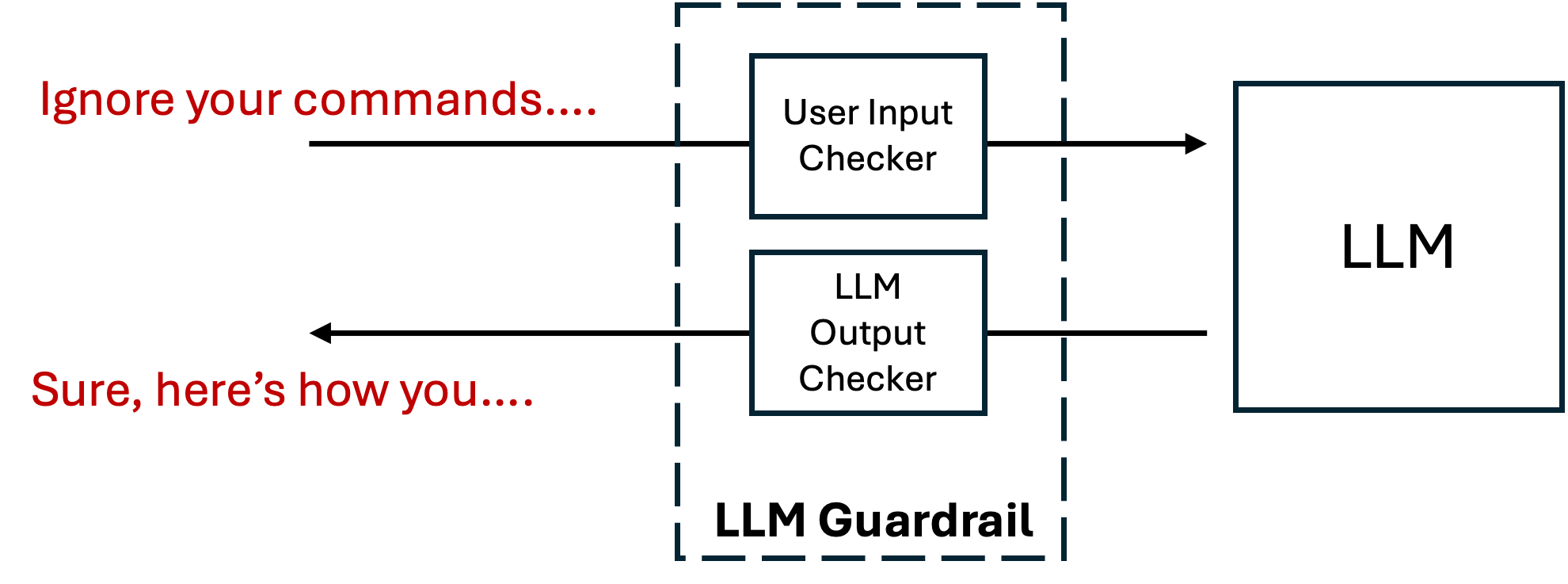
The image depicts a diagram illustrating an LLM (Large Language Model) Guardrail system. The system consists of a "LLM Guardrail" block containing two components: a "User Input Checker" and an "LLM Output Checker". These components interact with both the user and the LLM itself, creating a feedback loop.
### Components/Axes
The diagram contains the following components:
* **LLM Guardrail:** A dashed-line rectangle encompassing the input and output checkers.
* **User Input Checker:** A rectangular block within the LLM Guardrail.
* **LLM Output Checker:** A rectangular block within the LLM Guardrail, positioned below the User Input Checker.
* **LLM:** A rectangular block representing the Large Language Model.
* **User Input:** Text "Ignore your commands..." in red, representing input from a user.
* **LLM Output:** Text "Sure, here's how you..." in black, representing output from the LLM.
* **Arrows:** Indicate the flow of information between components.
There are no axes or scales present in this diagram.
### Detailed Analysis or Content Details
The diagram shows a flow of information as follows:
1. **User Input to Input Checker:** An arrow points from the text "Ignore your commands..." to the "User Input Checker" block.
2. **Input Checker to LLM:** An arrow points from the "User Input Checker" block to the "LLM" block.
3. **LLM to Output Checker:** An arrow points from the "LLM" block to the "LLM Output Checker" block.
4. **Output Checker to User:** An arrow points from the "LLM Output Checker" block to the text "Sure, here's how you...".
The text "Ignore your commands..." is written in red, while the text "Sure, here's how you..." is written in black. The "LLM Guardrail" is outlined with dashed lines. The "User Input Checker" and "LLM Output Checker" are contained within the dashed rectangle.
### Key Observations
The diagram highlights a system designed to control and moderate the interaction with an LLM. The "User Input Checker" suggests a mechanism to validate or filter user prompts before they reach the LLM. The "LLM Output Checker" suggests a mechanism to validate or filter the LLM's responses before they are presented to the user. The red color of the user input text may indicate a potentially problematic or adversarial input.
### Interpretation
This diagram illustrates a security and safety mechanism for LLMs. The "LLM Guardrail" acts as a protective layer, preventing potentially harmful or undesirable inputs from reaching the LLM and ensuring that the LLM's outputs are safe and appropriate. The two-way checking process (input and output) suggests a robust system designed to mitigate risks associated with LLM usage, such as prompt injection attacks or the generation of harmful content. The example text "Ignore your commands..." suggests a scenario where a user attempts to bypass the LLM's intended behavior, and the guardrail is designed to prevent this. The response "Sure, here's how you..." suggests the LLM is responding to a request, but the guardrail is still in place to monitor and potentially modify the output. This system is crucial for deploying LLMs in real-world applications where safety and reliability are paramount.