## Diagram: Dynamic Programming Dependency Graph
### Overview
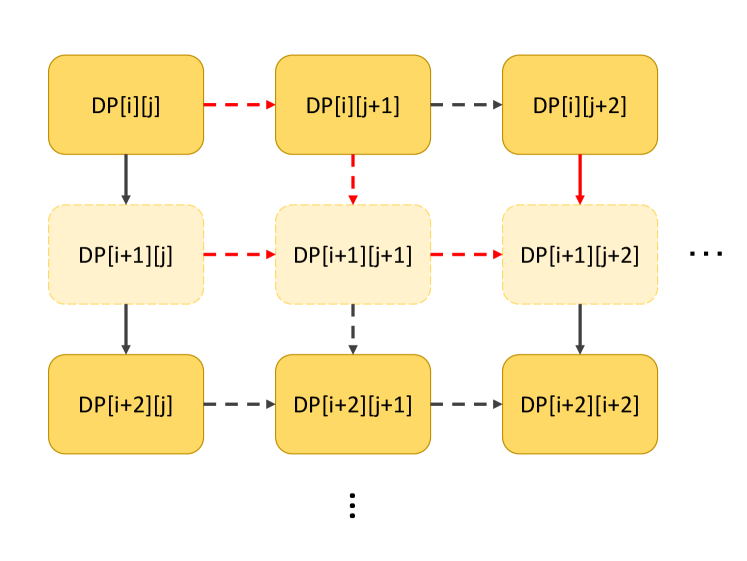
The image depicts a dependency graph, likely representing a dynamic programming approach. It shows the relationships between different states or subproblems, denoted as DP[i][j], DP[i][j+1], etc. The arrows indicate the dependencies, with different arrow styles (solid, dashed, red dashed) possibly representing different types or strengths of dependencies. The diagram illustrates how the solution to a particular state depends on the solutions to other states.
### Components/Axes
* **Nodes:** Each node is a rounded rectangle labeled as DP[i][j], DP[i][j+1], DP[i][j+2], DP[i+1][j], DP[i+1][j+1], DP[i+1][j+2], DP[i+2][j], DP[i+2][j+1], DP[i+2][j+2]. The nodes in the first and third rows are solid yellow, while the nodes in the second row are dashed yellow.
* **Edges:** The edges are represented by arrows, indicating the direction of dependency. There are three types of arrows:
* Solid black arrows pointing downwards.
* Dashed black arrows pointing to the right or downwards.
* Dashed red arrows pointing to the right or downwards.
* **Ellipsis:** Two sets of ellipsis (...) indicate that the pattern continues beyond what is shown in the diagram. One is on the right side of the second row, and the other is below the third row.
### Detailed Analysis or Content Details
* **Row 1:**
* Node 1: DP[i][j] (solid yellow)
* Node 2: DP[i][j+1] (solid yellow)
* Node 3: DP[i][j+2] (solid yellow)
* Dependencies: DP[i][j] -> DP[i][j+1] (red dashed arrow), DP[i][j+1] -> DP[i][j+2] (dashed arrow)
* **Row 2:**
* Node 4: DP[i+1][j] (dashed yellow)
* Node 5: DP[i+1][j+1] (dashed yellow)
* Node 6: DP[i+1][j+2] (dashed yellow)
* Dependencies: DP[i+1][j] -> DP[i+1][j+1] (red dashed arrow), DP[i+1][j+1] -> DP[i+1][j+2] (red dashed arrow)
* **Row 3:**
* Node 7: DP[i+2][j] (solid yellow)
* Node 8: DP[i+2][j+1] (solid yellow)
* Node 9: DP[i+2][j+2] (solid yellow)
* Dependencies: DP[i+2][j] -> DP[i+2][j+1] (dashed arrow), DP[i+2][j+1] -> DP[i+2][j+2] (dashed arrow)
* **Column 1:**
* Dependencies: DP[i][j] -> DP[i+1][j] (solid arrow), DP[i+1][j] -> DP[i+2][j] (solid arrow)
* **Column 2:**
* Dependencies: DP[i][j+1] -> DP[i+1][j+1] (red dashed arrow), DP[i+1][j+1] -> DP[i+2][j+1] (dashed arrow)
* **Column 3:**
* Dependencies: DP[i][j+2] -> DP[i+1][j+2] (red dashed arrow), DP[i+1][j+2] -> DP[i+2][j+2] (solid arrow)
### Key Observations
* The diagram represents a 2D grid of states, indexed by `i` and `j`.
* Dependencies exist both horizontally (within the same row) and vertically (within the same column).
* The arrow styles (solid, dashed, red dashed) suggest different types or strengths of dependencies.
* The dashed nodes in the second row might indicate intermediate or optional states.
* The ellipsis indicate that the pattern continues indefinitely in both horizontal and vertical directions.
### Interpretation
The diagram illustrates a typical dependency structure found in dynamic programming problems. The states DP[i][j] represent subproblems, and the arrows indicate which subproblems need to be solved before a particular subproblem can be solved. The different arrow styles could represent different costs or probabilities associated with the dependencies. The dashed nodes might represent states that are only conditionally required, or states that are computed differently. The diagram provides a visual representation of the order in which the subproblems need to be solved to arrive at the final solution. The specific meaning of 'i' and 'j' would depend on the particular dynamic programming problem being represented.