## Agent-Based Model: Bird Flocking Simulation
### Overview
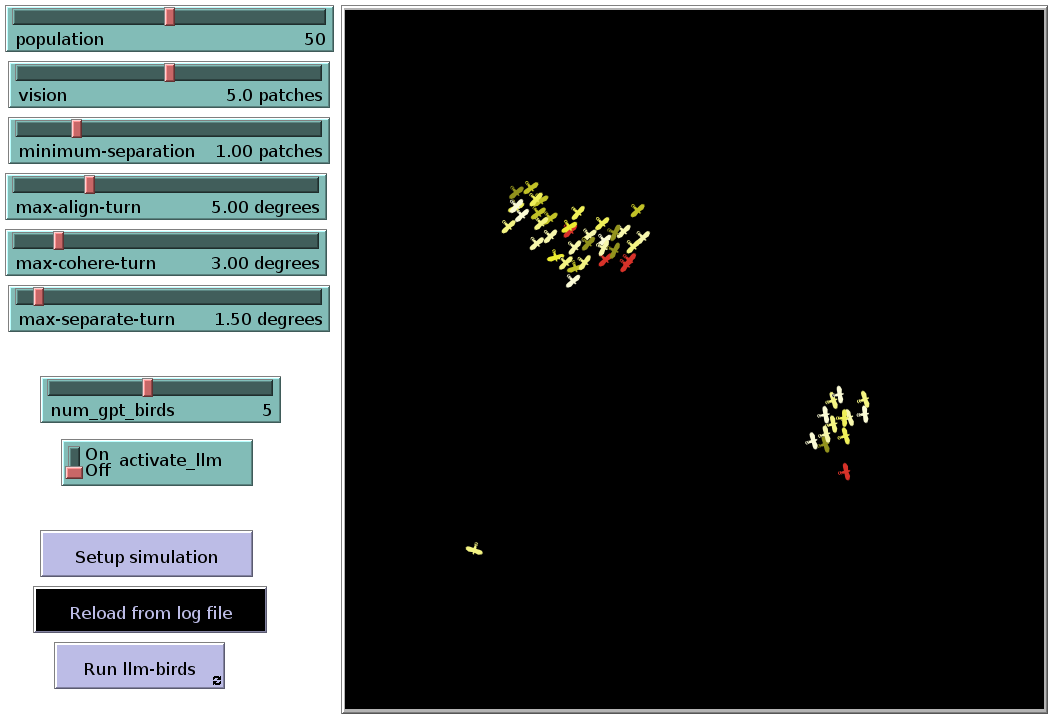
The image depicts a snapshot of an agent-based model simulating bird flocking behavior. The left side of the image shows the control panel with adjustable parameters, while the right side displays the simulation environment with agents (birds) represented as small airplane-like icons. The simulation appears to be running, with birds clustered in two distinct flocks.
### Components/Axes
**Left Panel (Control Panel):**
* **population:** Slider control with a current value of 50.
* **vision:** Slider control with a current value of 5.0 patches.
* **minimum-separation:** Slider control with a current value of 1.00 patches.
* **max-align-turn:** Slider control with a current value of 5.00 degrees.
* **max-cohere-turn:** Slider control with a current value of 3.00 degrees.
* **max-separate-turn:** Slider control with a current value of 1.50 degrees.
* **num_gpt_birds:** Slider control with a current value of 5.
* **activate_llm:** On/Off toggle switch, currently set to "On".
* **Buttons:**
* "Setup simulation"
* "Reload from log file"
* "Run llm-birds"
**Right Panel (Simulation Environment):**
* **Background:** Black.
* **Agents (Birds):** Represented as small airplane-like icons. The agents have varying colors, primarily yellow and red.
* **Flocks:** Two distinct flocks are visible. One larger flock is located in the upper-center of the environment, and a smaller flock is in the lower-right. A single agent is located in the bottom-left.
### Detailed Analysis
* **Agent Distribution:** The agents are not uniformly distributed. They are clustered into two flocks, suggesting that the flocking behavior is active.
* **Agent Color:** The agents have varying colors, primarily yellow and red. The color variation might represent different states or properties of the agents within the simulation.
* **Parameter Settings:** The control panel shows the current settings for various parameters that influence the flocking behavior, such as vision, minimum separation, and turning angles.
### Key Observations
* The simulation is running with specific parameter settings.
* The agents are exhibiting flocking behavior, forming two distinct groups.
* The agents have varying colors, which may indicate different states or properties.
### Interpretation
The image provides a snapshot of an agent-based model simulating bird flocking behavior. The control panel allows users to adjust parameters that influence the flocking behavior, such as vision, minimum separation, and turning angles. The simulation environment displays the agents (birds) and their interactions. The formation of flocks demonstrates the emergent behavior resulting from the interaction of individual agents based on the defined rules. The varying colors of the agents suggest that there may be additional factors or states influencing their behavior within the simulation. The single agent in the bottom-left is an outlier, and may be in the process of joining a flock, or may be too far away from other agents to be influenced by the flocking rules.