## Heatmap: Text Highlighting
### Overview
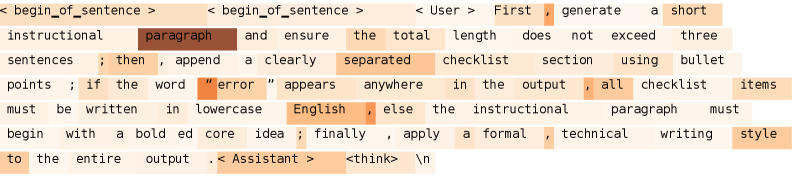
The image is a heatmap visualization of text, where the intensity of the color (ranging from light orange to dark brown) indicates the relative importance or focus on each word. The text appears to be a set of instructions given to an AI assistant.
### Components/Axes
* **Text Content:** The text is a sequence of instructions and prompts.
* **Color Gradient:** The color gradient represents the level of attention or importance assigned to each word. Lighter shades of orange indicate lower importance, while darker shades of brown indicate higher importance.
### Detailed Analysis or ### Content Details
Here's a transcription of the text, along with observations about the highlighting:
* `<begin_of_sentence>`: Light orange.
* `<begin_of_sentence>`: Light orange.
* `< User >`: Light orange.
* `First`: Light orange.
* `,`: Light orange.
* `generate`: Light orange.
* `a`: Light orange.
* `short`: Light orange.
* `instructional`: Light orange.
* `paragraph`: Dark brown.
* `and`: Light orange.
* `ensure`: Light orange.
* `the`: Light orange.
* `total`: Light orange.
* `length`: Light orange.
* `does`: Light orange.
* `not`: Light orange.
* `exceed`: Light orange.
* `three`: Light orange.
* `sentences`: Light orange.
* `;`: Light orange.
* `then`: Light orange.
* `,`: Light orange.
* `append`: Light orange.
* `a`: Light orange.
* `clearly`: Light orange.
* `separated`: Light orange.
* `checklist`: Light orange.
* `section`: Light orange.
* `using`: Light orange.
* `bullet`: Light orange.
* `points`: Light orange.
* `;`: Light orange.
* `if`: Light orange.
* `the`: Light orange.
* `word`: Light orange.
* `"error"`: Light orange.
* `appears`: Light orange.
* `anywhere`: Light orange.
* `in`: Light orange.
* `the`: Light orange.
* `output`: Light orange.
* `,`: Light orange.
* `all`: Light orange.
* `checklist`: Light orange.
* `items`: Light orange.
* `must`: Light orange.
* `be`: Light orange.
* `written`: Light orange.
* `in`: Light orange.
* `lowercase`: Light orange.
* `English`: Light orange.
* `,`: Light orange.
* `else`: Light orange.
* `the`: Light orange.
* `instructional`: Light orange.
* `paragraph`: Light orange.
* `must`: Light orange.
* `begin`: Light orange.
* `with`: Light orange.
* `a`: Light orange.
* `bold`: Light orange.
* `ed`: Light orange.
* `core`: Light orange.
* `idea`: Light orange.
* `;`: Light orange.
* `finally`: Light orange.
* `,`: Light orange.
* `apply`: Light orange.
* `a`: Light orange.
* `formal`: Light orange.
* `,`: Light orange.
* `technical`: Light orange.
* `writing`: Light orange.
* `style`: Light orange.
* `to`: Light orange.
* `the`: Light orange.
* `entire`: Light orange.
* `output`: Light orange.
* `.`: Light orange.
* `< Assistant >`: Light orange.
* `<think>`: Light orange.
* `\n`: Light orange.
### Key Observations
* The word "paragraph" is highlighted in dark brown, indicating it is a key focus of the instructions.
* Most of the other words are highlighted in light orange, suggesting a relatively even distribution of attention across the rest of the text.
### Interpretation
The heatmap suggests that the AI assistant should pay particular attention to the concept of a "paragraph" when following these instructions. The instructions are directing the AI to generate a short instructional paragraph, followed by a checklist. The instructions also specify formatting rules based on the presence of the word "error". The highlighting emphasizes the importance of the paragraph generation task.