## Diagram: Multi-Task Learning for Text-Image Similarity
### Overview
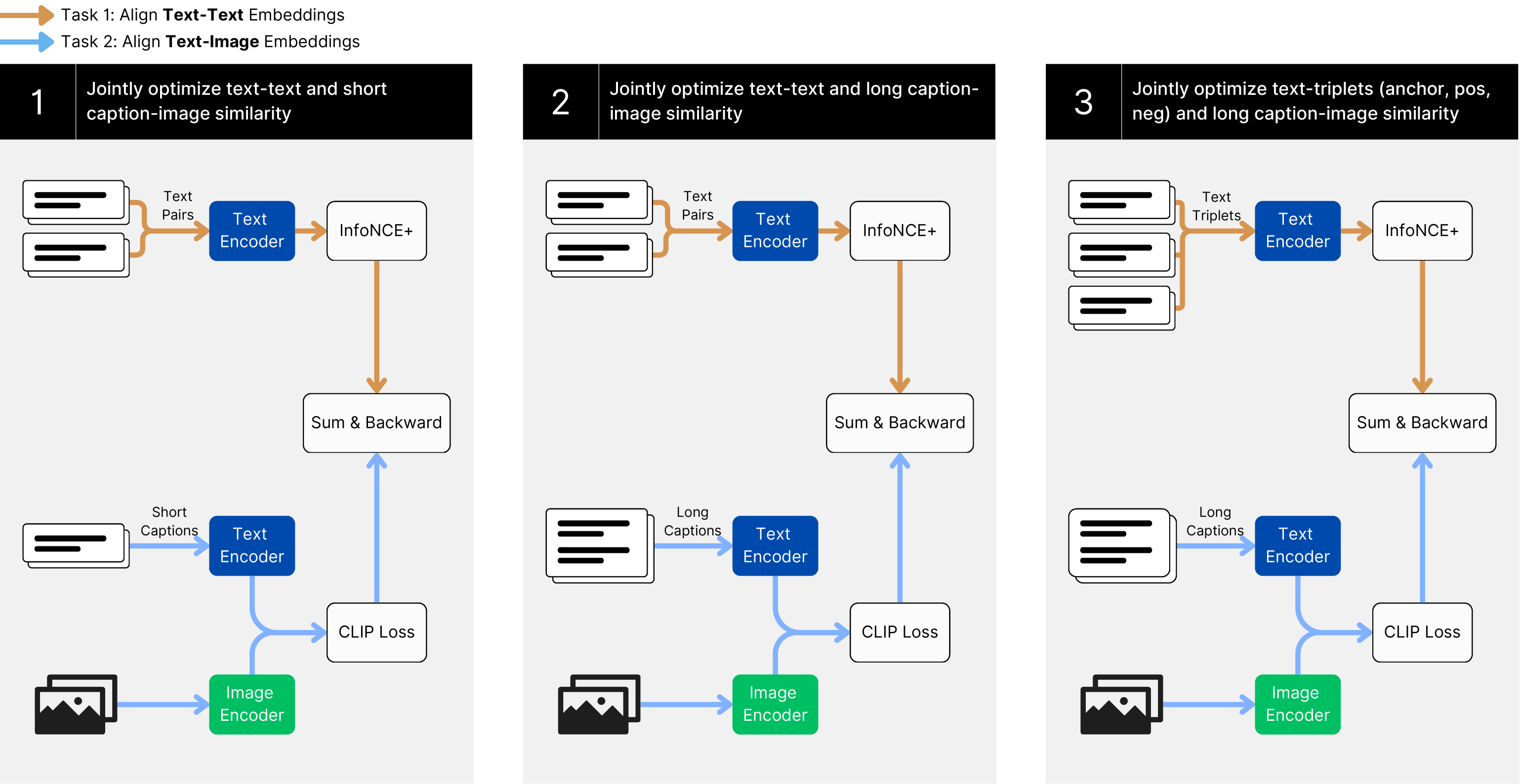
The image presents a diagram illustrating a multi-task learning approach for jointly optimizing text-text and text-image similarity. It shows three distinct tasks, each with its own data inputs, encoders, loss functions, and optimization steps. The tasks are numbered 1, 2, and 3, and each involves a combination of text and image data.
### Components/Axes
* **Legend (Top-Left)**:
* Orange Arrow: Task 1: Align Text-Text Embeddings
* Blue Arrow: Task 2: Align Text-Image Embeddings
* **Task 1 (Left)**: Jointly optimize text-text and short caption-image similarity
* **Task 2 (Center)**: Jointly optimize text-text and long caption-image similarity
* **Task 3 (Right)**: Jointly optimize text-triplets (anchor, pos, neg) and long caption-image similarity
### Detailed Analysis
**Task 1: Jointly optimize text-text and short caption-image similarity**
* **Input 1**: "Text Pairs" (represented by two stacked documents) connected by an orange arrow to "Text Encoder" (blue rectangle).
* **Input 2**: "Short Captions" (represented by one document) connected by a blue arrow to "Text Encoder" (blue rectangle).
* **Input 3**: Image (represented by an image icon) connected by a blue arrow to "Image Encoder" (green rectangle).
* **Process 1**: Output of "Text Encoder" (from "Text Pairs") connected by an orange arrow to "InfoNCE+" (white rectangle).
* **Process 2**: Output of "InfoNCE+" connected by an orange arrow to "Sum & Backward" (white rectangle).
* **Process 3**: Output of "Text Encoder" (from "Short Captions") connected by a blue arrow to "CLIP Loss" (white rectangle).
* **Process 4**: Output of "Image Encoder" connected by a blue arrow to "CLIP Loss" (white rectangle).
* **Process 5**: Output of "CLIP Loss" connected by a blue arrow to "Sum & Backward" (white rectangle).
**Task 2: Jointly optimize text-text and long caption-image similarity**
* **Input 1**: "Text Pairs" (represented by two stacked documents) connected by an orange arrow to "Text Encoder" (blue rectangle).
* **Input 2**: "Long Captions" (represented by one document) connected by a blue arrow to "Text Encoder" (blue rectangle).
* **Input 3**: Image (represented by an image icon) connected by a blue arrow to "Image Encoder" (green rectangle).
* **Process 1**: Output of "Text Encoder" (from "Text Pairs") connected by an orange arrow to "InfoNCE+" (white rectangle).
* **Process 2**: Output of "InfoNCE+" connected by an orange arrow to "Sum & Backward" (white rectangle).
* **Process 3**: Output of "Text Encoder" (from "Long Captions") connected by a blue arrow to "CLIP Loss" (white rectangle).
* **Process 4**: Output of "Image Encoder" connected by a blue arrow to "CLIP Loss" (white rectangle).
* **Process 5**: Output of "CLIP Loss" connected by a blue arrow to "Sum & Backward" (white rectangle).
**Task 3: Jointly optimize text-triplets (anchor, pos, neg) and long caption-image similarity**
* **Input 1**: "Text Triplets" (represented by three stacked documents) connected by an orange arrow to "Text Encoder" (blue rectangle).
* **Input 2**: "Long Captions" (represented by one document) connected by a blue arrow to "Text Encoder" (blue rectangle).
* **Input 3**: Image (represented by an image icon) connected by a blue arrow to "Image Encoder" (green rectangle).
* **Process 1**: Output of "Text Encoder" (from "Text Triplets") connected by an orange arrow to "InfoNCE+" (white rectangle).
* **Process 2**: Output of "InfoNCE+" connected by an orange arrow to "Sum & Backward" (white rectangle).
* **Process 3**: Output of "Text Encoder" (from "Long Captions") connected by a blue arrow to "CLIP Loss" (white rectangle).
* **Process 4**: Output of "Image Encoder" connected by a blue arrow to "CLIP Loss" (white rectangle).
* **Process 5**: Output of "CLIP Loss" connected by a blue arrow to "Sum & Backward" (white rectangle).
### Key Observations
* All three tasks utilize a "Text Encoder" and an "Image Encoder."
* Tasks 1, 2, and 3 use "InfoNCE+" and "CLIP Loss" components.
* Tasks 1 uses "Text Pairs" and "Short Captions" as text inputs, while Tasks 2 and 3 use "Text Pairs" and "Long Captions" as text inputs. Task 3 also uses "Text Triplets".
* All tasks end with a "Sum & Backward" operation.
* The orange arrows represent the flow of text-text embeddings, while the blue arrows represent the flow of text-image embeddings.
### Interpretation
The diagram illustrates a multi-task learning framework designed to improve text-image similarity by jointly optimizing different objectives. Each task focuses on a specific combination of text and image data, allowing the model to learn more robust and generalizable representations. The use of "InfoNCE+" and "CLIP Loss" suggests that the model is trained to maximize the similarity between related text and images while minimizing the similarity between unrelated ones. The "Sum & Backward" operation likely represents the aggregation of losses from different components and the subsequent backpropagation of gradients for model training. The differences in text inputs ("Text Pairs," "Short Captions," "Long Captions," and "Text Triplets") indicate that the model is designed to handle various types of text data, including paired text, short captions, long captions, and triplets of text (anchor, positive, negative).