## Flowchart: Tool Generator Agent Process
### Overview
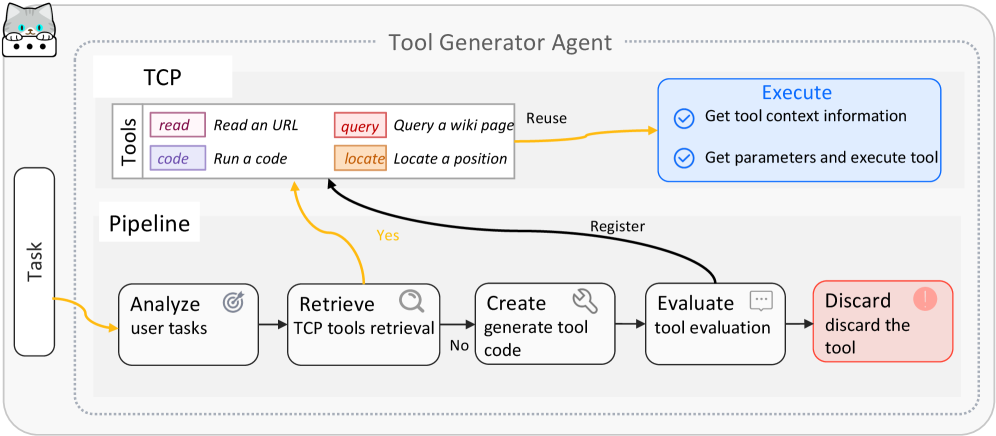
The flowchart illustrates the workflow of a "Tool Generator Agent" system designed to analyze user tasks, retrieve or generate tools, evaluate their effectiveness, and execute or discard them. The process includes feedback loops for tool reuse and iterative refinement.
### Components/Axes
1. **Main Elements**:
- **Task**: Starting point for user-defined tasks.
- **Pipeline**: Core workflow stages (Analyze, Retrieve, Create, Evaluate, Discard/Execute).
- **TCP Tools**: Predefined tools (Read URL, Run Code, Query Wiki, Locate Position).
- **Execute**: Final step for tool execution.
- **Discard**: Path for ineffective tools.
2. **Flow Arrows**:
- **Yellow Arrows**: Indicate tool reuse or feedback to the pipeline.
- **Black Arrows**: Represent primary workflow progression.
- **Conditional Branches**: "Yes" (retrieve existing tools) vs. "No" (generate new code).
3. **Key Labels**:
- **TCP Tools**:
- `read`: Read an URL
- `code`: Run a code
- `query`: Query a wiki page
- `locate`: Locate a position
- **Pipeline Stages**:
- Analyze user tasks
- Retrieve TCP tools
- Create generate tool code
- Evaluate tool evaluation
- Discard discard the tool
- Execute: Get tool context information, Get parameters and execute tool
### Detailed Analysis
1. **Task Initiation**:
- The process begins with a user-defined **Task**.
- Arrows lead to **Analyze user tasks**, which determines if existing tools suffice.
2. **Tool Retrieval vs. Generation**:
- **Yes** (tools exist): Flow proceeds to **Retrieve TCP tools**.
- **No** (tools absent): Triggers **Create generate tool code** to develop new tools.
3. **Tool Evaluation**:
- Generated or retrieved tools move to **Evaluate tool evaluation**.
- Evaluation determines tool validity (e.g., functionality, accuracy).
4. **Execution or Discard**:
- **Valid Tools**: Proceed to **Execute**, where parameters are extracted and the tool is run.
- **Invalid Tools**: Sent to **Discard discard the tool** (marked with a red box and exclamation icon).
5. **Feedback Loop**:
- Successful execution allows tools to be **Reuse** (yellow arrow) back into the pipeline for future tasks.
### Key Observations
- **Conditional Logic**: The system prioritizes efficiency by reusing existing tools before generating new ones.
- **Iterative Refinement**: The feedback loop enables continuous improvement by reintegrating effective tools.
- **Evaluation Gatekeeper**: The "Evaluate" step acts as a quality control checkpoint, ensuring only functional tools proceed.
- **Discard Mechanism**: Ineffective tools are explicitly removed, preventing clutter or errors in subsequent workflows.
### Interpretation
This diagram represents an automated, adaptive system for tool management. By combining predefined tools (TCP) with dynamic code generation, it balances efficiency and flexibility. The evaluation and discard steps highlight a focus on reliability, while the reuse loop suggests a design optimized for repetitive or similar tasks. The system’s structure implies scalability, as it can handle diverse user inputs through modular tool integration. The absence of explicit error-handling paths (e.g., retries for failed executions) may indicate assumptions about tool robustness or user task clarity.