## Diagram: Tool Generator Agent Workflow
### Overview
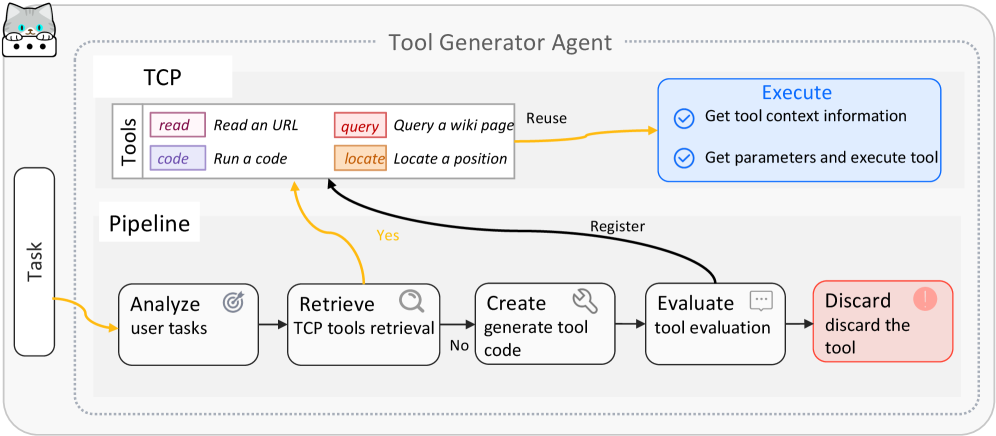
The image is a diagram illustrating the workflow of a Tool Generator Agent. It depicts the process from analyzing user tasks to executing or discarding a generated tool. The workflow is divided into two main sections: TCP (Tools) and Pipeline.
### Components/Axes
* **Title:** Tool Generator Agent
* **Sections:**
* **TCP (Tools):** Contains available tools.
* **Pipeline:** Describes the workflow stages.
* **Task:** Input to the pipeline.
* **Tools (TCP):**
* `read`: Read an URL (Pink)
* `query`: Query a wiki page (Orange-Red)
* `code`: Run a code (Light Purple)
* `locate`: Locate a position (Orange)
* **Pipeline Stages:**
* Analyze user tasks (Target Icon)
* Retrieve TCP tools retrieval (Magnifying Glass Icon)
* Create generate tool code (Wrench Icon)
* Evaluate tool evaluation (Chat Bubble Icon)
* Discard discard the tool (Exclamation Point Icon)
* **Execute:**
* Get tool context information (Blue)
* Get parameters and execute tool (Blue)
* **Arrows:** Indicate the flow of the process.
* Yellow arrows indicate the main flow and reuse.
* Black arrows indicate registration and feedback loops.
* **Decision Points:**
* "Yes" and "No" labels indicate branching based on evaluation.
### Detailed Analysis
1. **Task Input:** The process begins with a "Task" input on the left.
2. **Pipeline Flow:**
* The task is first analyzed ("Analyze user tasks").
* Then, relevant tools are retrieved ("Retrieve TCP tools retrieval").
* Tool code is generated ("Create generate tool code").
* The generated tool is evaluated ("Evaluate tool evaluation").
3. **Decision Point:**
* If the tool evaluation is negative ("No"), the process loops back to "Retrieve TCP tools retrieval".
* If the tool evaluation is positive ("Yes"), the tool is registered.
4. **Tool Reuse:**
* Tools from the TCP section can be reused. The `read`, `query`, and `locate` tools can be reused.
5. **Execution:**
* The selected tool is executed ("Execute"), which involves getting tool context information and executing the tool with parameters.
6. **Discard:**
* If the tool is not suitable, it is discarded ("Discard discard the tool").
### Key Observations
* The diagram illustrates a cyclical process of tool generation, evaluation, and refinement.
* The TCP section provides a set of tools that can be used in the pipeline.
* The "Yes/No" decision point is crucial for determining whether a tool is registered or discarded.
* The "Reuse" arrow indicates that existing tools can be incorporated into the process.
### Interpretation
The diagram represents a system for automatically generating and evaluating tools. The pipeline aims to create tools that effectively address user tasks. The feedback loop ensures that only suitable tools are registered and used. The TCP section acts as a repository of reusable tools, promoting efficiency and consistency. The process emphasizes iterative refinement and quality control in tool generation.