\n
## Diagram: Tool Generator Agent Pipeline
### Overview
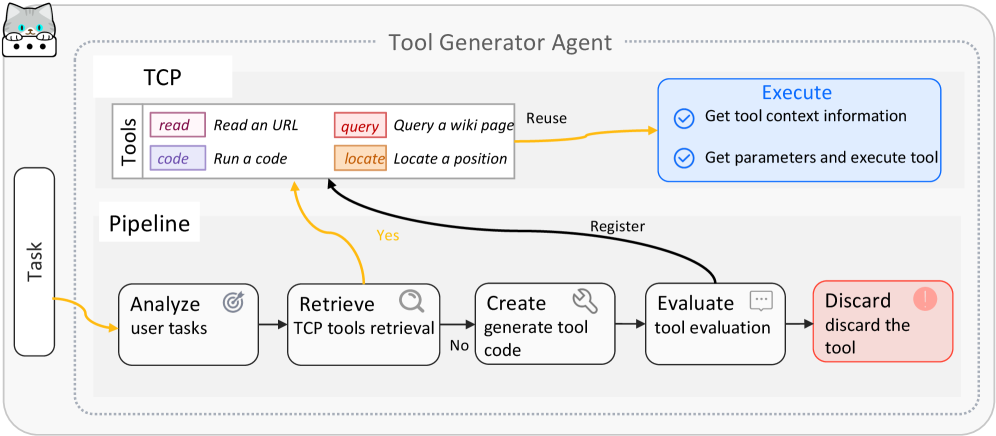
This diagram illustrates the pipeline of a Tool Generator Agent, detailing how user tasks are analyzed, tools are retrieved or created, and then executed and evaluated. The diagram shows a flow from a "Task" input through a series of processing steps, interacting with a "TCP" (Tool Communication Protocol) component.
### Components/Axes
The diagram is structured around two main sections: "TCP" (Tools) and "Pipeline". The "Pipeline" is a sequence of steps: "Analyze user tasks", "Retrieve TCP tools retrieval", "Create generate tool code", "Evaluate tool evaluation", and "Discard discard the tool". The "TCP" section lists available tools: "Read a URL", "Run a code", "Query a wiki page", and "Locate a position". There is also an "Execute" section with two sub-steps: "Get tool context information" and "Get parameters and execute tool". Arrows indicate the flow of control and data.
### Detailed Analysis or Content Details
The process begins with a "Task" (represented by a rounded rectangle on the left).
1. **Analyze user tasks:** The task is first analyzed. An arrow leads from this step to the "Retrieve TCP tools retrieval" step.
2. **Retrieve TCP tools retrieval:** This step checks if existing tools can fulfill the task. A "Yes" branch leads to the "Register" arrow, which connects to the "Execute" section. A "No" branch leads to the "Create generate tool code" step.
3. **Create generate tool code:** If no existing tool is suitable, a new tool is generated. This step leads to the "Evaluate tool evaluation" step.
4. **Evaluate tool evaluation:** The generated tool is evaluated. This step leads to the "Discard discard the tool" step.
5. **Discard discard the tool:** If the tool is not satisfactory, it is discarded.
6. **Execute:** If a tool is retrieved or created and evaluated successfully, it is executed. The "Execute" section has two steps:
* "Get tool context information"
* "Get parameters and execute tool"
7. **TCP (Tools):** The "TCP" section lists the available tools:
* "read" - Read a URL
* "code" - Run a code
* "query" - Query a wiki page
* "locate" - Locate a position
The "Reuse" arrow connects the "TCP" tools to the "Execute" section.
### Key Observations
The diagram highlights a closed-loop process where the agent attempts to reuse existing tools first. If reuse is not possible, it generates new tools, evaluates them, and discards those that are not suitable. The "Execute" section is a separate component that handles the actual execution of the selected tool. The diagram emphasizes the iterative nature of tool selection and generation.
### Interpretation
This diagram represents a sophisticated agent architecture designed for dynamic task completion. The agent doesn't rely on a fixed set of tools but can adapt by creating new tools when necessary. The evaluation and discard steps suggest a quality control mechanism to ensure that only effective tools are used. The separation of the "TCP" and "Pipeline" components indicates a modular design, allowing for easy addition or modification of tools without affecting the core pipeline logic. The diagram suggests a system capable of handling a wide range of tasks by leveraging both pre-existing and dynamically generated tools. The "Reuse" arrow is critical, indicating a preference for efficiency and avoiding redundant tool creation. The entire process is driven by the initial "Task" input, suggesting a goal-oriented approach to problem-solving.