# Technical Document Extraction: Mixed-Precision Training Flow Diagram
## 1. Document Overview
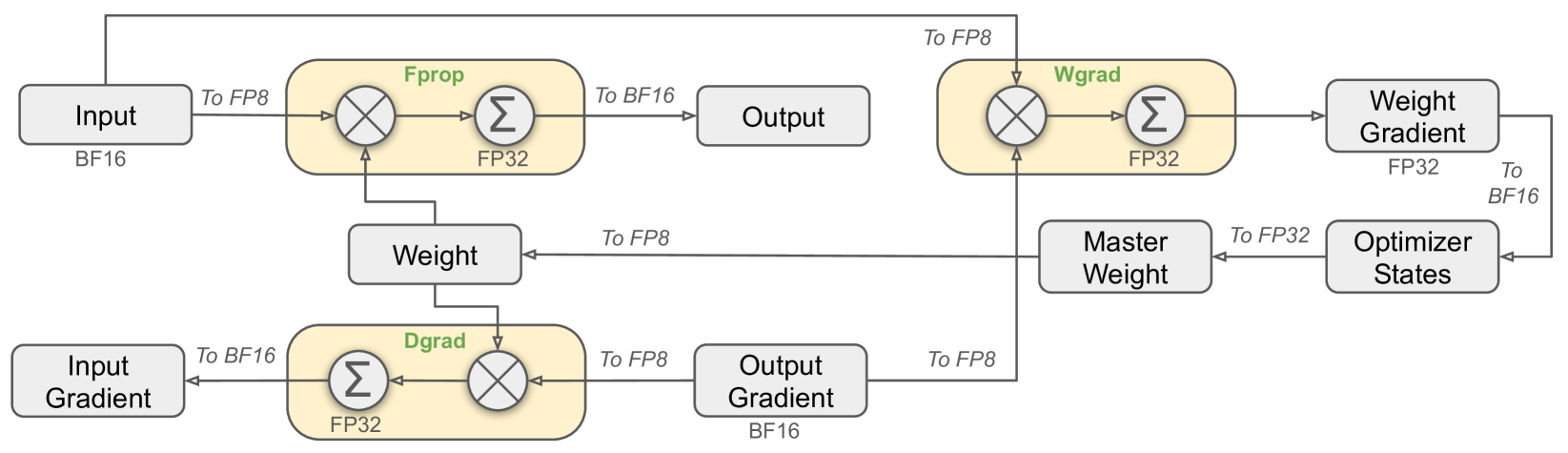
This image is a technical architectural diagram illustrating the data flow and precision casting (quantization) logic for a deep learning training iteration. It specifically details the interactions between Forward Propagation (**Fprop**), Data Gradient calculation (**Dgrad**), and Weight Gradient calculation (**Wgrad**) using mixed-precision formats (BF16, FP32, and FP8).
---
## 2. Component Isolation
### A. Data Nodes (Grey Rectangles)
These represent the tensors stored in memory at various stages of the training loop.
* **Input**: Labeled as **BF16**.
* **Weight**: Central node used by Fprop and Dgrad.
* **Output**: Result of the forward pass.
* **Output Gradient**: Labeled as **BF16**; the starting point for the backward pass.
* **Input Gradient**: The final result of the Dgrad process.
* **Weight Gradient**: Labeled as **FP32**; the result of the Wgrad process.
* **Optimizer States**: Receives data from Weight Gradient.
* **Master Weight**: High-precision weight storage used to update the model.
### B. Computational Blocks (Yellow Rounded Rectangles)
These represent the arithmetic operations (Matrix Multiplication and Accumulation). Each contains a multiplication symbol ($\otimes$) and a summation symbol ($\sum$).
* **Fprop (Forward Propagation)**: Accumulation occurs in **FP32**.
* **Dgrad (Data Gradient)**: Accumulation occurs in **FP32**.
* **Wgrad (Weight Gradient)**: Accumulation occurs in **FP32**.
---
## 3. Process Flow and Precision Transitions
The diagram tracks how data is cast between formats (e.g., "To FP8") as it moves between nodes and computational blocks.
### Forward Propagation (Fprop)
1. **Input (BF16)** is cast **To FP8** and enters the Fprop block.
2. **Weight** enters the Fprop block (implied FP8 conversion based on the multiplication operation).
3. Inside **Fprop**, multiplication is performed, and results are accumulated in **FP32**.
4. The result is cast **To BF16** to become the **Output**.
### Data Gradient (Dgrad) - Backward Pass
1. **Output Gradient (BF16)** is cast **To FP8** and enters the Dgrad block.
2. **Weight** enters the Dgrad block.
3. Inside **Dgrad**, multiplication is performed, and results are accumulated in **FP32**.
4. The result is cast **To BF16** to become the **Input Gradient**.
### Weight Gradient (Wgrad) - Backward Pass
1. **Input (BF16)** is routed from the start, cast **To FP8**, and enters the Wgrad block.
2. **Output Gradient (BF16)** is cast **To FP8** and enters the Wgrad block.
3. Inside **Wgrad**, multiplication is performed, and results are accumulated in **FP32**.
4. The result is output as the **Weight Gradient (FP32)**.
### Optimizer and Weight Update
1. **Weight Gradient (FP32)** is cast **To BF16** and enters **Optimizer States**.
2. **Optimizer States** feeds into the **Master Weight** (cast **To FP32**).
3. The **Master Weight** is cast **To FP8** to update the active **Weight** used in the next Fprop/Dgrad cycle.
---
## 4. Summary of Precision Formats
| Component / Path | Precision Format |
| :--- | :--- |
| Primary Storage (Input, Output, Gradients) | BF16 |
| Internal Accumulation (Fprop, Dgrad, Wgrad) | FP32 |
| Master Weight / Weight Gradient | FP32 |
| Computational Inputs (Casting) | FP8 |
## 5. Spatial Grounding and Logic Check
* **Header/Top Row**: Shows the forward path (Input $\rightarrow$ Fprop $\rightarrow$ Output) and the start of the weight gradient path.
* **Middle Row**: Shows the Weight management (Weight $\rightarrow$ Master Weight $\rightarrow$ Optimizer States).
* **Bottom Row**: Shows the backward path (Input Gradient $\leftarrow$ Dgrad $\leftarrow$ Output Gradient).
* **Trend/Logic**: The diagram consistently shows that while storage and accumulation happen in higher precision (BF16/FP32), the operands for the heavy matrix multiplications are down-cast to **FP8** to optimize computational throughput.