## Diagram: Reporter Agent Workflow
### Overview
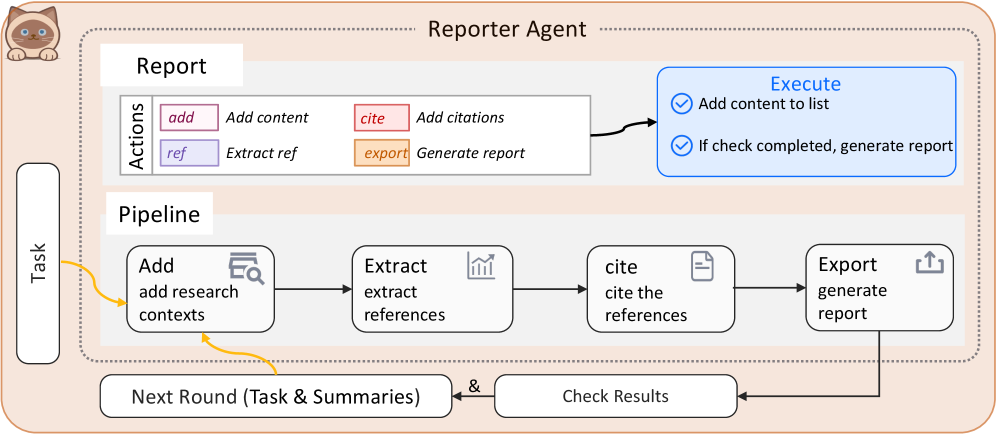
The image is a diagram illustrating the workflow of a "Reporter Agent." It outlines the process from task initiation to report generation, detailing the actions, pipeline stages, and execution steps involved.
### Components/Axes
* **Title:** Reporter Agent
* **Sections:**
* Task (left side)
* Report (top section)
* Pipeline (middle section)
* Next Round (Task & Summaries) & Check Results (bottom section)
* **Report Actions Legend:** Located in the top-left of the "Report" section.
* `add` (pink): Add content
* `cite` (red): Add citations
* `ref` (purple): Extract ref
* `export` (orange): Generate report
* **Execute Box:** Located in the top-right of the "Report" section.
* Add content to list (with a checkmark icon)
* If check completed, generate report (with a checkmark icon)
* **Pipeline Stages:**
* Add: add research contexts (magnifying glass icon)
* Extract: extract references (bar graph icon)
* cite: cite the references (document icon)
* Export: generate report (upload icon)
### Detailed Analysis
* **Task:** A vertical box on the left side labeled "Task."
* **Report:** Contains "Actions" and an "Execute" box. The "Actions" section lists the different actions that can be performed, each associated with a specific color. The "Execute" box contains two tasks with checkmarks.
* **Pipeline:** A horizontal sequence of steps:
1. **Add:** "add research contexts" with a magnifying glass icon.
2. **Extract:** "extract references" with a bar graph icon.
3. **cite:** "cite the references" with a document icon.
4. **Export:** "generate report" with an upload icon.
* **Flow:**
* The "Task" box has a yellow arrow pointing to the "Add" stage in the "Pipeline."
* The "Add" stage in the "Pipeline" has a yellow arrow pointing to the "Next Round (Task & Summaries)" box.
* The "Pipeline" stages are connected sequentially with black arrows.
* The "Export" stage in the "Pipeline" has a black arrow pointing to the "Check Results" box.
* The "Next Round (Task & Summaries)" box is connected to the "Check Results" box with an "&" symbol.
* The "Check Results" box has a black arrow pointing back to the "Add" stage in the "Pipeline."
### Key Observations
* The diagram illustrates a cyclical workflow, where the output of the "Pipeline" ("Check Results") feeds back into the "Add" stage for the next round.
* The "Report" section seems to represent a higher-level set of actions, while the "Pipeline" breaks down the report generation process into more granular steps.
* The "Execute" box in the "Report" section suggests a conditional execution based on whether a check is completed.
### Interpretation
The diagram describes the workflow of a "Reporter Agent," likely a software or automated system designed to generate reports. The process begins with a "Task," which initiates the "Pipeline." The "Pipeline" consists of stages for adding research contexts, extracting references, citing references, and exporting the report. The "Next Round" and "Check Results" components suggest an iterative process where the results of one round inform the next. The "Report" section provides a higher-level view of the actions involved, while the "Execute" box indicates a conditional execution based on completion checks. The overall workflow is cyclical, allowing for continuous refinement and improvement of the generated reports.