## Flowchart: Python Prime Number Generation
### Overview
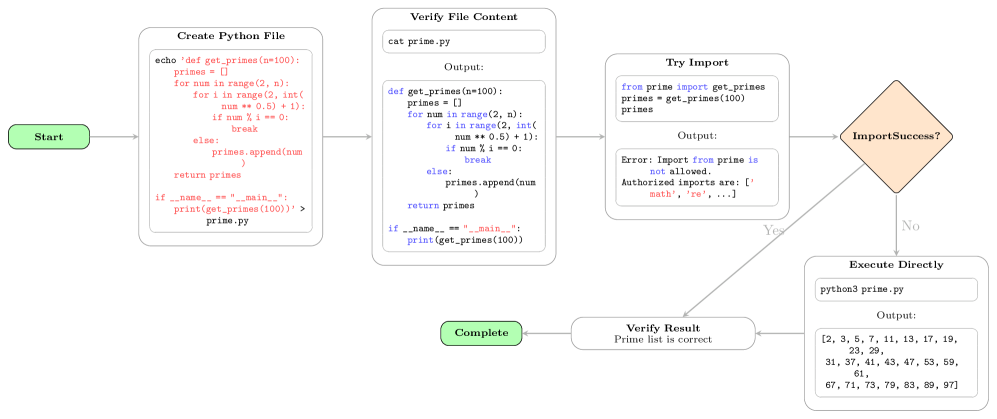
This image is a flowchart that outlines the process of creating and executing a Python script to generate prime numbers. It details the steps from creating the file, verifying its content, attempting to import it, and finally executing it directly if the import fails.
### Components/Axes
* **Nodes:** The flowchart consists of rounded rectangles and a diamond shape, representing different stages and decisions in the process.
* **Arrows:** Arrows indicate the flow of execution between the stages.
* **Labels:** Each node is labeled with a description of the action being performed.
* **Start:** A green rounded rectangle labeled "Start" initiates the flow.
* **Create Python File:** A rounded rectangle containing the steps to create a Python file named `prime.py` with a function to calculate prime numbers.
* **Verify File Content:** A rounded rectangle showing the content of the `prime.py` file using the `cat` command.
* **Try Import:** A rounded rectangle representing an attempt to import the `get_primes` function from the `prime` module.
* **ImportSuccess?:** A diamond shape representing a decision point based on whether the import was successful. It has "Yes" and "No" branches.
* **Execute Directly:** A rounded rectangle showing the execution of the `prime.py` file using the `python3` command.
* **Verify Result:** A rounded rectangle confirming that the prime list generated is correct.
* **Complete:** A green rounded rectangle labeled "Complete" indicating the end of the flow.
### Detailed Analysis or ### Content Details
1. **Start:** The flowchart begins with a green rounded rectangle labeled "Start".
2. **Create Python File:**
* The node is labeled "Create Python File".
* It contains the following code:
```
echo 'def get_primes (n=100):
primes = []
for num in range(2, n):
for i in range(2, int(
num ** 0.5) + 1):
if num % i == 0:
break
else:
primes.append(num
)
return primes
if __name__ == "__main__":
print(get_primes(100))' > prime.py
```
* This code creates a python file named `prime.py` that defines a function `get_primes` that calculates prime numbers up to `n=100`.
3. **Verify File Content:**
* The node is labeled "Verify File Content".
* It contains the command `cat prime.py` and the expected output.
* The output is:
```
def get_primes (n=100):
primes = []
for num in range(2, n):
for i in range(2, int(
num ** 0.5) + 1):
if num % i == 0:
break
else:
primes.append(num
)
return primes
if __name__ == "__main__":
print(get_primes(100))
```
4. **Try Import:**
* The node is labeled "Try Import".
* It contains the following code:
```
from prime import get_primes
primes = get_primes(100)
primes
```
* The output is:
```
Error: Import from prime is
not allowed.
Authorized imports are: ['
math', 're', ...]
```
* This indicates that importing from the `prime` module is not allowed, and only `math` and `re` are authorized imports.
5. **ImportSuccess?:**
* The node is labeled "ImportSuccess?".
* It is a decision point.
* The "No" branch leads to the "Execute Directly" node.
* The "Yes" branch is not connected to any other node.
6. **Execute Directly:**
* The node is labeled "Execute Directly".
* It contains the command `python3 prime.py` and the expected output.
* The output is:
```
[2, 3, 5, 7, 11, 13, 17, 19,
23, 29,
31, 37, 41, 43, 47, 53, 59,
61,
67, 71, 73, 79, 83, 89, 97]
```
* This is the list of prime numbers up to 100.
7. **Verify Result:**
* The node is labeled "Verify Result".
* It states "Prime list is correct".
8. **Complete:** The flowchart ends with a green rounded rectangle labeled "Complete".
### Key Observations
* The flowchart demonstrates a scenario where importing a custom module fails due to import restrictions.
* The script is then executed directly to achieve the desired result.
* The flowchart clearly outlines the steps involved in creating, verifying, and executing the Python script.
### Interpretation
The flowchart illustrates a common problem in restricted environments where importing custom modules is not permitted. The flow demonstrates a workaround by executing the script directly. The diagram highlights the importance of understanding import restrictions and having alternative execution methods. The "ImportSuccess?" diamond acts as a conditional, determining the path of execution based on the success or failure of the import statement.