\n
## Flowchart: Python Prime Number Generation and Verification
### Overview
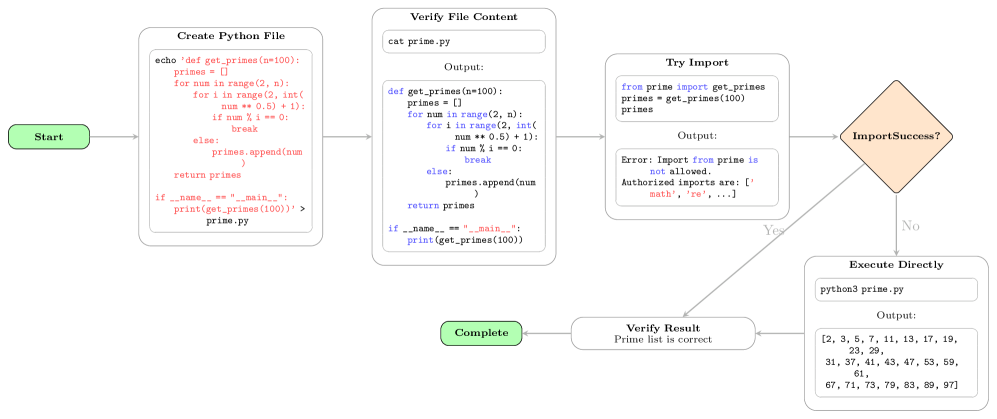
This flowchart illustrates the process of creating a Python file to generate prime numbers, verifying its content, attempting to import it, and executing it directly if the import fails. It also includes a final verification step to confirm the correctness of the generated prime list.
### Components/Axes
The flowchart consists of several rectangular blocks representing actions or processes, diamond shapes representing decision points, and rounded rectangles representing the start and end points. Arrows indicate the flow of execution. The blocks contain Python code snippets and textual descriptions.
### Detailed Analysis or Content Details
**1. Start (Green Rounded Rectangle - Top-Left)**
- Label: "Start"
**2. Create Python File (Yellow Rectangle - Left)**
- Label: "Create Python File"
- Code:
```python
echo 'def get_primes(n=100):
primes = []
for num in range(2, n):
for i in range(2, int(num**0.5) + 1):
if num % i == 0:
break
else:
primes.append(num)
return primes
if __name__ == "__main__":
print(get_primes(100))' > prime.py
```
**3. Verify File Content (Yellow Rectangle - Center-Left)**
- Label: "Verify File Content"
- Code:
```
cat prime.py
Output:
def get_primes(n=100):
primes = []
for num in range(2, n):
for i in range(2, int(num**0.5) + 1):
if num % i == 0:
break
else:
primes.append(num)
return primes
if __name__ == "__main__":
print(get_primes(100))
```
**4. Try Import (Yellow Rectangle - Right)**
- Label: "Try Import"
- Code:
```python
from prime import get_primes
primes = get_primes(100)
```
- Output:
```
Error: Import from prime is not allowed.
Authorized imports are: ['math', 're', ...]
```
**5. ImportSuccess? (Diamond - Center-Right)**
- Label: "ImportSuccess?"
- Two outgoing arrows:
- "Yes" (Green Arrow) leads to "Complete"
- "No" (Red Arrow) leads to "Execute Directly"
**6. Execute Directly (Yellow Rectangle - Bottom-Right)**
- Label: "Execute Directly"
- Code:
```python
python3 prime.py
```
- Output:
```
[2, 3, 5, 7, 11, 13, 17, 19, 23, 29, 31, 37, 41, 43, 47, 53, 59, 61, 67, 71, 73, 79, 83, 89, 97]
```
**7. Verify Result (Yellow Rectangle - Bottom-Center)**
- Label: "Verify Result"
- Text: "Prime list is correct"
**8. Complete (Green Rounded Rectangle - Bottom-Right)**
- Label: "Complete"
### Key Observations
The flowchart demonstrates a security measure where direct imports from user-created Python files are disallowed. This is indicated by the "Error: Import from prime is not allowed" message. The process then falls back to executing the file directly, which successfully generates the prime number list. The final step verifies the correctness of the result.
### Interpretation
This flowchart illustrates a secure execution pipeline for Python code. The system attempts to import the generated code as a module, but a security policy prevents this. This policy likely exists to prevent malicious code from being executed through imports. The fallback mechanism of direct execution allows the code to run, but isolates it from the broader system, mitigating potential security risks. The verification step ensures that the executed code produces the expected output, confirming its functionality. The authorized imports list suggests a whitelist approach to module access. This is a common security practice in environments where untrusted code needs to be executed. The flowchart highlights a robust approach to code execution that prioritizes security while still allowing for functionality.