## Flowchart: Python Prime Number Script Execution and Verification Process
### Overview
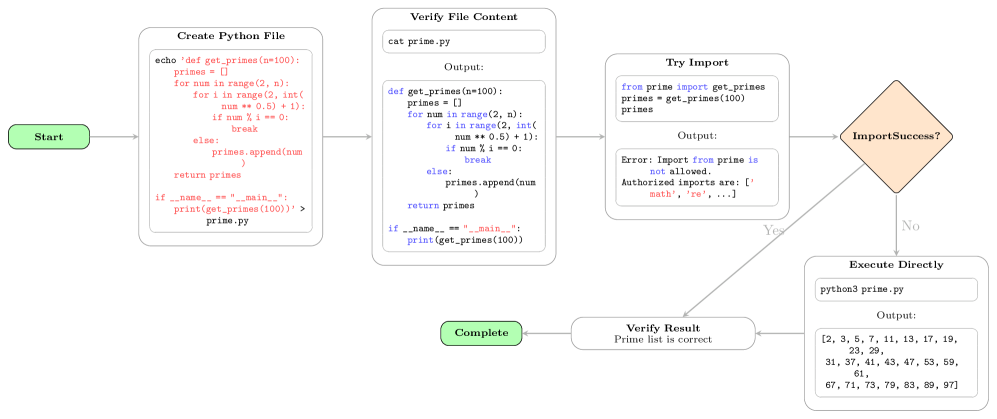
The image displays a technical flowchart illustrating a multi-step process for creating, verifying, and executing a Python script designed to generate prime numbers. The process includes error handling for unauthorized imports and a fallback execution path. The diagram uses color-coded shapes (green for start/end, white for process steps, orange for decision) connected by directional arrows to depict the workflow.
### Components/Axes
The flowchart consists of the following interconnected components, arranged generally from left to right:
1. **Start Node** (Green rounded rectangle, far left): Labeled "Start".
2. **Process Step 1** (White rectangle, top-left): Titled "Create Python File". Contains a shell command to create a file named `prime.py` with specific Python code.
3. **Process Step 2** (White rectangle, top-center): Titled "Verify File Content". Shows the command `cat prime.py` and its expected output, which is the Python code from the previous step.
4. **Process Step 3** (White rectangle, top-right): Titled "Try Import". Contains Python code attempting to import a function from the `prime` module and shows an error output.
5. **Decision Node** (Orange diamond, center-right): Labeled "ImportSuccess?". This is the branching point.
6. **Process Step 4 - Yes Path** (White rectangle, bottom-center): Titled "Verify Result". Contains the text "Prime list is correct".
7. **Process Step 5 - No Path** (White rectangle, bottom-right): Titled "Execute Directly". Shows the command `python3 prime.py` and its output, a list of numbers.
8. **End Node** (Green rounded rectangle, bottom-left): Labeled "Complete".
### Detailed Analysis
**Flow and Logic:**
The process begins at "Start" and proceeds sequentially through creating and verifying the Python file. It then attempts to import a function from that file. The "ImportSuccess?" decision node checks the outcome of this import attempt.
* **Yes Path (Import Successful):** If the import succeeds (arrow labeled "Yes"), the flow moves to "Verify Result" and then to "Complete".
* **No Path (Import Fails):** If the import fails (arrow labeled "No"), the flow moves to "Execute Directly", which runs the script as a standalone program, then to "Verify Result", and finally to "Complete".
**Transcribed Text and Code:**
* **Create Python File Box:**
```bash
echo 'def get_primes(n=100):
primes = []
for num in range(2, n):
for i in range(2, int(num ** 0.5) + 1):
if num % i == 0:
break
else:
primes.append(num)
return primes
if __name__ == "__main__":
print(get_primes(100))' > prime.py
```
* **Verify File Content Box:**
* Command: `cat prime.py`
* Output: The exact Python code from the previous step is displayed.
* **Try Import Box:**
* Code:
```python
from prime import get_primes
primes = get_primes(100)
```
* Output:
```
Error: Import from prime is not allowed.
Authorized imports are: ['math', 're', ...]
```
* **Execute Directly Box:**
* Command: `python3 prime.py`
* Output:
```
[2, 3, 5, 7, 11, 13, 17, 19, 23, 29, 31, 37, 41, 43, 47, 53, 59, 61, 67, 71, 73, 79, 83, 89, 97]
```
### Key Observations
1. **Error Handling:** The "Try Import" step explicitly fails with a security or policy error, stating that imports from the user-created module `prime` are not allowed. It lists authorized modules like `'math'` and `'re'`.
2. **Fallback Mechanism:** The system has a designed fallback. When the import fails, it automatically attempts to execute the script directly using the Python interpreter (`python3 prime.py`), which succeeds.
3. **Output Verification:** Both the "Yes" and "No" paths converge at the "Verify Result" step, which confirms the prime list is correct, indicating the script's logic is sound regardless of the execution method.
4. **Script Functionality:** The Python code defines a function `get_primes(n=100)` that generates prime numbers up to `n` using a basic trial division method with a `for...else` construct. The `if __name__ == "__main__":` block allows it to be run as a script.
### Interpretation
This flowchart demonstrates a robust execution pipeline for user-submitted code in a restricted or sandboxed environment (e.g., an online coding platform, automated testing system, or secure execution container).
* **Security Context:** The error message in the "Try Import" step is the most significant element. It reveals an environment that restricts module imports to a whitelist (`'math'`, `'re'`, etc.) for security reasons, preventing potentially malicious or unstable code from accessing the system.
* **Process Resilience:** The workflow is designed to handle this expected failure gracefully. Instead of halting, it falls back to a more permissive execution method (direct script execution), which likely runs in a different, possibly less restricted, subprocess or context.
* **Goal:** The ultimate goal is not to test the import mechanism but to verify the correctness of the `get_primes` function's output. The system achieves this through alternative means when the primary method (importing and calling the function) is blocked by security policies.
* **Implied Architecture:** The diagram suggests a two-layer execution model: a primary, restricted environment for interactive or modular code execution, and a secondary, possibly more isolated environment for standalone script execution. The "Verify Result" step acts as a common validation point for both paths.