TECHNICAL ASSET FINGERPRINT
5cc6c6fa9103083705a79597
Click to view fullscreen
Press ESC or click to close
FOUND IN PAPERS
EXPERT: healer-alpha-free VERSION 1
RUNTIME: free/openrouter/healer-alpha
INTEL_VERIFIED
## Process Diagram: Interactive AI-Assisted Machine Learning Workflow
### Overview
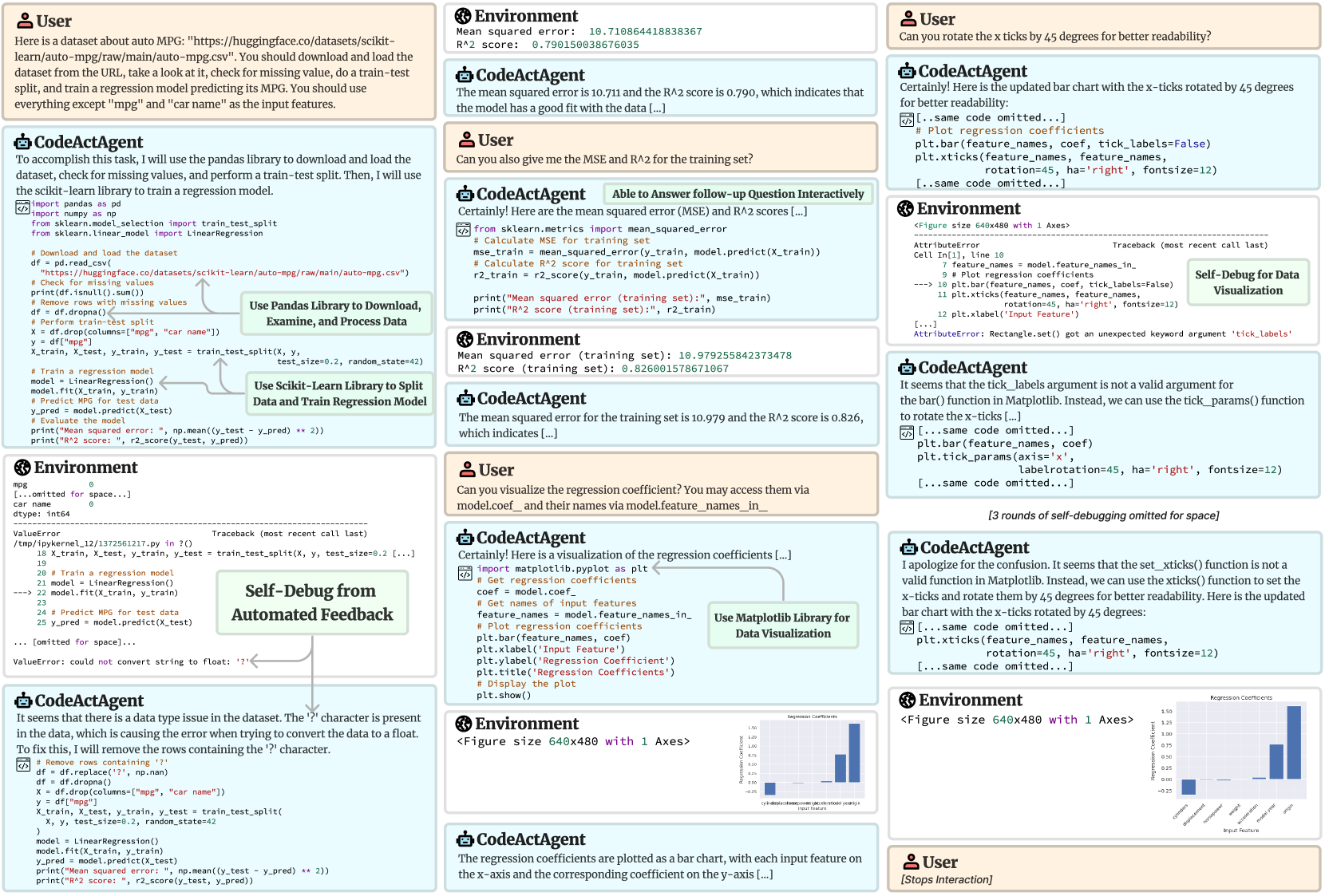
This image is a detailed process diagram or screenshot capturing a multi-turn interaction between a **User** and a **CodeActAgent** (an AI assistant capable of executing code). The workflow demonstrates an end-to-end machine learning task: loading a dataset, training a regression model, evaluating it, debugging errors, and creating visualizations. The diagram is composed of multiple panels showing dialogue, code execution, environment outputs, error tracebacks, and resulting charts. Annotations highlight key processes like "Self-Debug from Automated Feedback" and library usage.
### Components/Axes
The image is structured as a flowchart or conversation log with distinct, labeled panels. The primary components are:
1. **User Panels:** Contain natural language requests and instructions.
2. **CodeActAgent Panels:** Contain the agent's responses, explanations, and generated Python code.
3. **Environment Panels:** Show the output of code execution, including printed results, error messages (tracebacks), and figure objects.
4. **Annotation Boxes:** Green boxes with text that label specific processes within the workflow (e.g., "Use Pandas Library...", "Self-Debug...").
5. **Visualization Outputs:** Two instances of a bar chart titled "Regression Coefficients".
**Spatial Layout:** The flow generally moves from top-left to bottom-right, but the interaction is non-linear, featuring back-and-forth dialogue and debugging loops. The main chart visualizations appear in the bottom-right quadrant.
### Detailed Analysis
#### 1. Initial Request & Data Processing
* **User Request (Top-Left):** Asks the agent to load the "auto MPG" dataset from a Hugging Face URL, check for missing values, perform a train-test split, and train a regression model to predict MPG, using all features except "mpg" and "car name".
* **Agent's Initial Code:** Uses `pandas` to load the CSV, checks for nulls (`df.isnull().sum()`), removes rows with missing values (`df.dropna()`), and performs a train-test split (`train_test_split` with `test_size=0.2, random_state=42`). It then trains a `LinearRegression` model.
* **Environment Output (Error):** A `ValueError` occurs: `could not convert string to float: '?'`. The traceback points to the line `model.fit(X_train, y_train)`.
* **Agent's Debugging:** Identifies that the '?' character in the data is causing the conversion error. The fix is to replace '?' with `np.nan` and then drop those rows.
#### 2. Model Evaluation
* **Environment Output (After Debugging):** Successfully prints model performance on the **test set**:
* `Mean squared error: 10.710864418838367`
* `R^2 score: 0.790150038676035`
* **User Follow-up:** Asks for the MSE and R² for the **training set**.
* **Agent's Response & Code:** Calculates and prints the training set metrics.
* **Environment Output (Training Set):**
* `Mean squared error (training set): 10.979255842373478`
* `R^2 score (training set): 0.826001578671067`
#### 3. Visualization & Iterative Debugging
* **User Request:** Asks to visualize the regression coefficients, accessed via `model.coef_` and `model.feature_names_in_`.
* **Agent's First Visualization Code:** Uses `matplotlib.pyplot` to create a bar chart. Code includes `plt.bar(feature_names, coef)`, `plt.xticks(feature_names, rotation=45, ha='right')`.
* **Environment Output (Error):** An `AttributeError`: `Rectangle.set() got an unexpected keyword argument 'tick_labels'`. The agent notes the `tick_labels` argument is invalid for `bar()`.
* **Agent's Debugging (Round 1):** Suggests using `tick_params()` instead.
* **Agent's Debugging (Round 2):** Apologizes for confusion, states `set_xticks()` is not valid, and provides corrected code using `plt.xticks()` with `rotation=45, ha='right', fontsize=12`.
* **Final Visualization Output:** A bar chart is successfully generated and displayed twice in the diagram (once in a smaller, earlier state and once in the final, larger state).
#### 4. Final Chart Details: "Regression Coefficients"
* **Chart Type:** Vertical Bar Chart.
* **Title:** `Regression Coefficients` (visible at the top of the chart area).
* **X-Axis Label:** `Input Feature` (visible below the axis).
* **Y-Axis Label:** `Regression Coefficient` (visible to the left of the axis).
* **X-Axis Ticks (Feature Names):** The labels are rotated 45 degrees. From left to right, they are:
1. `cylinders`
2. `displacement`
3. `horsepower`
4. `weight`
5. `acceleration`
6. `model year`
7. `origin`
* **Y-Axis Scale:** Ranges from approximately -0.25 to 1.50, with major ticks at intervals of 0.25.
* **Data Points (Approximate Coefficient Values):** Based on bar height relative to the y-axis:
* `cylinders`: ~ -0.20
* `displacement`: ~ 0.05
* `horsepower`: ~ 0.00 (very close to zero)
* `weight`: ~ -0.75
* `acceleration`: ~ -0.05
* `model year`: ~ 0.75
* `origin`: ~ 1.25
* **Visual Trend:** The coefficients vary significantly in magnitude and direction. `origin` has the largest positive coefficient, `weight` has the largest negative coefficient, and `horsepower` has a coefficient near zero.
### Key Observations
1. **Iterative Debugging:** The workflow prominently features error-driven debugging. The agent encounters a `ValueError` during data loading and an `AttributeError` during plotting, and successfully self-corrects based on the error messages.
2. **Performance Discrepancy:** The model's R² score is slightly higher on the training set (0.826) than on the test set (0.790), which is typical and indicates the model generalizes reasonably well without severe overfitting.
3. **Feature Importance:** The bar chart suggests that `origin`, `model year`, and `weight` are the most influential features in predicting MPG for this linear model, with `origin` having a strong positive effect and `weight` a strong negative effect.
4. **Code Execution Context:** The "Environment" panels show this is likely running in a Jupyter-like notebook environment, as indicated by references to `Cell In[1]` and the display of `<Figure size 640x480 with 1 Axes>`.
### Interpretation
This diagram serves as a case study in **interactive, AI-assisted data science**. It demonstrates how a conversational agent can translate natural language instructions into executable code, handle common data science pitfalls (like non-numeric placeholders in data), and iteratively refine both analysis and visualization based on feedback and errors.
The process highlights the importance of **human-in-the-loop** interaction, where the user guides the exploration (asking for training metrics, requesting specific visualizations) and the agent handles the implementation details. The final regression coefficient chart provides interpretable insights into the linear model's behavior, showing which vehicle characteristics the model associates with higher or lower fuel efficiency (MPG). The large positive coefficient for `origin` (likely a categorical variable encoded numerically) warrants further investigation into what the numeric values represent (e.g., region of manufacture). The strong negative coefficient for `weight` aligns with physical intuition—heavier cars are less fuel-efficient.
The explicit "Self-Debug" annotations frame this not just as a task completion, but as a demonstration of the agent's **resilience and learning capability** within a constrained environment, turning runtime errors into opportunities for correction and explanation.
DECODING INTELLIGENCE...