# Technical Document Extraction: Token and Expert Choice Routing Mechanisms
## Diagram Overview
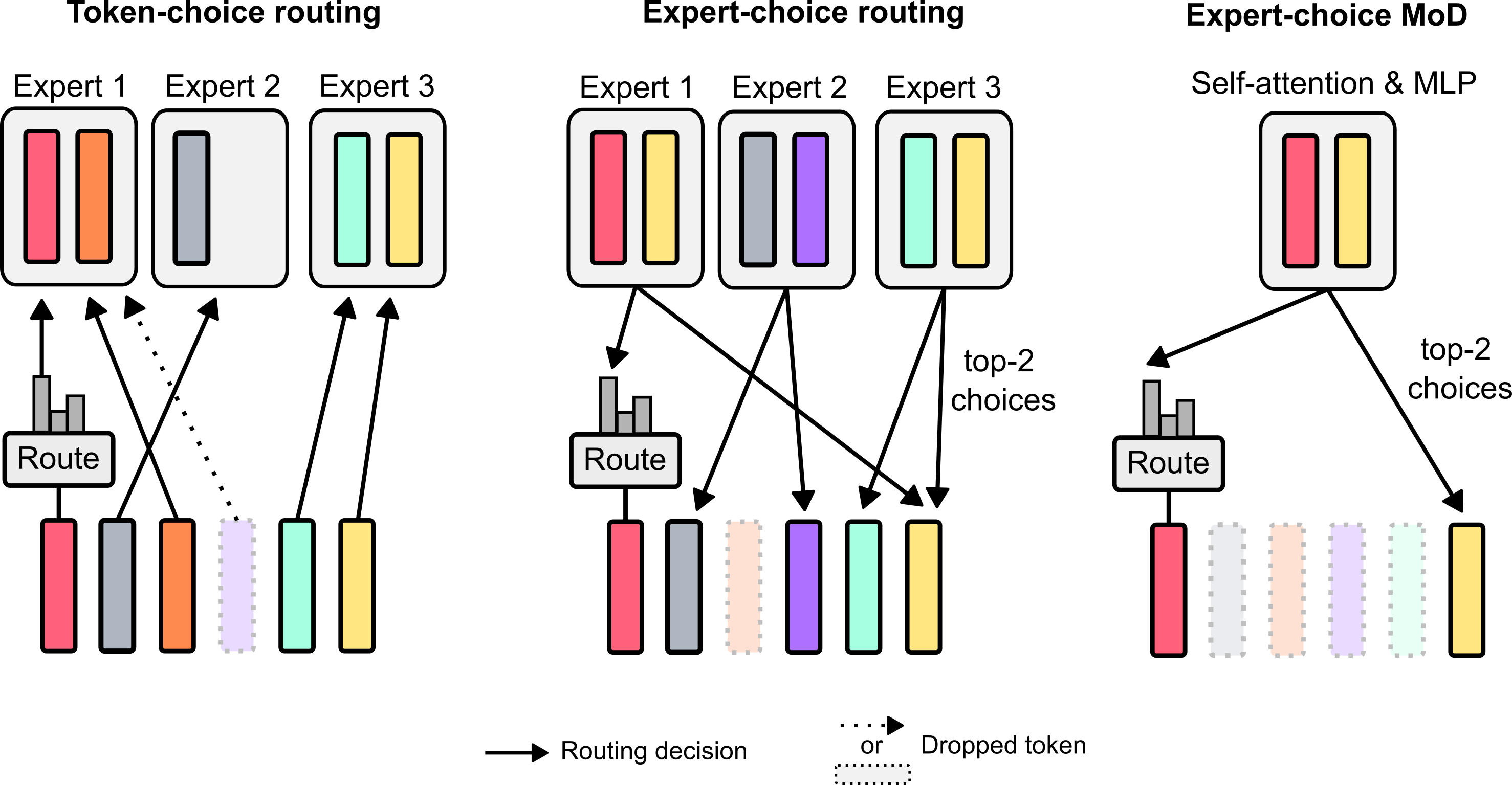
The image illustrates three routing mechanisms in a machine learning architecture, focusing on token and expert selection processes. The diagram uses color-coded bars, arrows, and route boxes to represent decision flows and token distribution.
---
### 1. **Token-choice Routing**
#### Components:
- **Experts**:
- **Expert 1**: Red and orange bars (two parallel bars per expert).
- **Expert 2**: Gray bar (single bar).
- **Expert 3**: Cyan and yellow bars (two parallel bars).
- **Route Box**:
- Contains a bar chart (gray bars) representing token distribution.
- Arrows labeled **"Routing decision"** point to experts.
- Dashed arrow labeled **"Dropped token"** indicates unrouted tokens.
- **Flow**:
- Tokens are routed to experts based on the route box's bar chart.
- Expert 2 receives tokens via a secondary (dashed) path.
#### Key Observations:
- Token distribution is explicit via the route box's bar chart.
- Expert 2 has a fallback routing mechanism (dashed arrow).
---
### 2. **Expert-choice Routing**
#### Components:
- **Experts**:
- **Expert 1**: Red and yellow bars.
- **Expert 2**: Gray and purple bars.
- **Expert 3**: Cyan and yellow bars.
- **Route Box**:
- Connects to **top-2 choices** via arrows.
- Arrows labeled **"Routing decision"** select experts.
- **Flow**:
- Tokens are routed to the top 2 experts based on criteria (e.g., relevance, confidence).
- Dashed lines indicate dropped tokens.
#### Key Observations:
- Hierarchical routing: Only top 2 experts are selected per token.
- Expert 3 receives tokens via a direct path from the route box.
---
### 3. **Expert-choice MoD (Mixture of Depths)**
#### Components:
- **Experts**:
- **Expert 1**: Red and yellow bars.
- **Expert 3**: Cyan and yellow bars.
- **Route Box**:
- Labeled **"Self-attention & MLP"**, indicating integrated mechanisms.
- Arrows labeled **"top-2 choices"** route tokens.
- **Flow**:
- Tokens are routed to the top 2 experts using a combination of self-attention and MLP.
- Dashed lines indicate dropped tokens.
#### Key Observations:
- Hybrid routing mechanism combining attention and multilayer perceptron (MLP).
- Simplified expert selection (only Experts 1 and 3 are active).
---
### Common Elements Across All Routing Mechanisms
1. **Color Coding**:
- Experts are represented by distinct color pairs (e.g., red/orange, gray, cyan/yellow).
- No explicit legend, but colors are consistent across sections.
2. **Dropped Tokens**:
- Represented by dashed arrows or unconnected bars.
3. **Routing Decisions**:
- Arrows labeled **"Routing decision"** or **"top-2 choices"** dictate token flow.
---
### Summary of Routing Strategies
| Mechanism | Token Selection | Expert Selection | Key Features |
|-------------------------|-----------------------|------------------------|---------------------------------------|
| **Token-choice** | Explicit distribution | All experts | Fallback routing for Expert 2 |
| **Expert-choice** | Top-2 experts | Top-2 experts | Hierarchical selection |
| **Expert-choice MoD** | Top-2 experts | Top-2 experts | Hybrid self-attention + MLP |
---
### Notes for Technical Implementation
1. **Token-choice Routing**:
- Requires a bar chart (route box) to quantify token distribution.
- Fallback mechanisms (dashed arrows) ensure robustness.
2. **Expert-choice Routing**:
- Depends on a scoring system to rank experts (e.g., relevance scores).
- Top-2 selection reduces computational overhead.
3. **Expert-choice MoD**:
- Combines self-attention (for contextual token relationships) and MLP (for expert-specific processing).
- Simplifies the expert pool to critical candidates.
---
### Diagram Flow Summary
1. **Input Tokens**: Represented by vertical bars (colors denote experts).
2. **Route Box**: Processes tokens to determine routing decisions.
3. **Expert Selection**: Tokens are routed to selected experts (solid arrows) or dropped (dashed arrows).
4. **Output**: Processed tokens from selected experts.
This diagram provides a framework for optimizing computational efficiency in large-scale models by dynamically routing tokens to specialized experts.