## Line Chart: Accuracy vs. Percentage
### Overview
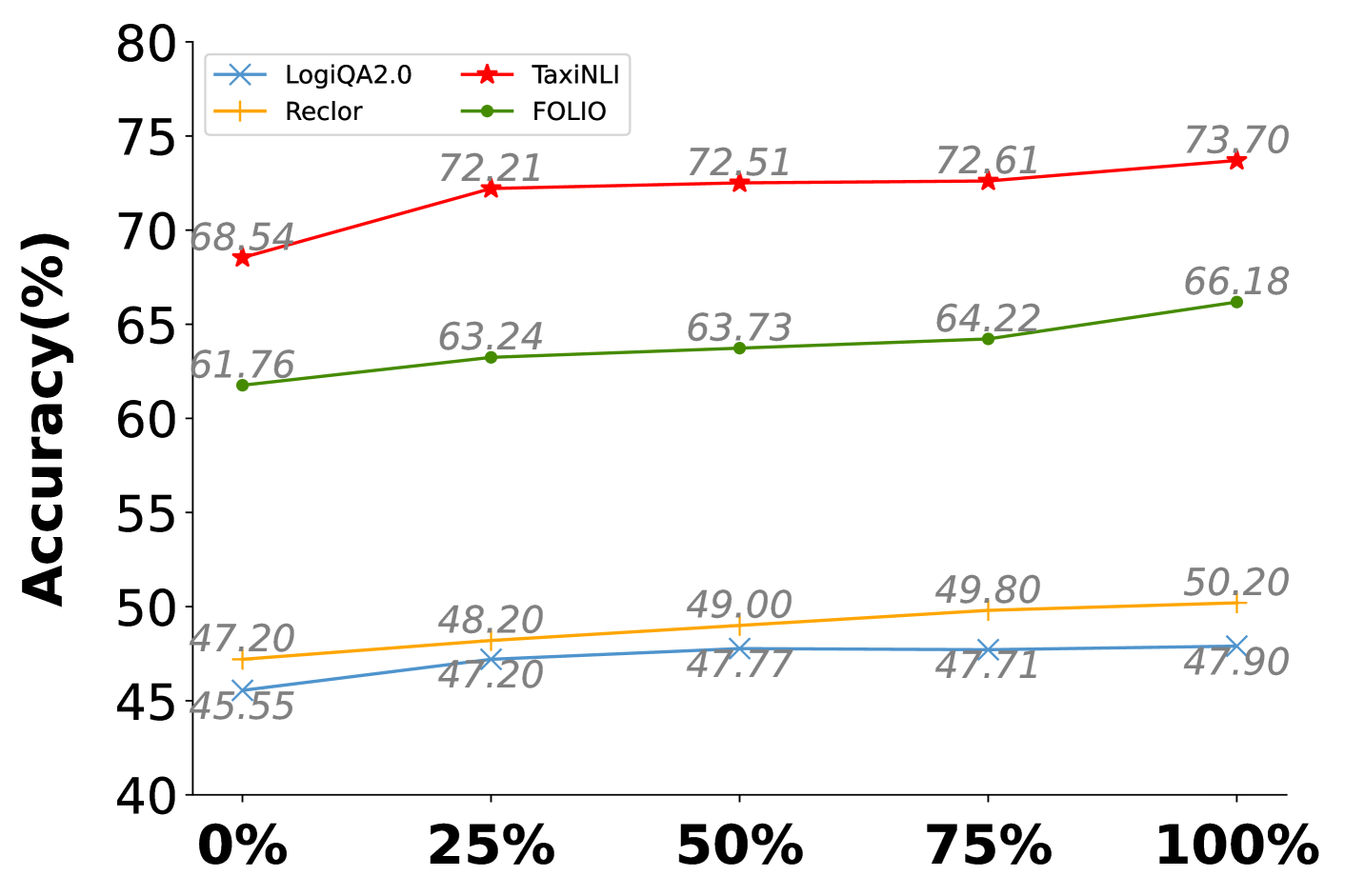
The image is a line chart comparing the accuracy percentages of four different models (LogiQA2.0, TaxiNLI, Reclor, and FOLIO) across varying percentage points (0%, 25%, 50%, 75%, and 100%). The chart displays how the accuracy of each model changes as the percentage increases.
### Components/Axes
* **X-axis:** Percentage, with markers at 0%, 25%, 50%, 75%, and 100%.
* **Y-axis:** Accuracy (%), ranging from 40% to 80% with tick marks every 5%.
* **Legend:** Located in the top-left corner, identifying each model with a specific color and marker:
* LogiQA2.0 (light blue, 'x' marker)
* TaxiNLI (red, star marker)
* Reclor (yellow, '+' marker)
* FOLIO (green, circle marker)
### Detailed Analysis
* **LogiQA2.0 (light blue):** The line is relatively flat, showing a slight upward trend.
* 0%: 45.55%
* 25%: 47.20%
* 50%: 47.77%
* 75%: 47.71%
* 100%: 47.90%
* **TaxiNLI (red):** The line shows an upward trend, starting high and increasing slightly.
* 0%: 68.54%
* 25%: 72.21%
* 50%: 72.51%
* 75%: 72.61%
* 100%: 73.70%
* **Reclor (yellow):** The line shows a slight upward trend.
* 0%: 47.20%
* 25%: 48.20%
* 50%: 49.00%
* 75%: 49.80%
* 100%: 50.20%
* **FOLIO (green):** The line shows an upward trend.
* 0%: 61.76%
* 25%: 63.24%
* 50%: 63.73%
* 75%: 64.22%
* 100%: 66.18%
### Key Observations
* TaxiNLI consistently has the highest accuracy across all percentage points.
* LogiQA2.0 consistently has the lowest accuracy across all percentage points.
* Reclor and LogiQA2.0 have similar accuracy values.
* FOLIO shows a moderate increase in accuracy as the percentage increases.
### Interpretation
The chart compares the performance of four different models (LogiQA2.0, TaxiNLI, Reclor, and FOLIO) at different percentage points. TaxiNLI outperforms the other models in terms of accuracy, while LogiQA2.0 performs the worst. FOLIO shows a steady improvement in accuracy as the percentage increases. Reclor's performance is similar to LogiQA2.0. The data suggests that TaxiNLI is the most effective model among the four, based on the accuracy metric. The percentage points on the x-axis likely represent the amount of data used for training or some other relevant parameter.