\n
## Diagram: Automated Bug Fixing Workflow
### Overview
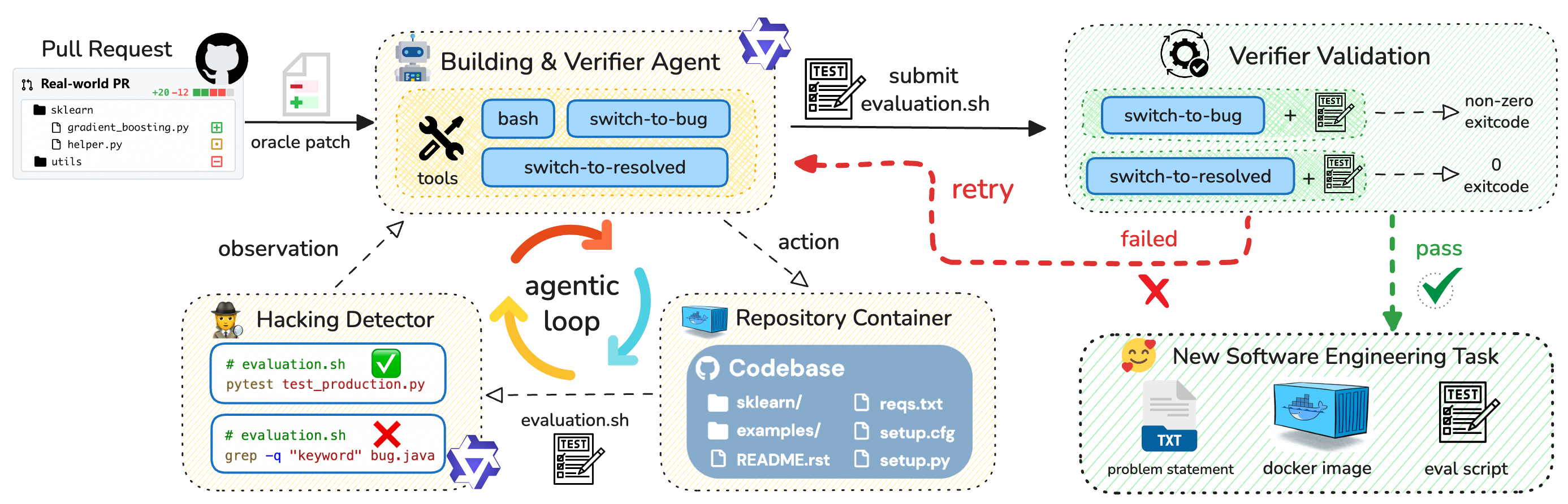
This diagram illustrates an automated workflow for bug fixing, involving a pull request, a building & verifier agent, a hacking detector, a repository container, and a verifier validation process. The workflow appears to be an agentic loop, where observations lead to actions, and the system attempts to resolve bugs automatically.
### Components/Axes
The diagram is segmented into four main areas:
1. **Pull Request (Top-Left):** Represents the initial code change.
2. **Building & Verifier Agent (Top-Center):** The core agent responsible for building and verifying changes.
3. **Hacking Detector & Repository Container (Bottom-Left):** Components for detecting potential issues and managing the codebase.
4. **Verifier Validation & New Software Engineering Task (Bottom-Right):** The validation process and the creation of new tasks.
Key elements include:
* **Pull Request:** Contains files `sklearn`, `gradient_boosting.py`, `helper.py`, `utils`.
* **Building & Verifier Agent:** Includes `bash`, `tools`, `switch-to-bug`, `switch-to-resolved`, and `evaluation.sh`.
* **Hacking Detector:** Displays `evaluation.sh` with both a success (green checkmark) and failure (red cross) result.
* **Repository Container:** Contains `sklearn`, `examples`, `README.rst`, `setup.py`, `reqs.txt`, `setup.cfg`.
* **Verifier Validation:** Shows `switch-to-bug` and `switch-to-resolved` states with corresponding exit codes (non-zero for failure, 0 for success).
* **New Software Engineering Task:** Includes `problem statement` (TXT file), `docker image`, and `eval script`.
Arrows indicate the flow of information and control between these components. Colors are used to denote success (green), failure (red), and general flow (gray/purple).
### Detailed Analysis or Content Details
**1. Pull Request:**
* Files listed: `sklearn`, `gradient_boosting.py`, `helper.py`, `utils`.
* Indication of a real-world pull request.
* +20 -12 (likely representing added and removed lines of code).
**2. Building & Verifier Agent:**
* The agent uses `bash` and `tools`.
* It switches between `switch-to-bug` and `switch-to-resolved` states.
* `evaluation.sh` is submitted for testing.
* A "retry" loop is indicated by a dashed red arrow.
**3. Hacking Detector:**
* `evaluation.sh` is executed twice:
* `pytest test_production.py` – Successful (green checkmark).
* `grep -q "keyword" bug.java` – Failed (red cross).
* An "agentic loop" is shown, with "observation" leading to "action".
**4. Repository Container:**
* Contains the codebase: `sklearn`, `examples`, `README.rst`, `setup.py`, `reqs.txt`, `setup.cfg`.
* `evaluation.sh` is used to interact with the container.
**5. Verifier Validation:**
* `switch-to-bug` results in a non-zero exit code (failure).
* `switch-to-resolved` results in a 0 exit code (success).
* The validation process can either "pass" (green checkmark) or "fail" (red cross).
**6. New Software Engineering Task:**
* Created when the workflow fails (indicated by the red "X").
* Includes a `problem statement` (TXT file), a `docker image`, and an `eval script`.
### Key Observations
* The workflow is designed to automatically detect and fix bugs.
* The "retry" loop suggests that the agent attempts to resolve bugs multiple times before giving up.
* The Hacking Detector identifies potential issues using different tests (`pytest` and `grep`).
* Failure in the validation process triggers the creation of a new software engineering task, indicating that human intervention is sometimes required.
* The agentic loop is central to the process, enabling continuous observation and action.
### Interpretation
This diagram depicts a sophisticated automated bug fixing system. The system leverages an agent that observes the codebase, takes actions to fix bugs, and validates the changes. The agentic loop allows for iterative improvement and adaptation. The inclusion of a "Hacking Detector" suggests a focus on security vulnerabilities. The workflow is not entirely autonomous, as failures can lead to the creation of new tasks for human engineers. The use of Docker images and evaluation scripts indicates a focus on reproducibility and automated testing. The diagram highlights the challenges of automating bug fixing and the need for a combination of automated tools and human expertise. The two different tests in the Hacking Detector suggest a multi-faceted approach to identifying potential issues. The clear distinction between "bug" and "resolved" states, along with the associated exit codes, demonstrates a rigorous validation process.