## Diagram: Deep Analyzer Agent Workflow
### Overview
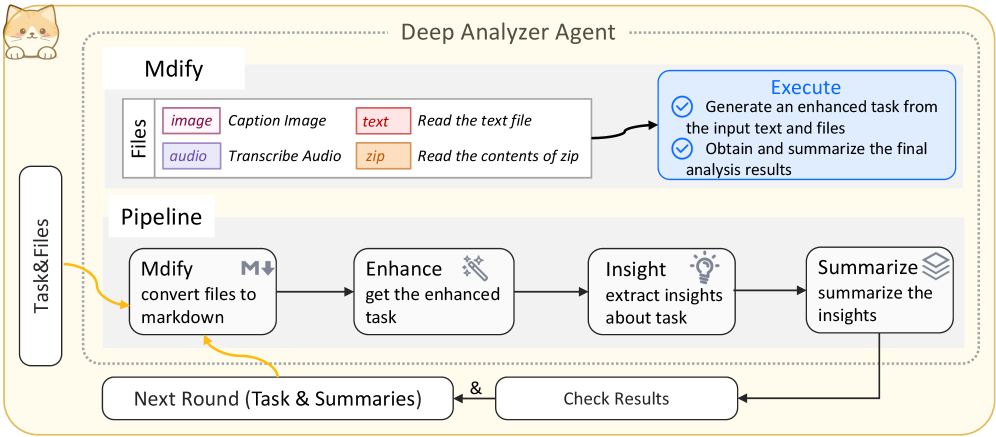
The image is a diagram illustrating the workflow of a "Deep Analyzer Agent." It outlines the process from input files to summarized insights, including steps for file conversion, task enhancement, insight extraction, and summarization. The diagram also shows how the process can loop back for further analysis.
### Components/Axes
* **Title:** Deep Analyzer Agent
* **Files:** This section describes the types of files the agent can process.
* `image`: Caption Image (color: purple-red)
* `audio`: Transcribe Audio (color: purple)
* `text`: Read the text file (color: red-orange)
* `zip`: Read the contents of zip (color: orange)
* **Pipeline:** This section outlines the main processing steps.
* `Mdify`: convert files to markdown (includes a markdown icon)
* `Enhance`: get the enhanced task (includes a magic wand icon)
* `Insight`: extract insights about task (includes a lightbulb icon)
* `Summarize`: summarize the insights (includes a stack of papers icon)
* **Execute:** This section describes the actions performed.
* Generate an enhanced task from the input text and files (includes a checkmark icon)
* Obtain and summarize the final analysis results (includes a checkmark icon)
* **Task&Files:** Input to the process.
* **Next Round (Task & Summaries):** Output and feedback loop.
* **Check Results:** Feedback loop component.
### Detailed Analysis or ### Content Details
1. **Input Files:**
* The agent accepts four types of files: images, audio, text, and zip archives.
* Images are used for captioning.
* Audio files are transcribed.
* Text files are read directly.
* Zip archives are unpacked and their contents are read.
2. **Pipeline Stages:**
* **Mdify:** Converts input files to markdown format. An arrow points downward from the "M" in "Mdify," suggesting a conversion or transformation process.
* **Enhance:** Enhances the task based on the converted files.
* **Insight:** Extracts insights from the enhanced task.
* **Summarize:** Summarizes the extracted insights.
3. **Execution:**
* The agent generates an enhanced task from the input text and files.
* The agent obtains and summarizes the final analysis results.
4. **Feedback Loop:**
* The "Next Round (Task & Summaries)" component represents the output of the pipeline.
* An arrow connects this component back to the "Task&Files" input, indicating a feedback loop for further analysis.
* The "Check Results" component is connected to both the "Summarize" stage and the "Next Round" component, suggesting a quality control or validation step.
### Key Observations
* The diagram illustrates a sequential workflow with a feedback loop.
* The "Mdify" stage appears to be a crucial step for converting various file types into a unified format (markdown).
* The "Execute" section highlights the core functionalities of the agent: task generation and result summarization.
### Interpretation
The diagram describes a system designed to analyze various types of input files, extract meaningful insights, and provide a summary of the findings. The feedback loop suggests an iterative process where the agent can refine its analysis based on previous results. The "Mdify" stage indicates that the system uses markdown as an intermediate format, which likely simplifies subsequent processing steps. The overall architecture suggests a sophisticated tool for automated data analysis and summarization.