\n
## Diagram: Deep Analyzer Agent Workflow
### Overview
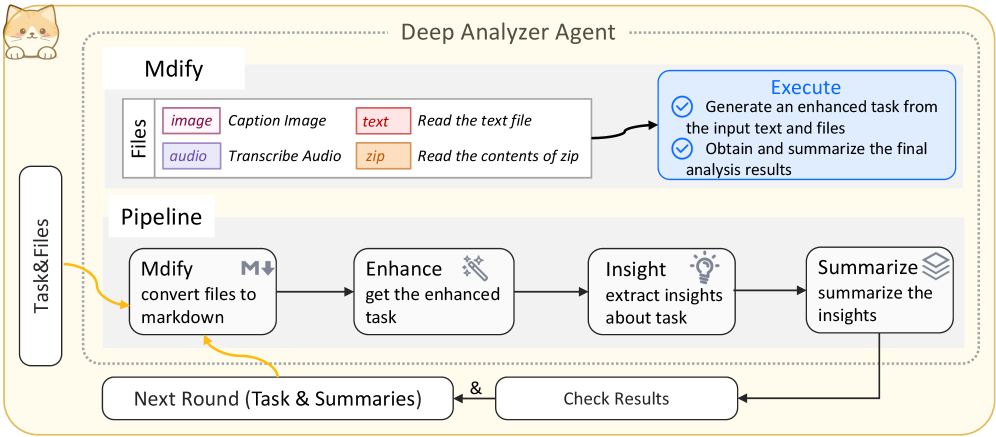
The image depicts a diagram illustrating the workflow of a "Deep Analyzer Agent". The agent processes various file types (image, text, audio, zip) through a pipeline, culminating in task execution, insight extraction, and summarization. The diagram is organized into two main sections: "Mdify" (file processing) and "Pipeline" (task enhancement and analysis), with feedback loops for iterative refinement.
### Components/Axes
The diagram consists of several rectangular blocks representing different stages or components. These are connected by arrows indicating the flow of data and control. Key components include:
* **Task & Files (Input):** Located on the left, representing the initial input to the agent.
* **Mdify (File Processing):** A larger block containing sub-blocks for different file types:
* **Image:** "Caption Image"
* **Text:** "Read the text file"
* **Audio:** "Transcribe Audio"
* **Zip:** "Read the contents of zip"
* **Execute:** A block on the right with two bullet points:
* "Generate an enhanced task from the input text and files"
* "Obtain and summarize the final analysis results"
* **Pipeline:** A horizontal sequence of blocks:
* **Mdify:** "convert files to markdown"
* **Enhance:** "get the enhanced task" (with a pencil icon)
* **Insight:** "extract insights about task" (with a lightbulb icon)
* **Summarize:** "summarize the insights"
* **Next Round (Task & Summaries):** A block at the bottom, representing the output of the pipeline for the next iteration.
* **Check Results:** A block connected to "Next Round" via an arrow.
### Detailed Analysis or Content Details
The diagram illustrates a cyclical process.
1. **Input:** The process begins with "Task & Files" entering the system.
2. **File Processing (Mdify):** The input files are processed based on their type: images are captioned, text files are read, audio is transcribed, and zip files are unpacked.
3. **Task Enhancement (Pipeline):** The processed files are converted to markdown, then enhanced to create a refined task.
4. **Insight Extraction & Summarization:** Insights are extracted from the enhanced task, and these insights are summarized.
5. **Iteration:** The summarized insights and the original task are fed back into the system as "Next Round (Task & Summaries)" for further analysis and refinement.
6. **Result Verification:** The "Check Results" block suggests a quality control step before proceeding to the next round.
7. **Execution:** The enhanced task is executed, generating results that are then summarized.
The arrows indicate a clear flow of information from left to right and a feedback loop from the bottom back to the pipeline. The "Mdify" block is duplicated in the pipeline, suggesting a re-processing step.
### Key Observations
* The diagram emphasizes an iterative process, with feedback loops for continuous improvement.
* The agent handles multiple file types, demonstrating versatility.
* The pipeline is clearly defined, with distinct stages for enhancement, insight extraction, and summarization.
* The inclusion of "Check Results" suggests a focus on accuracy and reliability.
* The diagram is visually clean and easy to follow, using icons to represent different actions.
### Interpretation
The diagram represents a sophisticated data analysis workflow. The "Deep Analyzer Agent" is designed to take raw input (tasks and files), process it through a series of steps to extract meaningful insights, and then refine those insights through iterative analysis. The agent's ability to handle multiple file types and its emphasis on feedback loops suggest a robust and adaptable system. The diagram highlights the importance of converting data into a standardized format (markdown) for efficient processing. The "Execute" block indicates that the agent is not just about analysis but also about taking action based on the insights gained. The overall design suggests a system aimed at automating complex analytical tasks and providing actionable intelligence. The presence of a cat icon in the top-left corner is purely decorative and does not contribute to the technical understanding of the diagram.