## System Diagram: Deep Analyzer Agent
### Overview
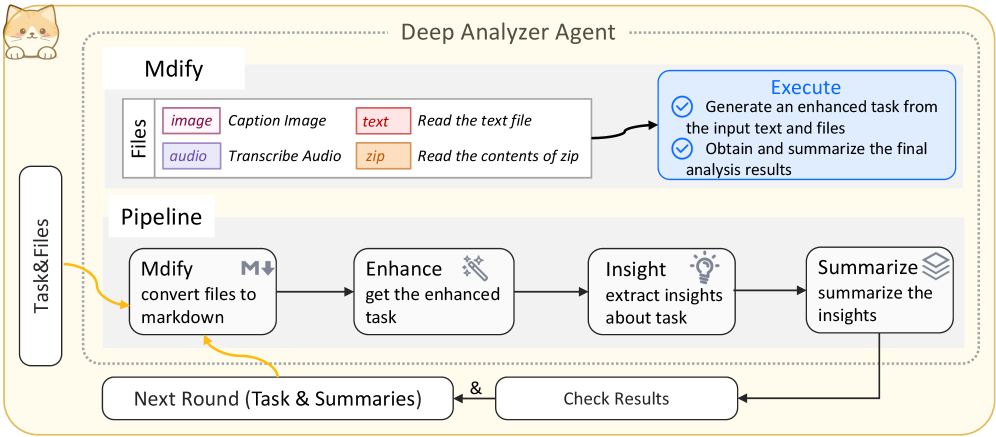
This image is a technical system diagram illustrating the architecture and workflow of an AI agent named "Deep Analyzer Agent." The diagram is contained within a dotted-line border and features a small cartoon cat icon in the top-left corner. It depicts a cyclical process for ingesting various file types, processing them through a pipeline, and generating summarized insights.
### Components & Flow
The diagram is segmented into several key regions and components:
**1. Header & Container:**
* **Title:** "Deep Analyzer Agent" is centered at the top.
* **Container:** A large, light-yellow box with a dotted border encloses the core system components.
* **Icon:** A small, cartoon-style cat face is positioned in the top-left corner, outside the main dotted border.
**2. Input Section (Left Side):**
* **Label:** A vertical, rounded rectangle on the far left is labeled **"Task & Files"**.
* **Function:** This represents the entry point for user-provided tasks and associated files. A yellow arrow points from this box into the main "Pipeline" area.
**3. Core Processing Unit - "Mdify" (Top-Left of Main Container):**
* **Title:** "Mdify" is displayed in a white box.
* **Files Sub-section:** Below the title, a gray box labeled **"Files"** lists supported input types and their corresponding actions:
* `image` (pink box) -> **Caption Image**
* `audio` (purple box) -> **Transcribe Audio**
* `text` (red box) -> **Read the text file**
* `zip` (orange box) -> **Read the contents of zip**
* **Function:** This component is responsible for converting various file formats into a unified markdown representation.
**4. Execution Unit (Top-Right of Main Container):**
* **Title:** A blue-outlined box labeled **"Execute"**.
* **Content:** Contains two checked bullet points:
* ✅ **Generate an enhanced task from the input text and files**
* ✅ **Obtain and summarize the final analysis results**
* **Connection:** A black arrow points from the "Mdify" files list to this "Execute" box, indicating that processed files feed into the execution phase.
**5. Main Pipeline (Center of Main Container):**
* **Title:** A white box labeled **"Pipeline"** sits above the central flowchart.
* **Process Flow:** A linear sequence of four rounded rectangles connected by black arrows:
1. **Mdify** (icon: `M↓`) - **convert files to markdown**
2. **Enhance** (icon: magic wand) - **get the enhanced task**
3. **Insight** (icon: lightbulb) - **extract insights about task**
4. **Summarize** (icon: stacked layers) - **summarize the insights**
* **Feedback Loop:** A yellow arrow originates from the "Summarize" box, curves downward, and points back to the "Mdify" box in the pipeline. This arrow is labeled **"Next Round (Task & Summaries)"**.
**6. Verification & Iteration (Bottom of Diagram):**
* **Component:** A box labeled **"Check Results"** is positioned below the main pipeline.
* **Flow:** A black arrow points from the "Summarize" box down to "Check Results." Another black arrow points from "Check Results" leftward, connecting to the yellow "Next Round" feedback loop arrow.
* **Function:** This represents a validation step that informs the next iteration of the process.
### Detailed Analysis
The diagram explicitly defines a multi-stage, iterative processing system:
1. **Input:** Accepts a "Task" and associated "Files" (image, audio, text, zip).
2. **Normalization:** The "Mdify" stage converts all inputs into a markdown format.
3. **Enhancement:** The "Enhance" stage refines the task based on the processed files.
4. **Analysis:** The "Insight" stage performs the core analytical work.
5. **Output:** The "Summarize" stage produces the final condensed results.
6. **Iteration:** The "Check Results" and "Next Round" components create a closed loop, allowing the system to refine its analysis based on previous outputs, suggesting an autonomous or multi-pass operational mode.
### Key Observations
* **Cyclical Architecture:** The most prominent feature is the feedback loop, indicating this is not a one-shot system but one designed for iterative improvement or multi-stage problem-solving.
* **Multimodal Capability:** The system is explicitly designed to handle and unify multiple data modalities (visual, auditory, textual, compressed archives).
* **Clear Separation of Concerns:** The diagram neatly separates file ingestion ("Mdify" files list), core processing ("Pipeline"), high-level execution goals ("Execute"), and verification ("Check Results").
* **Visual Coding:** File types are color-coded (pink=image, purple=audio, red=text, orange=zip) for quick visual reference.
### Interpretation
This diagram outlines the architecture of a sophisticated, autonomous AI agent designed for deep analysis. The system's core innovation appears to be its **iterative, self-correcting pipeline**. It doesn't just process inputs once; it summarizes its findings, checks them, and feeds them back into the start for another round of analysis ("Next Round (Task & Summaries)"). This suggests the agent is built for complex, open-ended tasks where initial insights can guide deeper investigation.
The "Execute" box defines the agent's high-level goals: to understand a user's task in context of provided files and to deliver a summarized result. The "Pipeline" details *how* it achieves this—by systematically converting, enhancing, analyzing, and condensing information. The inclusion of a "Check Results" phase implies a built-in mechanism for quality control or validation before committing to the next iteration.
In essence, this is a blueprint for an AI that can take a messy, multimodal problem, break it down, analyze it from multiple angles, and refine its understanding over multiple cycles to produce a comprehensive summary. The friendly cat icon and clean design belie a complex, powerful analytical engine.