## Flowchart: Deep Analyzer Agent Pipeline
### Overview
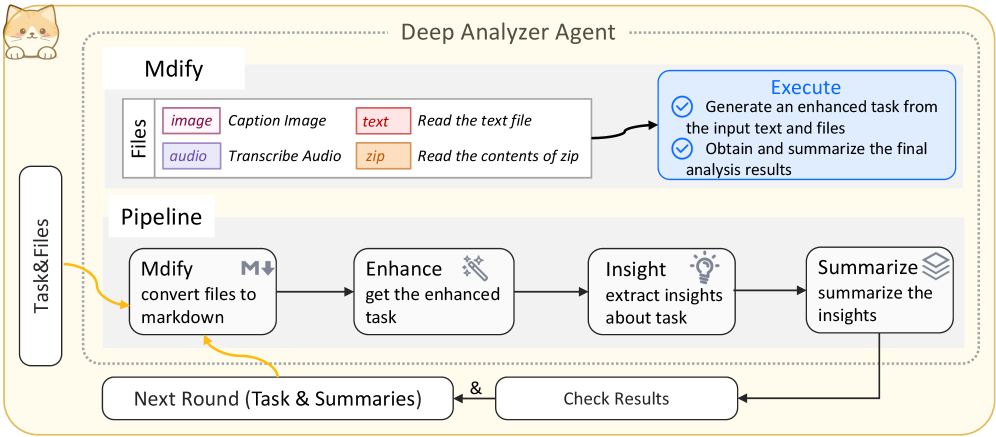
The diagram illustrates a multi-step workflow for processing and analyzing files through a "Deep Analyzer Agent." It includes file modification ("Mdfy"), a pipeline of tasks (Enhance, Insight, Summarize), and an execution phase with iterative feedback.
### Components/Axes
- **Header**: "Deep Analyzer Agent" title at the top.
- **Left Panel**: "Task & Files" section with a cat icon.
- **Main Sections**:
- **Mdfy**: Contains file types (image, audio, text, zip) with actions (Caption Image, Transcribe Audio, Read text file, Read zip contents).
- **Pipeline**: Four sequential steps:
1. **Mdfy** (convert files to markdown).
2. **Enhance** (get enhanced task).
3. **Insight** (extract insights about task).
4. **Summarize** (summarize insights).
- **Execute**: Two tasks with checkmarks:
- Generate enhanced task from input text and files.
- Obtain and summarize final analysis results.
- **Footer**: "Next Round (Task & Summaries)" and "Check Results" steps with bidirectional arrows.
### Detailed Analysis
- **Mdfy Section**:
- **Files**:
- Image → Caption Image (pink box).
- Audio → Transcribe Audio (purple box).
- Text → Read the text file (red box).
- Zip → Read the contents of zip (orange box).
- Arrows connect file types to their respective actions.
- **Pipeline Steps**:
- **Mdfy** → **Enhance** → **Insight** → **Summarize** (black arrows).
- **Mdfy** also has a yellow arrow looping back to "Task & Files."
- **Execute Section**:
- Two tasks with checkmarks:
1. Generate an enhanced task from input text and files.
2. Obtain and summarize the final analysis results.
- **Footer Loop**:
- "Next Round (Task & Summaries)" and "Check Results" are connected by a bidirectional arrow, indicating iterative refinement.
### Key Observations
- **Sequential Flow**: Tasks progress linearly from Mdfy to Summarize, with feedback loops for refinement.
- **File Type Handling**: The Mdfy step explicitly processes diverse file types (image, audio, text, zip).
- **Iterative Design**: The "Check Results" step suggests the pipeline can be repeated based on prior outcomes.
### Interpretation
This diagram represents a structured workflow for data analysis, emphasizing file preprocessing ("Mdfy"), task enhancement, insight extraction, and result summarization. The iterative loop ("Next Round" and "Check Results") implies a focus on continuous improvement, where outputs from one cycle inform subsequent analyses. The explicit handling of multiple file types suggests the system is designed for multimodal data integration. The "Execute" phase highlights the final deliverables: enhanced tasks and summarized insights, which could be critical for decision-making or reporting.