## Screenshot: Unity Environment
### Overview
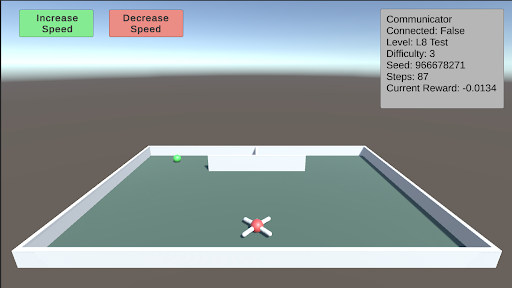
The image is a screenshot of a Unity environment, likely a simulation or game. It shows a simple scene with a green sphere, a white and red cross-shaped object, and a walled enclosure. UI elements include "Increase Speed" and "Decrease Speed" buttons, and a "Communicator" box displaying various parameters.
### Components/Axes
* **Buttons (Top-Left):**
* "Increase Speed" (Green)
* "Decrease Speed" (Red)
* **Communicator Box (Top-Right):**
* Title: "Communicator"
* Connected: False
* Level: L8 Test
* Difficulty: 3
* Seed: 966678271
* Steps: 87
* Current Reward: -0.0134
* **Environment:**
* Enclosure: White walls, light green floor
* Green Sphere: Located in the top-left quadrant of the enclosure.
* Cross-Shaped Object: Located in the bottom-center of the enclosure, colored white and red.
### Detailed Analysis or Content Details
* **Communicator Box Details:**
* The "Connected" status is "False," indicating that the environment is not currently connected to an external system.
* The "Level" is "L8 Test," suggesting this is a test level.
* The "Difficulty" is set to "3."
* The "Seed" is "966678271," likely used for random number generation within the simulation.
* The number of "Steps" taken is "87."
* The "Current Reward" is "-0.0134," indicating a negative reward value.
### Key Observations
* The environment appears to be a simple test setup, possibly for reinforcement learning or agent training.
* The negative reward suggests the agent may not be performing optimally or is being penalized for certain actions.
* The "Increase Speed" and "Decrease Speed" buttons imply the user can control the simulation speed.
### Interpretation
The screenshot depicts a basic Unity environment designed for testing or training an agent. The "Communicator" box provides real-time feedback on the agent's performance, including the number of steps taken and the current reward. The negative reward value suggests that the agent is either not achieving its goal or is incurring penalties. The "Increase Speed" and "Decrease Speed" buttons allow for adjusting the simulation speed, which could be useful for debugging or accelerating the training process. The level being "L8 Test" indicates this is likely a development or testing environment.