# Self-Check / Error Detection Workflow Diagram
## Overview
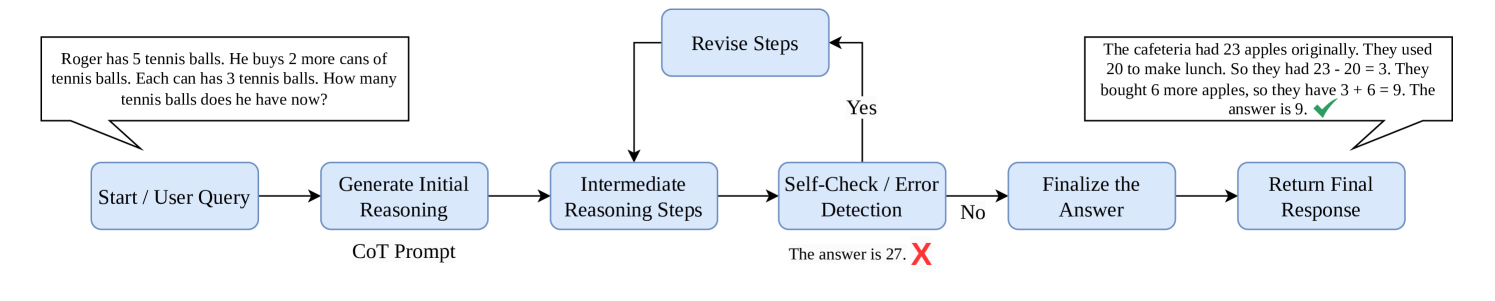
The diagram illustrates a multi-step reasoning and error-checking process for solving mathematical problems. It includes decision points, iterative revisions, and final answer validation.
---
## Key Components & Flow
### 1. **Start / User Query**
- **Input**: User-submitted problem statement.
- **Example**:
*"Roger has 5 tennis balls. He buys 2 more cans of tennis balls. Each can has 3 tennis balls. How many tennis balls does he have now?"*
---
### 2. **Generate Initial Reasoning**
- **Process**: Create an initial chain-of-thought (CoT) prompt to solve the problem.
- **Output**: Initial reasoning steps (not explicitly shown in the diagram).
---
### 3. **Intermediate Reasoning Steps**
- **Process**: Execute the CoT prompt to derive intermediate calculations.
- **Example Output**:
*"The answer is 27. X"*
(Indicates an incorrect intermediate result with an error marker "X".)
---
### 4. **Self-Check / Error Detection**
- **Decision Point**:
- **Yes (Error Detected)**:
- Flow: Return to **Revise Steps**.
- **No (No Error)**:
- Flow: Proceed to **Finalize the Answer**.
---
### 5. **Revise Steps**
- **Process**: Iteratively refine the reasoning to correct errors.
- **Loop**: Connects back to **Intermediate Reasoning Steps** for re-evaluation.
---
### 6. **Finalize the Answer**
- **Process**: Confirm the corrected answer after error resolution.
- **Example**:
*"The cafeteria had 23 apples originally. They used 20 to make lunch. So they had 23 - 20 = 3. They bought 6 more apples, so they have 3 + 6 = 9. The answer is 9. ✅"*
(Indicates a correct final answer with a green checkmark.)
---
### 7. **Return Final Response**
- **Output**: Deliver the validated answer to the user.
---
## Visual Elements
- **Color Coding**:
- **Blue Boxes**: Process steps.
- **Red "X"**: Error marker (e.g., "The answer is 27. X").
- **Green "✅"**: Correct answer marker (e.g., "The answer is 9. ✅").
- **Arrows**: Define the directional flow between steps, including loops for revisions.
---
## Example Problems Embedded in Diagram
1. **Tennis Balls Problem**:
- Initial incorrect answer: 27 (marked with "X").
2. **Cafeteria Apples Problem**:
- Correct answer: 9 (marked with "✅").
---
## Technical Notes
- **Decision Logic**:
- The flowchart emphasizes iterative error correction, with a feedback loop between **Self-Check/Error Detection** and **Revise Steps**.
- **Validation**:
- Final answers are explicitly validated with visual markers ("X" for errors, "✅" for correctness).
- **Scalability**:
- The process can handle complex reasoning tasks requiring multiple revisions.
---
## Diagram Structure
```mermaid
graph TD
A[Start / User Query] --> B[Generate Initial Reasoning]
B --> C[Intermediate Reasoning Steps]
C -->|Yes| D[Revise Steps]
C -->|No| E[Finalize the Answer]
D --> C
E --> F[Return Final Response]
```