\n
## Diagram: Feedback Loop for Reasoning Systems
### Overview
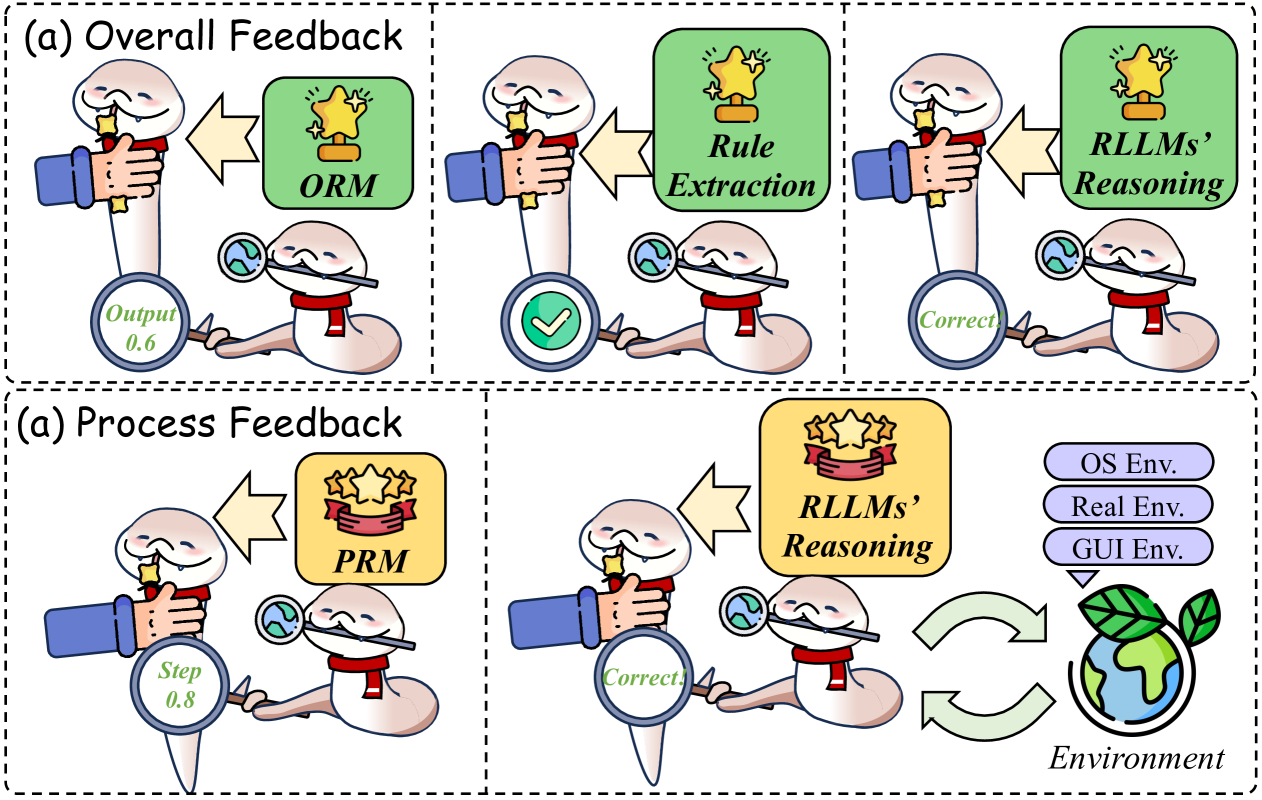
The image presents a diagram illustrating two feedback loops related to reasoning systems, labeled "(a) Overall Feedback" and "(a) Process Feedback". Both loops involve human input, a reasoning component (RLLMs), and an evaluation stage. The diagram uses visual metaphors of hands, brains, and robots to represent these components, along with arrows indicating the flow of information and feedback.
### Components/Axes
The diagram consists of three main components within each feedback loop:
1. **Human Input:** Represented by a hand making a gesture.
2. **Reasoning Component:** Represented by a robot head with gears, labeled either "ORM", "Rule Extraction", or "RLLMs' Reasoning".
3. **Evaluation/Output:** Represented by a robot body with a head, and a visual indicator of success or failure (check mark or 'X').
Additionally, the "Process Feedback" loop includes a representation of the "Environment" with three sub-categories: "OS Env.", "Real Env.", and "GUI Env.".
### Detailed Analysis or Content Details
**Overall Feedback Loop (Top Row):**
* **Step 1:** A hand points towards a box labeled "ORM" (approximately 0.6 of the image width). An arrow indicates input from the hand to the ORM.
* **Step 2:** The ORM outputs to a robot body. A curved line represents the output, and a label "Output 0.6" is associated with it. The robot body has a red 'X' on its head, indicating failure.
* **Step 3:** A hand points towards a box labeled "Rule Extraction" (approximately 0.3 of the image width). An arrow indicates input from the hand to the Rule Extraction component.
* **Step 4:** The Rule Extraction component outputs to a robot body. A curved line represents the output, and a check mark indicates success.
* **Step 5:** A hand points towards a box labeled "RLLMs' Reasoning" (approximately 0.6 of the image width). An arrow indicates input from the hand to the RLLMs' Reasoning component.
* **Step 6:** The RLLMs' Reasoning component outputs to a robot body. A curved line represents the output, and a label "Correct" is associated with it.
**Process Feedback Loop (Bottom Row):**
* **Step 1:** A hand points towards a box labeled "PRM" (approximately 0.3 of the image width). An arrow indicates input from the hand to the PRM.
* **Step 2:** The PRM outputs to a robot body. A curved line represents the output, and a label "Step 0.8" is associated with it.
* **Step 3:** The robot body outputs to the "RLLMs' Reasoning" component (approximately 0.6 of the image width). A check mark indicates success.
* **Step 4:** The RLLMs' Reasoning component outputs to the "Environment". A curved arrow indicates a cyclical interaction between the RLLMs' Reasoning and the Environment.
* **Environment:** The environment is divided into three categories: "OS Env.", "Real Env.", and "GUI Env.".
### Key Observations
* The "Overall Feedback" loop demonstrates three different reasoning approaches (ORM, Rule Extraction, RLLMs' Reasoning) and their respective success/failure rates.
* The "Process Feedback" loop focuses on the interaction between the RLLMs' Reasoning and the environment.
* The numerical labels "Output 0.6" and "Step 0.8" likely represent confidence scores or probabilities associated with the outputs.
* The use of check marks and 'X' symbols provides a clear visual indication of success or failure.
### Interpretation
The diagram illustrates a system for evaluating and improving reasoning capabilities. The "Overall Feedback" loop suggests an exploration of different reasoning methods, with varying degrees of success. The "Process Feedback" loop highlights the importance of interaction with the environment for refining the reasoning process. The numerical labels suggest a probabilistic approach to evaluating the outputs, where higher values indicate greater confidence or accuracy. The cyclical nature of the "Process Feedback" loop implies an iterative process of learning and adaptation. The diagram suggests a focus on Reinforcement Learning from Human Feedback (RLHF) or similar techniques, where human input is used to guide the learning process. The three environment types suggest the system is designed to operate in diverse settings.