# Technical Document Extraction: ADP-MA Replay Mode Interface
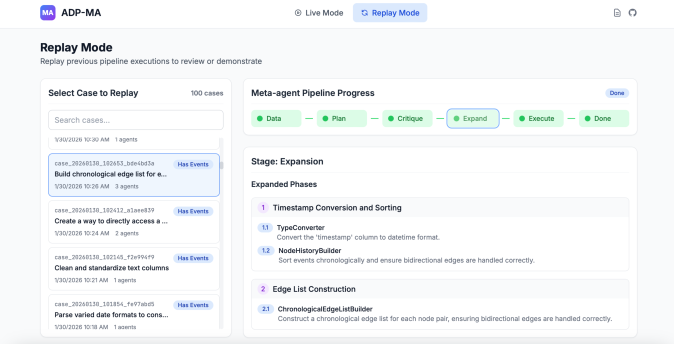
This document provides a comprehensive extraction of the textual and structural data from the provided image, which depicts a software interface for a pipeline execution review tool named **ADP-MA**.
---
## 1. Header Information
* **Application Name:** ADP-MA (accompanied by a purple icon with "MA")
* **Navigation/Status:**
* **Live Mode:** Inactive (indicated by a grey radio-style icon)
* **Replay Mode:** Active (indicated by a blue highlighted button with a refresh/replay icon)
* **Utility Icons:** Document icon and GitHub logo (top right).
---
## 2. Page Title and Description
* **Title:** Replay Mode
* **Description:** Replay previous pipeline executions to review or demonstrate.
---
## 3. Component Isolation: Left Sidebar (Case Selection)
**Section Title:** Select Case to Replay
**Metadata:** 100 cases
**Search Bar:** "Search cases..." (placeholder text)
### Case List (Data Table/List Structure)
The list contains multiple entries. The first entry is currently selected (highlighted in blue).
| Case ID / Timestamp | Title / Description | Status Tag | Agents |
| :--- | :--- | :--- | :--- |
| `1/30/2026 10:30 AM` | (Partial text visible above selection) | - | 1 agents |
| **`case_20260130_102653_bde4bd3a`** | **Build chronological edge list for e...** | **Has Events** | **3 agents** |
| `case_20260130_102412_a1aee839` | Create a way to directly access a ... | Has Events | 2 agents |
| `case_20260130_102145_f2e994f9` | Clean and standardize text columns | Has Events | 1 agents |
| `case_20260130_101854_fe97abd5` | Parse varied date formats to cons... | Has Events | 1 agents |
*Note: The selected case (second in list) is dated 1/30/2026 10:26 AM.*
---
## 4. Component Isolation: Main Content Area (Pipeline Progress)
### Meta-agent Pipeline Progress
This is a horizontal flow diagram showing the stages of the pipeline.
* **Overall Status:** Done (Blue pill label at top right of the section).
* **Flow Components:**
1. **Data:** Completed (Green dot, Green background)
2. **Plan:** Completed (Green dot, Green background)
3. **Critique:** Completed (Green dot, Green background)
4. **Expand:** **Active/Selected** (Green dot, Blue border highlight)
5. **Execute:** Completed (Green dot, Green background)
6. **Done:** Completed (Green dot, Green background)
---
## 5. Component Isolation: Stage Details (Expansion)
**Stage Title:** Stage: Expansion
**Sub-section:** Expanded Phases
This section breaks down the "Expand" stage into specific tasks and sub-tasks.
### Phase 1: Timestamp Conversion and Sorting
* **1.1 TypeConverter:**
* *Description:* Convert the 'timestamp' column to datetime format.
* **1.2 NodeHistoryBuilder:**
* *Description:* Sort events chronologically and ensure bidirectional edges are handled correctly.
### Phase 2: Edge List Construction
* **2.1 ChronologicalEdgeListBuilder:**
* *Description:* Construct a chronological edge list for each node pair, ensuring bidirectional edges are handled correctly.
---
## 6. Technical Summary of Flow
The interface demonstrates a **Replay Mode** for a multi-agent system.
1. The user selects a specific execution "case" from the left sidebar (currently viewing a case involving building an edge list).
2. The **Meta-agent Pipeline** shows a linear 6-step process from Data to Done.
3. The current view focuses on the **Expansion** stage, which is decomposed into two primary phases: **Timestamp Conversion/Sorting** and **Edge List Construction**, utilizing specific technical modules (`TypeConverter`, `NodeHistoryBuilder`, and `ChronologicalEdgeListBuilder`).