# Technical Document Extraction: Pipeline Replay Mode UI
## Header Section
- **Title**: `ADP-MA` (Top-left corner)
- **Mode Indicator**:
- `Live Mode` (Default state)
- `Replay Mode` (Active state, highlighted in blue)
## Main Content
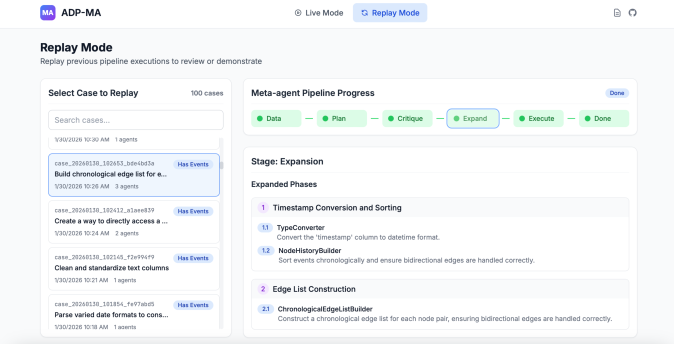
### 1. Replay Mode Overview
**Title**: `Replay Mode`
**Description**:
> "Replay previous pipeline executions to review or demonstrate"
### 2. Case Selection Interface
**Section Title**: `Select Case to Replay`
**Search Bar**: `Search cases...`
**Case List**:
1. **Case 1**
- Timestamp: `2026-12-26 10:26 AM`
- Agents: `1`
- Title: `Build chronological edge list for...`
- Status: `Has Events` (Blue button)
- Description: `Parse varied date formats to construct a chronological edge list for each node pair, ensuring bidirectional edges are handled correctly.`
2. **Case 2**
- Timestamp: `2026-12-26 10:24 AM`
- Agents: `2`
- Title: `Create a way to directly access a...`
- Status: `Has Events` (Blue button)
3. **Case 3**
- Timestamp: `2026-12-21 12:01 AM`
- Agents: `1`
- Title: `Clean and standardize text columns`
- Status: `Has Events` (Blue button)
---
### 3. Pipeline Progress Tracker
**Section Title**: `Meta-agent Pipeline Progress`
**Pipeline Stages** (Left-to-right flow):
1. `Data` (Green dot)
2. `Plan` (Green dot)
3. `Critique` (Green dot)
4. `Expand` (Green dot, **outlined in blue** – current stage)
5. `Execute` (Green dot)
6. `Done` (Green dot)
**Stage Details**:
#### `Stage: Expansion`
**Expanded Phases**:
1. **Timestamp Conversion and Sorting**
- `1.1 TypeConverter`: Convert the 'timestamp' column to datetime format.
- `1.2 NodeHistoryBuilder`: Sort events chronologically and ensure bidirectional edges are handled correctly.
2. **Edge List Construction**
- `2.1 ChronologicalEdgeListBuilder`: Construct a chronological edge list for each node pair, ensuring bidirectional edges are handled correctly.
---
### 4. UI Components
- **Legend**:
- Green dots represent pipeline stages.
- Blue outline highlights the active stage (`Expand`).
- **Spatial Grounding**:
- Legend positioned at the top-right of the pipeline progress tracker.
- Case list aligned vertically on the left; pipeline stages horizontally on the right.
### 5. Observations
- **No numerical data** present; UI focuses on textual status updates and stage progression.
- **Language**: Entirely English; no non-English text detected.
- **Critical Flow**:
`Data → Plan → Critique → Expand (current) → Execute → Done`
---
### 6. Missing Elements
- No data tables, heatmaps, or numerical trends to extract.
- No axis labels or markers beyond timestamps and agent counts in case listings.