## Image Analysis: Object Detection Scenarios
### Overview
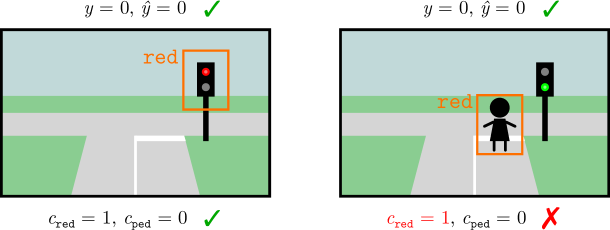
The image presents two scenarios related to object detection in a street scene. Each scenario depicts a simplified street intersection with a traffic light. The scenarios are used to illustrate the success or failure of an object detection model in identifying specific objects (traffic light color and pedestrians) and their corresponding labels.
### Components/Axes
Each scenario includes the following elements:
* **Street Scene:** A simplified representation of a street intersection with roads, sidewalks, and grass.
* **Traffic Light:** A traffic light with three lights (red, yellow, green).
* **Bounding Box:** An orange rectangle indicating the detected object.
* **Object Label:** Text indicating the type of object detected (e.g., "red").
* **Ground Truth Labels:** Variables representing the actual state of the scene (y), the predicted state (ŷ), the presence of a red light (c_red), and the presence of a pedestrian (c_ped).
* **Correctness Indicator:** A green checkmark or a red "X" indicating whether the prediction is correct or incorrect.
### Detailed Analysis or ### Content Details
**Scenario 1 (Left):**
* **Scene:** A street intersection with a traffic light showing a red light.
* **Bounding Box:** An orange bounding box surrounds the red light.
* **Object Label:** The text "red" is displayed above the bounding box.
* **Ground Truth Labels:**
* `y = 0, ŷ = 0`: Indicates that the model correctly predicted the absence of a pedestrian.
* `c_red = 1, c_ped = 0`: Indicates that a red light is present and no pedestrian is present.
* **Correctness Indicator:** A green checkmark indicates that the prediction is correct.
**Scenario 2 (Right):**
* **Scene:** A street intersection with a traffic light showing a green light. A stick figure representing a pedestrian is present.
* **Bounding Box:** An orange bounding box surrounds the pedestrian.
* **Object Label:** The text "red" is displayed above the bounding box.
* **Ground Truth Labels:**
* `y = 0, ŷ = 0`: Indicates that the model correctly predicted the absence of a pedestrian.
* `c_red = 1, c_ped = 0`: Indicates that a red light is present and no pedestrian is present.
* **Correctness Indicator:** A red "X" indicates that the prediction is incorrect.
### Key Observations
* In the first scenario, the model correctly identifies the red light and its absence of a pedestrian.
* In the second scenario, the model incorrectly identifies the pedestrian as "red" and incorrectly identifies the traffic light as red.
### Interpretation
The image demonstrates a scenario where an object detection model performs well in one case (correctly identifying a red light) but fails in another (misidentifying a pedestrian as "red"). This highlights the challenges of object detection, particularly in scenarios with varying object appearances and potential for misclassification. The model seems to be confusing the pedestrian with the "red" class, possibly due to visual similarities or biases in the training data. The incorrect prediction in the second scenario indicates a need for improvement in the model's ability to distinguish between different object classes and to generalize to new scenarios.